Command Palette in SSH hosts

I must be being very dumb, but I cannot work out how to add entries to the command palette for SSH connections. I can access the palette search, but it is empty. I've searched the docs and the forum and must be missing something as I can't find any mention of it, other than one or two suggestions to use it (but no details of how to add to it)
All Comments (4)
Hello,
You need to create "Terminal command" type entries and they will become accessible through the command palette. You can make these entries either in your shared vaults, in the user vault, or in the system vault. Please note that when using a terminal from the shared vault, it will list commands from the shared vault and the system vault, and when using a terminal in the user vault, it will list commands from the user vault and the system vault (if the appropriate system setting to use the system vault while in the user vault is enabled).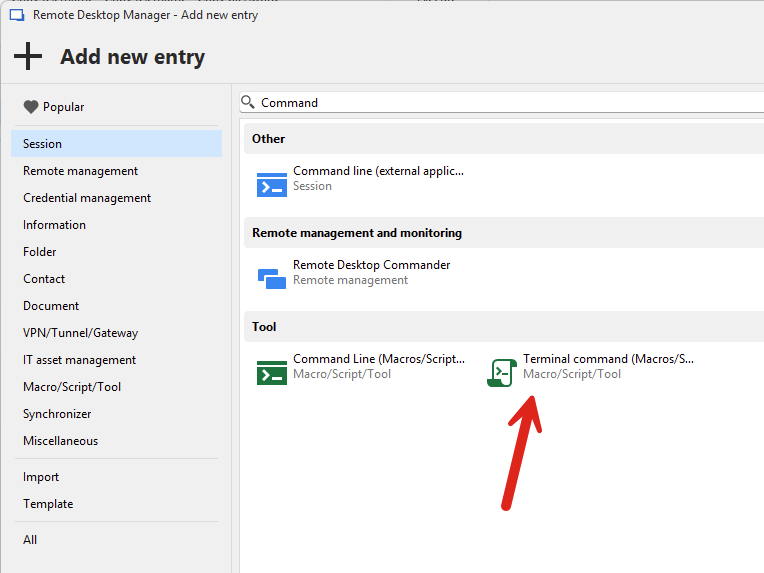
Afterwards, they will populate the command palette: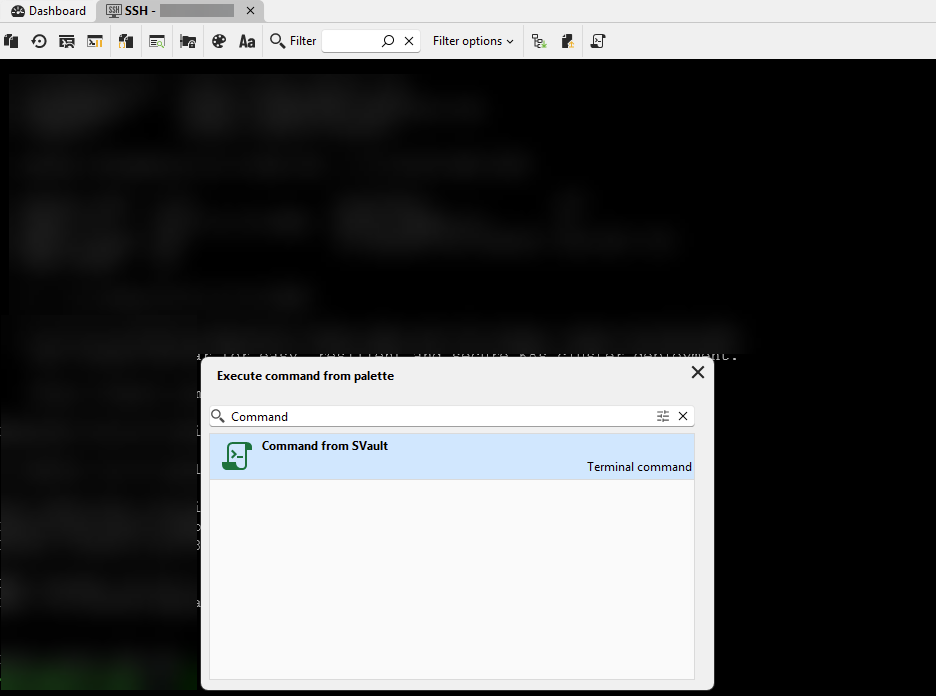
Let me know if this helps.
Regards,
Hubert Mireault
4aa28568-bc82-449d-a364-8ee0e09716ac.png
c0fd0c2d-9296-4f92-bad7-81891b3c1f6b.png
Hello,
On behalf of the documentation team, I just wanted to let you know that an article to better explain the use of this feature will be created shortly.
We will make sure to post it here as soon as it is available.
Best regards,
James Lafleur
Thanks, both - sorted now, and better docs would have helped, so will help others.
Hello,
The command palette article is available here.
Best regards,
Francis Simard
Technical writer