Does not autofill credit card

OS: macOS Sequoia 15.1.1
Browser: Chrome
Application: Workspace Browser Extension
I can't get it to autofill the credit cards I have saved when I go to pay on a website.
As you can see in the screenshot, it only gives me the option to autofill with the ones saved in Chrome: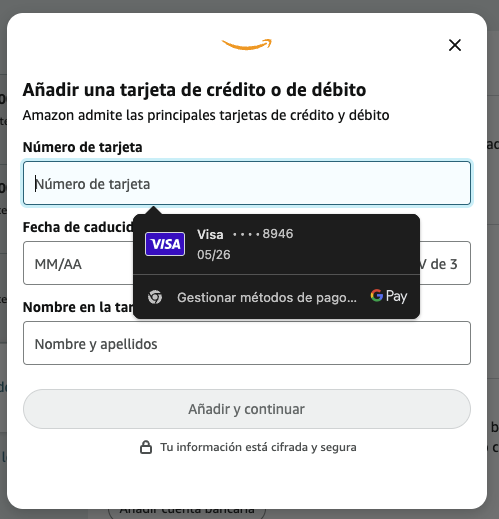
4c0ac049-b81f-4ddb-8f6b-0ea1c54126bd.png
CleanShot 2024-12-02 at 10.07.42.png
All Comments (2)
Hello juanpedrocegarra,
Thank you for reaching out to us.
I regret to inform you that the workspace logo used for auto-filling is currently not programmed to populate the credit card field.
However, I have submitted a feature request to our development team, and they will prioritize this for a future release.
In the meantime, you can still auto-fill your credit card information in the credit card field by following these steps:
- Select the credit card field.
- Open your workspace web extension.
- Locate the credit card and click on the key icon to auto-fill the field.
While testing this functionality for you earlier today, I encountered an issue with the HTML form on the Amazon website.
I have informed our development team, and they will also address this promptly.
Thank you for your understanding and patience. Please let me know if there is anything else I can assist you with.
Best regards,
Jacob Lafrenière
Thank you, we look forward to the changes.