Administrator user type vs administrator group?

Hi,
When creating a user, I may select a user type of Administrator, and when creating a user group, I may opt to make it an administrator group. What is the difference between an administrator user and a user that's member of an administrator group? When would you use one or the other?
Relatedly, I'm using an SQL Server data source. I first logged in using the sa account and made a general Administrator account, using which I created some actual users, some of which also should act in an administrative capacity. For now I have assigned those users to an administrator group. Is there any reason I need to keep/use the general Administrator account? Should I make those users administrator users instead?
All Comments (6)
Hello etfz,
Thank you for reaching out.
There is no difference between a User Admin Group and a User Administrator; both have the same rights.
I recommend using an admin group, as it will be necessary if you plan to explore application identities more deeply.
Additionally, I suggest keeping track of the main administrator and designating it as a break-glass admin account for emergency scenarios.
You can also look at our documentation website!
https://docs.devolutions.net/server/web-interface/user-groups-based-security/#administrators
Please don't hesitate to contact me if you have any further questions.
Best regards,
Jacob Lafrenière
Thanks for the reply. I'm not sure whether I've done anything wrong, then, but I can't seem to, for example, create new user groups, using a user that's member of the administrator group.
Unable to save user group
The INSERT permission was denied on the object 'UserSecurity', database 'RemoteDesktopManager', schema 'dbo'.
Hi etfz,
Stéfane here from the development team.
Starting with the "sa" account (or an equivalent) is the recommended way to create your first RDM admin user in RDM. This will allow RDM to grant all necessary permissions ("grants") at the server/database level, enabling the creation of both admin and non-admin users. Once configured, you do not need to use the "sa" account anymore. All RDM admin accounts should have the required permissions, whether the admin rights are granted directly to the user or through a group assignment.
That being said, based on the error message you posted, it seems you are experiencing issues with permissions (possible missing grants). Looks like we might have a bug, we will investigate.
In the meantime, while logged in to RDM as an admin (preferably one with admin rights granted directly, just to be safe), navigate to Administration > Users, select the user you are having issues with, and click the hammer icon. This action will recalculate and adjust the permissions (grant/revoke) to align them with their groups, which should resolve the issue.
Best regards,
Stéfane Lavergne
Hi,
I logged in using the first Administrator user and clicked Fix SQL login on the affected user. I got a popup saying Done, but the issue remains. When I check the SQL permission report I can see that, indeed, the user is denied INSERT, UPDATE and DELETE on DatabaseInfo as well as UserSecurity. If I make the user an administrator user, permissions are granted correctly, and removed again when restored to a regular user and just member of the administrator group. The group is set up like so: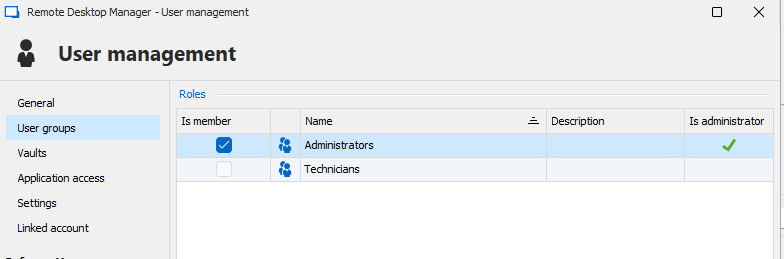
90775477-9541-4cc6-97a7-0b205e464390.png
bild.png
It's a bug, and we will investigate it. Thank you for reporting it.
For now, as a workaround, you will need to assign each user as an admin directly through the user settings.
Best regards,
Stéfane Lavergne
Just letting you know the issue has been resolved and should be released soon via the 2025.1 release. The first release is due Tuesday, March 11th, but I'm pretty sure my changes didn't make it in time, so any subsequent build after that should do the trick.
Best regards,
Stéfane Lavergne