Integrating Bitwarden with Remote Desktop Manager for Select Sessions
Integrating Bitwarden with Remote Desktop Manager for Select Sessions

Hi everyone,
I’m exploring ways to integrate Bitwarden with Remote Desktop Manager (RDM) to securely manage my credentials while retaining the flexibility to choose which sessions use it.
I don’t want Bitwarden to be the default credential source for all sessions. Instead, I’d like to manually assign Bitwarden credentials to specific sessions while keeping other sessions independent or using different credential sources.
What I’m Looking For:
- Steps to Integrate Bitwarden for Select Sessions:
- How can I configure RDM so that I can choose Bitwarden as the credential source only for specific sessions?
- Efficient Workflow:
- Is there a straightforward way to manage multiple credential sources (e.g., Bitwarden for some sessions, RDM’s built-in credential storage for others)?
- Best Practices:
- If you’ve used Bitwarden with RDM, are there any tips or tricks for managing this setup effectively?
Any insights, tutorials, or guidance would be greatly appreciated. I’d also love to hear how others are using RDM with Bitwarden, especially if you’re dealing with credentials that rotate frequently (e.g., via a PAM system).
Thanks in advance for your help!
All Comments (3)
Hello,
Thank you for contacting us on that matter!
There are features or concepts you can use in RDM to achieve your goals.
Here are some methods you can use when managing entries that use or do not use Bitwarden credentials.
- If you mean specific entry types, you can create Templates for the session types that use the Bitwarden credential entry from the user vault configured with the Always prompt with list option enabled.
- You can split the entries using folders and use the Inheritance for a given customer or a set of servers you manage to inherit the credential setting from its parent folder.
- I have in mind these 2 possibilities.
- Assuming that each user uses their own Bitwarden Client ID and secret, storing the Bitwarden credential in the user vault, as explained above, is a good strategy.
- If you want to import each Bitwarden credential in RDM, I recommend using the Bitwarden Synchronizer entry.
- About the Bitwarden credentials in a PAM scenario, having a Bitwarden entry configured with the Always prompt with list option enabled will grab the selected credential with its current password.
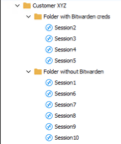
You can also subscribe for free to our Devolutions Academy to learn more about how to use RDM!
I hope these explanations provide interesting strategies. As I'm not a Bitwarden credentials user, I will let other Bitwarden customers post their solutions on how they manage them in RDM.
Best regards,
Érica Poirier
e70e2373-d9dc-4dbc-8538-52b94959fb9e.png
Hi Erica
Thank you for the guidance.
Actually I am new to both Bitwarden and RDM.
So, I guess I would some more time on this to figure out how to get it working.
I will work on this and update.
Warm regards
JS
Hello,
Thank you for your feedback.
Let us know if you have any more questions about this.
Best regards,
Érica Poirier