Shared credentials using Keeper Vault
0 vote

Currently RDM connected to Enterprise - Devolutions Server isn't able to use shared credentials (e.g. a local user on a Linux VM where it can't be domain joined) that are pulled from Keeper Vault across multiple users.
This would be a really helpful feature that means users don't have to manually lookup credentials and save clicks/clickthrough each time they want to connect to a VM with shared credentials.
I would imagine the feature would work in a similar way to the File > My Account Settings > Local Credentials > My personal credentials/My privileged account or External credentials > Keeper whereby you would enter your Keeper SSO login, then admins would update each VM in the Devolutions Server list, once ideally, to point to the unique UID URL that Keeper generates for each record. It would then pickup the fields you specify (e.g. Login (typically the username) and Password).
Due to synchronisers that pull a fresh list of the VMs down once a day the credentials at the VM level would need to stay the same unless it was a different VM.
I did have a back and forth support ticket for this but they confirmed this isn't possible at the moment and there was no existing feature request for this.
All Comments (19)
Hello,
I looked at the case but I'm not sure I undersstand your suggestion. Let me go over what I understood.
- Your users store in their My Personal Credentials a Keeper account for their AD credentials. These should not be used to connect to VMs.
- Your users have Windows VMs that you need to connect to using Keeper. Your users store this information in the My Privileged Account as a Keeper entry
- Your users have Linux VMs that you need to connect to using Keeper. Your main issue is here: you don't have another "my personal credentials" to store this final Keeper entry in
If this is a good summary of your situation, then the solution would be to leverage the existing User Vault feature, and ask your users to create a Keeper entry there instead. Then, the administrator can configure the sessions (like RDP) to use the "Find by name (user vault)" mode with a certain string. This string will need to match the name of the entry in the user vault if you don't want the user to be prompted to select which user vault credential they want to use.
Alternatively, it's also possible to use the User Specific Settings to point to this user vault entry. With a well thought out folder structure using inheritance, you can minimize the number of places your users would need to override with User Specific Settings. Even better, if all of your Linux VMs point to one credential entry, they can simply override this credential entry to use their user vault Keeper credential instead, so they would only need to do this in one place.
If these suggestions don't work for your scenario, I would need you to go into more details exactly about what you're doing, and where the friction points currently are, as well as showing with screen captures what you're thinking we could add to the application, as I'm unsure what you were suggesting.
Regards,
Hubert Mireault
Hi Hubert.
Your assessment is correct, thanks for summarising my requirements :)
Unfortunately I don't believe those solutions are suitable and meet our requirements as:
- It seems the User Vault requires each user to create a record for each VM which is time consuming if you have lots of VMs. Let me know if I misunderstood though.
- We want to ensure the same records that are stored in Keeper are used by all users for the same VM. This way no records are stored outside of Keeper, the records are just called from Keeper directly and no searching has to be done by the user as the record is referenced directly.
In password managers like Delinea Secret Server and Keeper, each record gets a UID (Unique ID) and therefore normally a unique URL. The records can then be called via API. I would like to link specific VMs in RDM with a specific record UID/URL so it pulls the record fields (e.g. username, password) and logs the user in without anything needed from the user side.
Kind regards, Byron
Hello Byron,
Actually, I discussed with a few members on my team, and I think we have a potential solution already available. It should answer both of your concerns (not needing to create many entries, and ensuring all your users can use the same credential from keeper for specific VMs, which the administrator configured). I'll describe it below, let me know what you think. If this still doesn't answer your scenario, then we'll see about the request.
First, configure a Keeper entry in RDM, in the shared vault where your users will be working. Make sure that this Keeper entry has "use my account settings" and "always prompt with list" checked.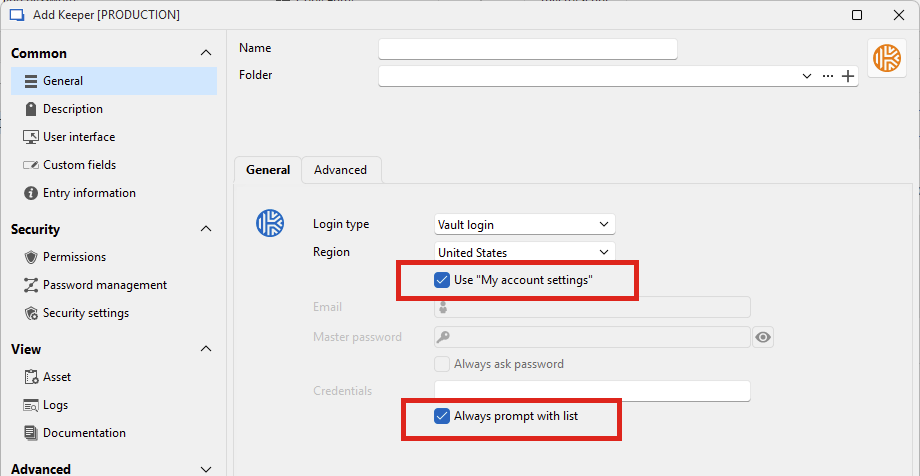
Use "my account settings":
This option will make RDM use the email and master password located in File > My account settings > Keeper. This means that for Keeper entries configured with this setting, it will look for the values stored in the user's "my account settings". If the user doesn't have any currently saved in there, RDM will prompt for it on the first usage, so it's relatively friction-less.
"Always prompt with list":
This option will allow RDM to use the "dynamic credential linking" concept, which will be used in the following example. This allows you to have one single entry in prompt mode, but configure a specific credential to be used for each of your entries using it, rather than always prompting or creating multiple entries.
After configuring this Keeper entry, you will then modify the entries that you have configured for your VMs. In my example I'll use RDP.
Simply change the credential mode to "Linked (vault)", and select your Keeper entry. Because it's configured with "always prompt with list", you will have a blue link you can click. When you click on it, you can select which specific credential stored within Keeper should be used as the credential.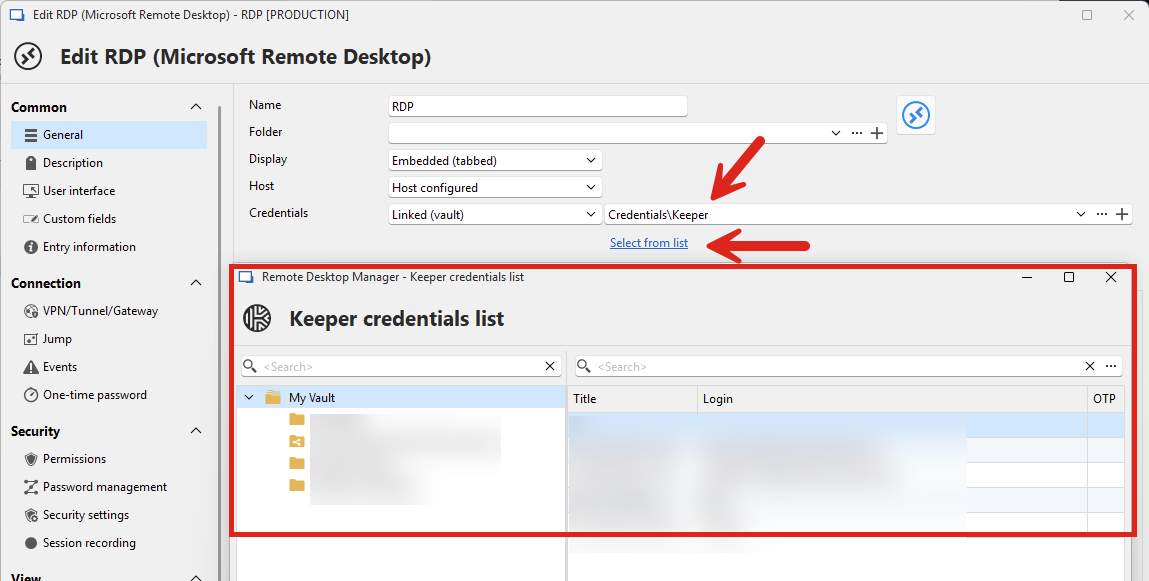
Save your RDP entry, and that's it. Now, whenever one of your users uses this RDP entry, RDM will connect to Keeper using the user's credentials stored in their "my account settings", and then will try to find the specific credential stored in Keeper that was selected through dynamic linking. As long as this selected credential is accessible to all of your users with their Keeper account, it should work like you're describing.
Let me know if something is unclear.
Regards,
Hubert Mireault
0cd1155d-5412-4278-93b7-12512131098e.png
850e44cd-b93b-4069-801f-53b8a0774724.png
Hi Hubert.
Thank for the detailed explanations :)
I started to go through that setup but was getting stopped by an error message dialog: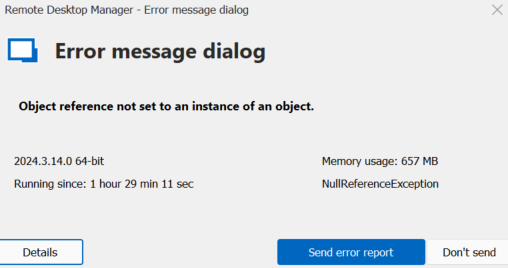
This was stopping me from actually loading the subfolders but I clicked the refresh button and it let me into them.
Shall I raise this with your support team? Here are the details:
NullReferenceException - Object reference not set to an instance of an object.
   at Devolutions.RemoteDesktopManager.Forms.FrmSelectKeeperEntry.<>c__DisplayClass47_0.<UpdateRecordsCache>b__0(IKeeperRecord r)
   at System.Linq.Enumerable.WhereArrayIterator`1.ToArray()
   at System.Linq.Buffer`1..ctor(IEnumerable`1 source)
   at System.Linq.OrderedEnumerable`1.ToList()
   at Devolutions.RemoteDesktopManager.Forms.FrmSelectKeeperEntry.UpdateRecordsCache()
   at Devolutions.RemoteDesktopManager.Forms.FrmSelectKeeperEntry.LoadRecordsInListView()
   at Devolutions.RemoteDesktopManager.Forms.FrmSelectKeeperEntry.TvFolders_AfterSelect(Object sender, TreeViewEventArgs e)
   at Devolutions.RemoteDesktopManager.Controls.EnhancedTreeList.OnAfterSelect(FocusedNodeChangedEventArgs e)
   at Devolutions.RemoteDesktopManager.Controls.EnhancedTreeList.RaiseAfterFocusNode(TreeListNode node)
   at DevExpress.XtraTreeList.TreeList.InternalSetFocusedRowIndex(Int32 newFocusedRowIndex)
   at DevExpress.XtraTreeList.TreeList.ValidateAndSetFocusedRowIndex(Int32 newFocusedRowIndex, Boolean force)
   at DevExpress.XtraTreeList.TreeList.UpdateFocusedRowIndex(Int32 newFocusedRowIndex, Boolean updateSelection, Boolean force)
   at DevExpress.XtraTreeList.Handler.TreeListHandler.TreeListControlState.ChangeSelection(RowInfo pressRowInfo)
   at DevExpress.XtraTreeList.Handler.TreeListHandler.NodePressedState.Init()
   at DevExpress.XtraTreeList.Handler.TreeListHandler.SetControlState(TreeListState state)
   at DevExpress.XtraTreeList.Handler.TreeListHandler.NormalState.OnPressNode()
   at DevExpress.XtraTreeList.Handler.TreeListHandler.NormalState.MouseDown(MouseEventArgs e, TreeListHitTest ht)
   at DevExpress.XtraTreeList.Handler.TreeListHandler.RegularState.MouseDown(MouseEventArgs e, TreeListHitTest ht)
   at DevExpress.XtraTreeList.Handler.TreeListHandler.OnMouseDownCore(MouseEventArgs e, TreeListHitTest hitTest)
   at DevExpress.XtraTreeList.Handler.TreeListHandler.OnMouseDown(MouseEventArgs e)
   at DevExpress.XtraTreeList.TreeList.OnMouseDown(MouseEventArgs e)
   at System.Windows.Forms.Control.WmMouseDown(Message& m, MouseButtons button, Int32 clicks)
   at System.Windows.Forms.Control.WndProc(Message& m)
   at DevExpress.XtraEditors.Container.EditorContainer.WndProc(Message& m)
   at DevExpress.XtraTreeList.TreeList.WndProc(Message& m)
   at System.Windows.Forms.NativeWindow.Callback(HWND hWnd, MessageId msg, WPARAM wparam, LPARAM lparam)
------------------------ extended stack ------------------------
   at Devolutions.RemoteDesktopManager.Forms.FrmErrorMessage.ShowErrorMessage(Exception exception, String message, String title)
   at Devolutions.RemoteDesktopManager.Forms.FrmErrorMessage.ShowErrorMessage(Exception exception, String title)
   at Devolutions.RemoteDesktopManager.Managers.LogManager.OnThreadException(Object sender, ThreadExceptionEventArgs t)
   at System.Windows.Forms.Application.ThreadContext.OnThreadException(Exception ex)
   at System.Windows.Forms.NativeWindow.Callback(HWND hWnd, MessageId msg, WPARAM wparam, LPARAM lparam)
   at DevExpress.Utils.Drawing.Helpers.NativeMethods.UnsafeNativeMethods.DefSubclassProc(IntPtr hWnd, IntPtr Msg, IntPtr wParam, IntPtr lParam)
   at DevExpress.Utils.Drawing.Helpers.NativeMethods.UnsafeNativeMethods.DefSubclassProc(IntPtr hWnd, IntPtr Msg, IntPtr wParam, IntPtr lParam)
   at DevExpress.Utils.Drawing.Helpers.Win32SubclasserFactory.Win32Subclasser.SubClassProcInner(IntPtr hWnd, IntPtr Msg, IntPtr wParam, IntPtr lParam, IntPtr uIdSubclass, IntPtr dwRefData)
   at Windows.Win32.PInvoke.DispatchMessage(MSG* lpMsg)
   at Windows.Win32.PInvoke.DispatchMessage(MSG* lpMsg)
   at System.Windows.Forms.Application.ComponentManager.Microsoft.Office.IMsoComponentManager.FPushMessageLoop(UIntPtr dwComponentID, msoloop uReason, Void* pvLoopData)
   at System.Windows.Forms.Application.ThreadContext.RunMessageLoopInner(msoloop reason, ApplicationContext context)
   at System.Windows.Forms.Application.ThreadContext.RunMessageLoop(msoloop reason, ApplicationContext context)
   at System.Windows.Forms.Form.ShowDialog(IWin32Window owner)
   at DevExpress.XtraEditors.XtraForm.ShowDialog(IWin32Window owner)
   at Devolutions.RemoteDesktopManager.Business.KeeperCredentialResolverConnectionTypeDescriptor.GetCredentialDynamicParameterBrowseResult(VaultOnline vault, IKeeperRecord[] records, String username, String password, Connection credentials)
   at Devolutions.RemoteDesktopManager.Business.KeeperCredentialResolverConnectionTypeDescriptor.BrowseDynamicValue(Connection connection, Connection credentials, String credentialDynamicValue, String credentialDynamicDescription)
   at Devolutions.RemoteDesktopManager.Managers.CredentialTypeManager.BrowseDynamicValue(Connection connection, Connection credential, String credentialDynamicValue, String credentialDynamicDescription, ConnectionEngine engine)
   at Devolutions.RemoteDesktopManager.Forms.FrmConnectionBase.BrowseCredentialDynamicParameter()
   at Devolutions.RemoteDesktopManager.Forms.FrmConnection.ButCredentialDynamicParameter_LinkClicked(Object sender, LinkLabelLinkClickedEventArgs e)
   at Devolutions.RemoteDesktopManager.Controls.EnhancedLinkLabel.TryClickHyperlink(MouseEventArgs e)
   at DevExpress.XtraEditors.LabelControl.OnMouseClick(MouseEventArgs e)
   at System.Windows.Forms.Control.WmMouseUp(Message& m, MouseButtons button, Int32 clicks)
   at System.Windows.Forms.Control.WndProc(Message& m)
   at DevExpress.Utils.Controls.ControlBase.BaseWndProc(Message& m)
   at DevExpress.XtraEditors.BaseControl.WndProc(Message& msg)
   at System.Windows.Forms.NativeWindow.Callback(HWND hWnd, MessageId msg, WPARAM wparam, LPARAM lparam)
   at Windows.Win32.PInvoke.DispatchMessage(MSG* lpMsg)
   at Windows.Win32.PInvoke.DispatchMessage(MSG* lpMsg)
   at System.Windows.Forms.Application.ComponentManager.Microsoft.Office.IMsoComponentManager.FPushMessageLoop(UIntPtr dwComponentID, msoloop uReason, Void* pvLoopData)
   at System.Windows.Forms.Application.ThreadContext.RunMessageLoopInner(msoloop reason, ApplicationContext context)
   at System.Windows.Forms.Application.ThreadContext.RunMessageLoop(msoloop reason, ApplicationContext context)
   at System.Windows.Forms.Form.ShowDialog(IWin32Window owner)
   at DevExpress.XtraEditors.XtraForm.ShowDialog(IWin32Window owner)
   at Devolutions.RemoteDesktopManager.Managers.ActionManager.EditConnection(IConnectionSource source, ConnectionEngine currentConnectionEngine, ConnectionEngine currentUIEngine)
   at Devolutions.RemoteDesktopManager.Managers.SessionMenuManager.MnuEditConnection_Click(Object sender, EventArgs e)
   at Devolutions.RemoteDesktopManager.Controls.EnhancedBarButtonItem.OnClick(BarItemLink link)
   at DevExpress.XtraBars.BarItemLink.OnLinkClick()
   at DevExpress.XtraBars.BarButtonItemLink.OnLinkClick()
   at DevExpress.XtraBars.BarButtonItemLink.OnLinkAction(BarLinkAction action, Object actionArgs)
   at DevExpress.XtraBars.ViewInfo.BarSelectionInfo.ClickLink(BarItemLink link)
   at DevExpress.XtraBars.ViewInfo.BarSelectionInfo.UnPressLink(BarItemLink link)
   at DevExpress.XtraBars.Controls.CustomLinksControl.OnMouseUp(MouseEventArgs e)
   at DevExpress.XtraBars.Controls.CustomPopupBarControl.OnMouseUp(MouseEventArgs e)
   at System.Windows.Forms.Control.WmMouseUp(Message& m, MouseButtons button, Int32 clicks)
   at System.Windows.Forms.Control.WndProc(Message& m)
   at DevExpress.XtraBars.Controls.CustomControl.WndProc(Message& msg)
   at System.Windows.Forms.NativeWindow.Callback(HWND hWnd, MessageId msg, WPARAM wparam, LPARAM lparam)
   at Windows.Win32.PInvoke.DispatchMessage(MSG* lpMsg)
   at System.Windows.Forms.Application.ComponentManager.Microsoft.Office.IMsoComponentManager.FPushMessageLoop(UIntPtr dwComponentID, msoloop uReason, Void* pvLoopData)
   at System.Windows.Forms.Application.ThreadContext.RunMessageLoopInner(msoloop reason, ApplicationContext context)
   at System.Windows.Forms.Application.ThreadContext.RunMessageLoop(msoloop reason, ApplicationContext context)
   at Devolutions.RemoteDesktopManager.Program.Main(String[] args)
The good news is, this works! I have tested this with me and my colleague and we can both access a Linux VM via SSH with the same login using our Keeper credentials in the background :)
Thanks so much for your help Hubert! Glad RDM is capable of this.
Just as a follow up, will the changes to each entry (e.g. template, linked vault etc.) be overridden by our synchroniser or only if it detects it is a different VM in VMware?
Kind regards, Byron
51e80d7f-ae51-4f05-add0-518d8f0b4e39.png
Hello Byron,
First, I'm glad that the proposed solution works for you. As you can see, RDM is quite versatile, but you do need to see the bigger picture in how the many different features can work together, which isn't always so simple (even for us, sometimes 😉).
For the error, I notice in your screen capture that you're on 2024.3.14.0. Could you update to 2024.3.20.0 and see if this is still happening? We fixed a lot of miscellaneous issues like this one in our minor updates since. If you're still able to reproduce this issue on that version, we'll take a deeper look at it.
Just as a follow up, will the changes to each entry (e.g. template, linked vault etc.) be overridden by our synchroniser or only if it detects it is a different VM in VMware?
The synchronizer should keep your other information like linked credentials intact. In 2024.2, we improved multiple synchronizers to match by ID, which also lets us update the entry rather than having to create a new one, as the ID doesn't change even if the information within does. In the synchronizer entry itself, in the "Fields" tab, you can configure which fields will be updated by the synchronizer. As you might expect, you shouldn't manually change those fields, or they will be modified the next time you do the synchronization process.
Let me know if there's anything else!
Regards,
Hubert Mireault
Hi Hubert.
Yes indeed, it is obviously very powerful!
Ah great, I have upgraded now and it seems that issue is not present in 2024.3.20.0 so that's fab news :)
Thanks for confirming regarding synchronizer override. It looks like we had Host name ticked in Fields so I have unticked that as we need to manually set these so the domain is correct.
I have hopefully two last questions:
- when logging in to an Ubuntu 24.04.1 LTS VM via SSH with a root user, I don't get an Interactive Authentication prompt. when logging in to an Ubuntu 22.04.4 LTS VM via SSH with a sudo user, I do get an Interactive Authentication prompt. Is there a way to prevent this? I've confirmed the RDM, VM SSH and VM /etc/sudoers config settings are the same on both VMs
- is there a way to get search to work correctly with Keeper? RDM can't find the records in the left or right search box:
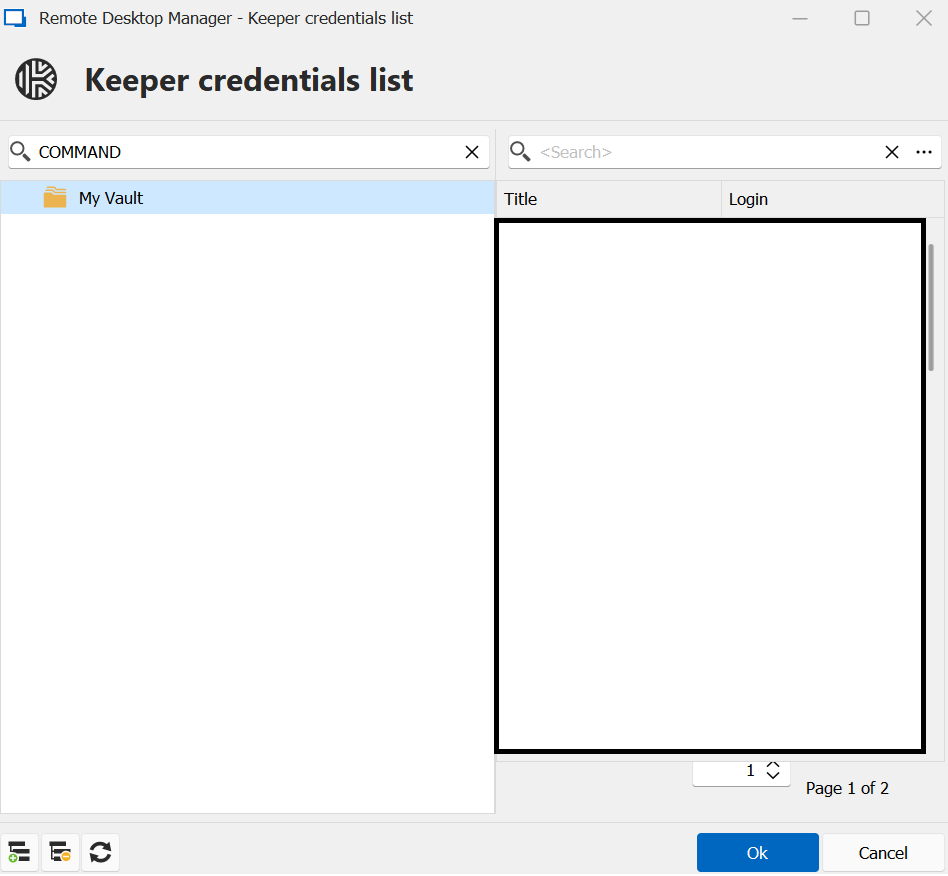 But they are present in Keeper:
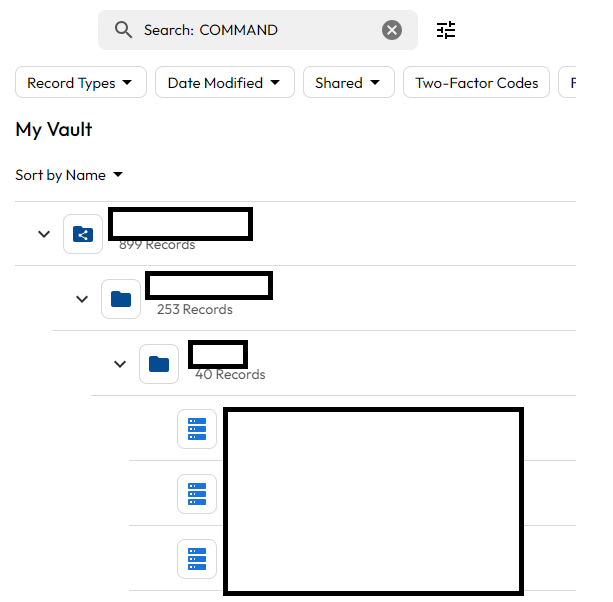 Thanks and kind regards, Byron
be92829e-dd9c-4919-93e2-0668e31748df.png
2580fe81-d269-4693-88c9-eced023b7e4c.png
Also when first loading of RDM and selecting the first VM to log into, is there any way to stop RDM asking for the Keeper password? We use SSO so this ideally shouldn't be necessary. This happens even though I am already logged into Keeper on the web browser, browser extension and desktop app.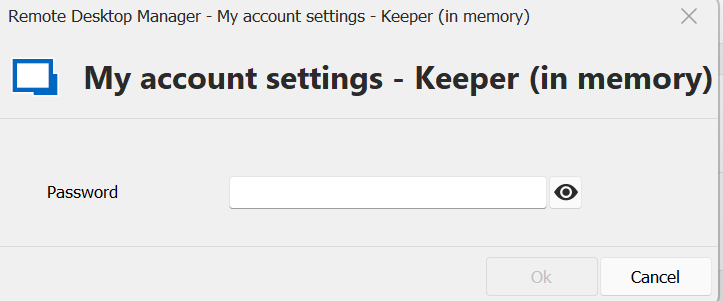
0a5023f5-6dab-4b9b-a383-383e2908509c.png
Hello,
when logging in to an Ubuntu 24.04.1 LTS VM via SSH with a root user, I don't get an Interactive Authentication prompt. when logging in to an Ubuntu 22.04.4 LTS VM via SSH with a sudo user, I do get an Interactive Authentication prompt. Is there a way to prevent this? I've confirmed the RDM, VM SSH and VM /etc/sudoers config settings are the same on both VMs
If you are using our SSH terminal entry, the configuration for the interactive authentication is located in the entry itself: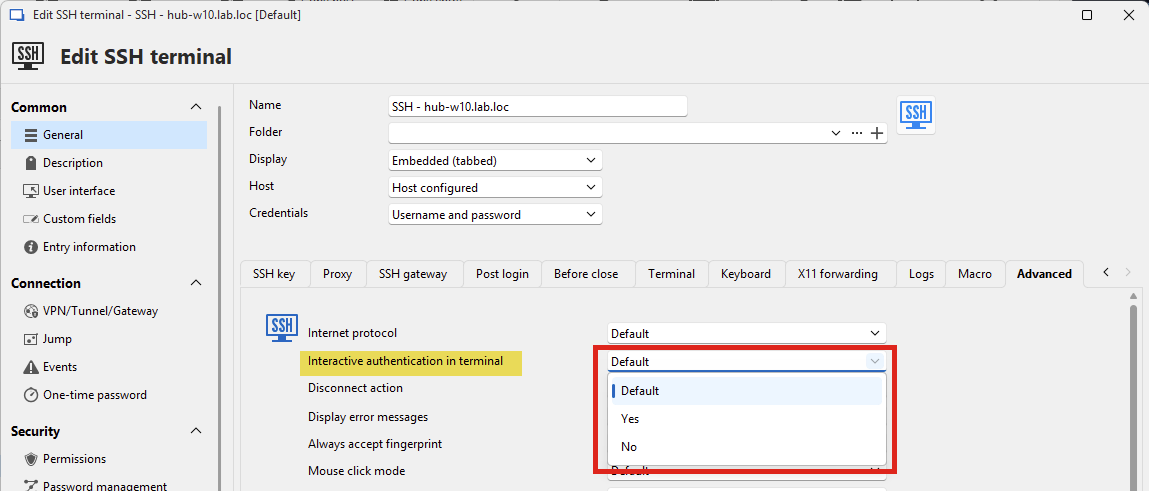
If you're asking why it's being asked for one machine but not the other, it's difficult to know without having access to the machine or seeing more of the login process. If it's asking for the password specifically, it might be because RDM isn't sending the password (or is sending the wrong password). We would need more information as to the configuration of the entry in RDM to diagnose this further. I would be curious if recreating the entry fixes the issue, or if using a Username/Password entry instead of Keeper makes a difference.
is there a way to get search to work correctly with Keeper? RDM can't find the records in the left or right search box:
Looking at your screenshot, it's possible that we don't support this type of Keeper entry. Could you let me know what type it is? Since there's a lot of different types, and we need to support them individually, we focused on what we thought were the more common ones. It's probably simple to add the missing ones in your case.
Also when first loading of RDM and selecting the first VM to log into, is there any way to stop RDM asking for the Keeper password?
I think the issue is that you configured the My Account Settings for Keeper to "in memory". I understand in your case you're using SSO, which usually doesn't require a password to be specified. I think it's a bit of an oversight in how the My Account Settings are configured for Keeper, it should allow for letting the Master Password be optional. If you configure it with your password, and uncheck "keep in memory", you shouldn't be prompted and it will work correctly with SSO. Can you let me know if this works?
If this works for now, we can see about changing the My Account Settings to allow the master password to be optional, to make more sense with SSO (since it is optional in the entry).
Let me know if this answers your queries.
Regards,
Hubert Mireault
9ec8dc51-a04c-4196-a28f-2c3e8c308a11.png
Hi Hubert.I was still getting the Interactive Authentication popup even when setting the individual RDM VM entry "Interactive Authentication in terminal" from Default to No. The only difference I can see between the two VMs is that the one getting the popup is Ubuntu 22.04 and the one not getting the popup is Ubuntu 24.04. Interestingly I've just tested this on a different Ubuntu 22.04 VM and it works fine with no popup, both Ubuntu 22 VMs have OpenSSH_8.9p1 so it must be a VM specific setup.
Please ignore the above "issue"/query, I just realised I was using the wrong VM in RDM (as there are 2 identical VMs). I was using the bottom entry, the top one works fine!
Yes of course, the Record Type in Keeper is a "Server" record and it's stored inside a Shared Folder.
It looks like unselecting "Keep in memory" in External credentials > Keeper and entering my master password has resolved the issue, however an option for SSO and not entering the master password would be great as our users don't use their master password at all :)
Kind regards, Byron
I'm glad you were able to figure out the SSH issue, that's one less thing needed to get you rolling with this solution.
For the "server" record, I've been trying to reproduce but not been able to. For me, they are listed correctly. Looking at the code, I can see a few things that could impact them not being listed:
- Were these entries created a long time ago? Keeper had a legacy system in their backend and while we do support it, it didn't support every type and had some limitations.
- Do these entries have a "Login" field, and is it populated?
- Is this the "built-in" "server" type, or is it one that was custom made?
I would be curious if you could try creating a new "server" type entry in Keeper, and seeing if it's listed in RDM. That might confirm these entries are using the legacy system, though I would have assumed they'd have been migrated automatically by now.
For the My Account Settings, I will open a ticket so we can make the master password optional. Thank you for the confirmation!
Regards,
Hubert Mireault
Good morning Hubert.
Just an update, to stop the SSH issue properly we also had to update our the shared entry under "Credentials" for Keeper to change "Login type" from "Vault login" to "Enterprise SSO":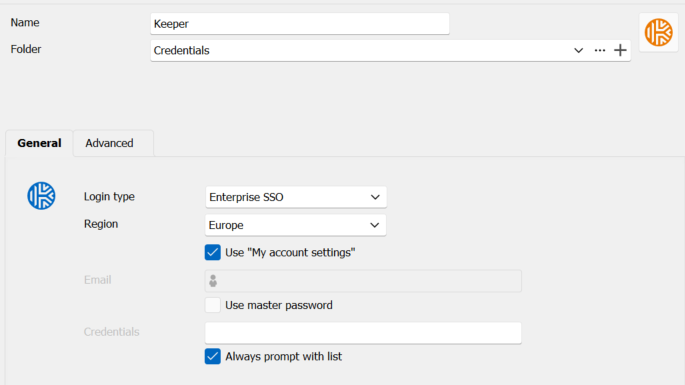
Regarding the Server record type, we have only had Keeper since Q3 2023 so this is the default Server record type as we don't have a custom record type for Servers. We use the main 4 fields with their original names in the Server record type:
- Hostname or IP Address
- Port
- Login (for the username)
- Password
To test I've created a new Record Type based on Server and creating a Record using that Record Type then completed the following tests:
- can now search for the test record in the right hand box when it is in my Vault
- still can't search for the test record in the left hand box when it is in my Vault
- can now search for the test record in the right hand box when it is moved from my Vault into a Shared Folder
- still can't search for the test record in the left hand box when it is is moved from my Vault into a Shared Folder
I'm guessing the left search box is just searching the folder names rather than the record names?
I've confirmed that removing the Port data has no effect. Would you therefore recommend recreating any records that have this issue?
Thanks for raising the ticket regarding the master password :)
It would appear our daily synchroniser has indeed overridden all my changes from yesterday unfortunately, do you recommend different settings to the ones below that we have currently? We had ignore previously but this caused duplicate entries which we want to avoid.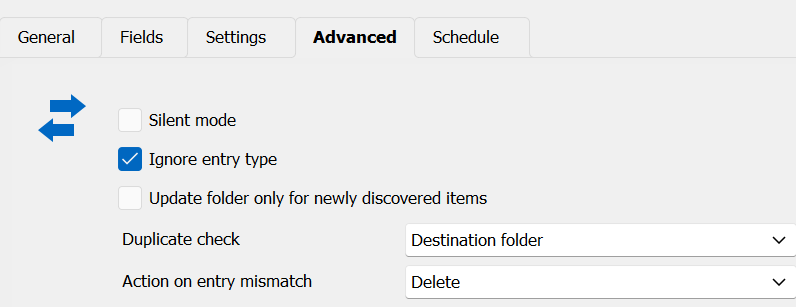
Thanks and kind regards, Byron
b389dd0b-7189-4854-9135-68d4e982ff5e.png
889dd63c-2aa5-458e-ba8d-09962fcf0e39.png
Hello Byron,
For the SSH terminal, it makes sense since you did say you wanted to use SSO with Keeper. From what I understand, it's case closed for this one, so that's good.
For the "server" types, we're not sure why it's not showing for you. Our theory is that they might still be using the legacy Keeper system underneath. Before recreating them, could you try and modify one of their fields (the name for example), and seeing if it triggers them to show up in RDM afterwards? If they're still on the legacy system, then Keeper might migrate them when you perform a change in them. If they haven't been modified since 2023, then perhaps that's the cause.
If this doesn't work, then I would say recreating them might be the quickest way to work around this issue, if it's feasible for you.
For the master password in the My Account Settings, I made the change to make it optional and it will be available in our next minor update which we want to release next week, version 2024.3.21.0. If the flow still need adjustments, let me know and we'll figure out a solution.
For your synchronization issue, did you notice whether your entry was newly created, or if it was actually updated? With the mismatch action set to "delete", it's possible that RDM couldn't find the ID of the machine in VMWare and deleted the entry to create a new one in its place. Does this happen repeatedly if you do the following:
- Synchronize your list of entries
- Make a change in the entry, whatever you tend to normally do
- Synchronize again
- Notice the result. Did it recreate the entry? Did it do nothing?
You could do these tests in a different vault to make sure you don't touch the entries you use regularly, just to isolate the behavior more.
Another thing that might play into it, are you executing your synchronizer through RDM, or through the Devolutions Server scheduler service? There are some discrepancies as to how the scheduler performs the synchronization versus how RDM does it. I believe ID matching is not be available through the Devolutions Server scheduler at the moment, which would explain the behavior. This is high in our list of priorities as multiple users have had this behavior occur where synchronizations duplicated entries (when the "mismatch entry" isn't configured). I suspect it might be the same issue you encounter, if you are using the scheduler for this.
Regards,
Hubert Mireault
Hi Hubert.
Apologies for the delay in my response.
I can confirm updating the "Title" and "Hostname or IP address" fields of the older Server Record Type (updated from uppercase to lowercase in case that was the cause) had no effect on making the record visible to RDM Credentials search.
That's great regarding the master password being optional, thank you for that! :)
Regarding if the sync was deleting or updating, it was hard to tell but it looked to me like it was deleting and recreating rather than updating.
We have DVLS Scheduler service setup on our DVLS VM, but we manipulate the settings via RDM.
On that note, we updated our Synchroniser from Delete to Make Expired and set it to not update the "Host" field. I then updated all our VMs to append their domain so they had their FQDN.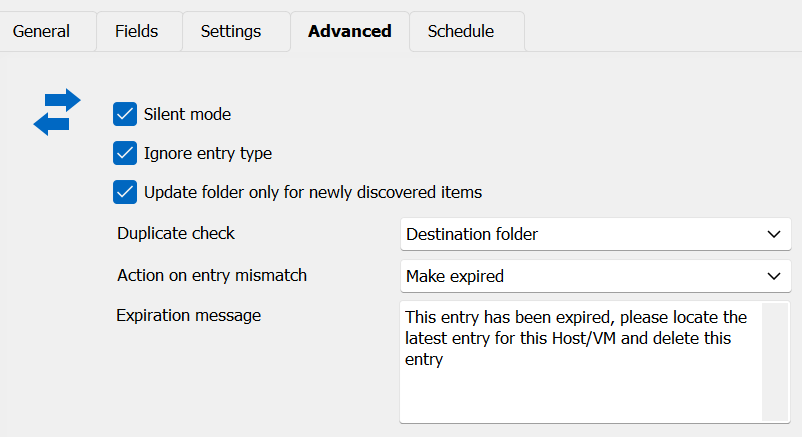
Unfortunately it has now duplicate every single VM and expired all the ones I updated D: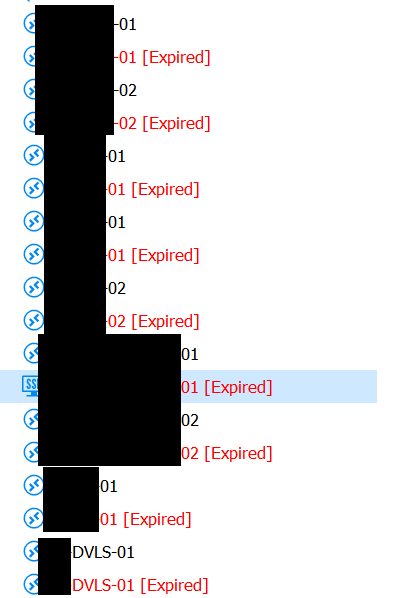
It looks like RDM pulls the VM name from VMware and uses that to populate both the "Session name" and "Host name" fields in each RDM entry. As we ideally don't want to update each VM in VMware, it would be good to find a solution to this problem so we can safely update in RDM and not have RDM override our changes but do update the server lists so they are up to date (e.g. if a VM gets deleted or moved).
Thanks and kind regards, Byron
51a2744f-0f5d-4c07-9e63-1aefb7b588f0.png
9434b22b-056e-46d2-83df-5c2ef2b28251.png
Hello Byron,
I can confirm updating the "Title" and "Hostname or IP address" fields of the older Server Record Type (updated from uppercase to lowercase in case that was the cause) had no effect on making the record visible to RDM Credentials search.
That's unfortunate. At the moment we're unable to reproduce with our Keeper accounts and with the little information we have I'm not sure there's anything we can do short of adding a lot of intrusive debugging logs when using the integration. Let me know if it's possible for you to recreate these entries, and if it's not, we'll see about adding more logging info (though I can't guarantee it'll be enough for us to fix this, since the cause is unknown).
That's great regarding the master password being optional, thank you for that! :)
I wanted to add that this should be available starting with 2024.3.21.0, which is already released, if you wanted to try it out!
We have DVLS Scheduler service setup on our DVLS VM, but we manipulate the settings via RDM.
I think this is the core of the issue here. DVLS currently doesn't perform ID matching when using the scheduler, so it explains why the entries are recreated and the previous ones triggering the "mismatch action" feature.
The only workaround for this at the moment would be to deactivate the scheduler synchronizer, and running it through RDM itself. RDM also has a way to have it run automatically, but the thing to keep in mind is that by default, only administrators can run synchronizers (there is a system setting to allow anyone to), and it obviously needs an RDM client to run the synchronizer. This can be done automatically on a timer which is configurable in File > Background Services.
I believe you should get better results this way. Maybe you can try it out in a controlled environment and see how it performs when it comes to duplicate entries.
I want to add again that it has become a priority for us to improve the scheduler-ran synchronizers in DVLS as the discrepancy is starting to affect multiple users, you included. I hope the workaround will help you out at the moment, but I understand it's less convenient for keeping your assets in RDM up-to-date.
Regards,
Hubert Mireault
Hi Hubert.
Not a problem. I'm more than happy to schedule a call with your support team if that would prove valuable to your dev teams. We can recreate the records it will just be a lot of work as we have hundreds of records.
That's great, I'm currently on 2024.3.22.0 and confirm removing my master password still works with SSO! Great work and thanks for being so receptive to feedback from your customers and community.
I've just tested by disabling the options in Synchroniser > Schedule then deleted a duplicate entry and synced manually from RDM and it recreated the duplicate even with the following settings. I tried with a variety of different combination settings as well.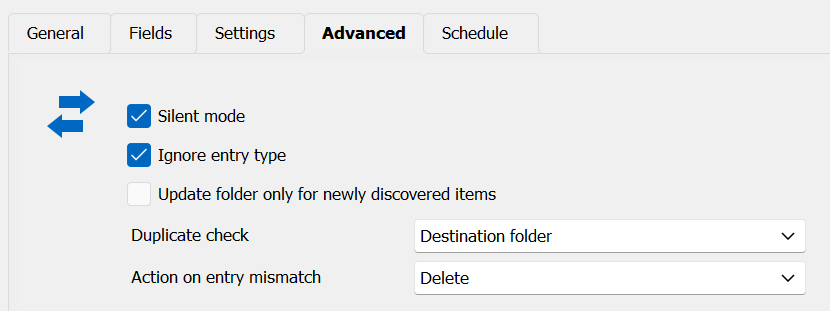
So it seems the RDM Synchroniser is also not ID matching the VMs.
VM entry we want to delete: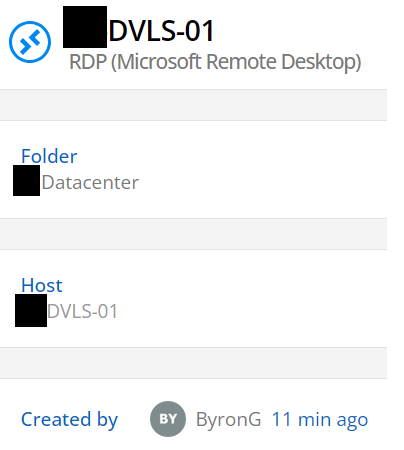
VM entry we want to keep: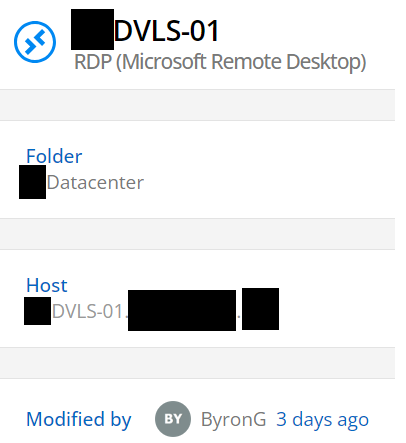
The VM we want to keep has had it's "Host" field updated with the domain/FQDN and credentials added via "Linked (vault"). Our aim is to have all VMs with their FQDN in the Host field as well as credentials connected via "Linked (vault)" where required.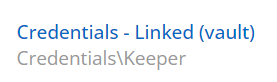
Earlier in this thread I set the Fields with "Host name" unticked in the hope the entries with updated Host and Credentials fields would not get overridden or replaced by the sync. Let me know if I've gone wrong here.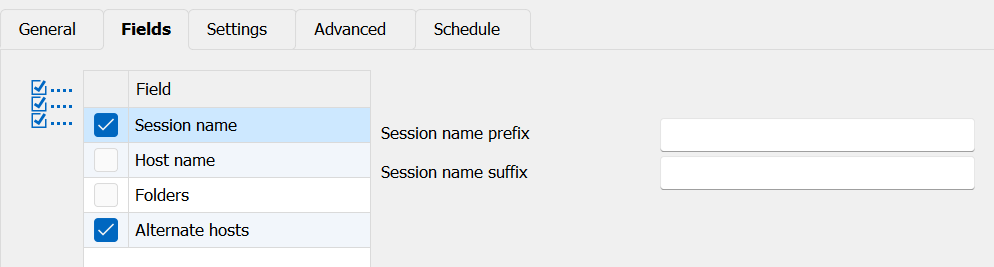
Kind regards, Byron
806f9287-92dd-41cd-a3ed-54b83caee776.png
7be42a18-7107-4c18-b08e-f4d670d7db4e.png
c95229c5-4db7-4849-9d50-5a0b46621603.png
91770aa4-7e56-458c-9e58-b4725da86de6.png
2a2fc3c6-560b-4194-b186-a03f0e0181ae.png
Hello Byron,
Sorry for the delay, with the holiday season most of the office was on vacation.
I think it would be a good idea to schedule a call with our support team at this point. Is the email account associated with your forum user the one you'd like to use to communicate with us? If so, I will ask our support team to open a case through email with you.
From what I understand there are two remaining issues:
- Certain records are not shown when using the RDM Keeper integration.
- There's an issue where the VMWare synchronization does not work as you'd expect and seems to create duplicates and doesn't properly handle previously synchronized entries.
If that's a good summary and the email is the correct one, I'll get the ball rolling on opening the support case.
Regards,
Hubert Mireault
Hi Hubert.
Not a problem! Happy New Year and hope you had a great holiday season :)
That sounds like a good idea. Yes that is correct.
Thanks Hubert, much appreciated.
Kind regards, Byron
Happy New Year to you as well! 🙂
I've asked our support team to open a case with you and given them additional leads as to what might be happening, especially for the duplication issues for the sync. I have my suspicions but it's the kind of thing that will be easier to confirm through a session with them. You should receive an email once the case has been opened.
Regards,
Hubert Mireault
Thanks Hubert for all your help! :)