Change Field "HOST" using Hostname instead of IP Address with SQL Query
Change Field "HOST" using Hostname instead of IP Address with SQL Query

HI!
We have a lot of Sessions (SSH, RDP, FTP etc etc) where we used the IPADDRESS in the session properties.
NOW we want to change the IP with the HOSTNAME
We have a table with the couple IP\Hostname
But we are not sure which table in RDM DATABASE is involved and WHERE to make the changes.
We see that the TABLE "ConnectionLog" have a FIELD called "HostName" but I'm quite sure that this is not the right place to make the changes.
Can you help us to identify the table\s to modify in order to mass edit the field HOST in Session Properties using a SLQ Query: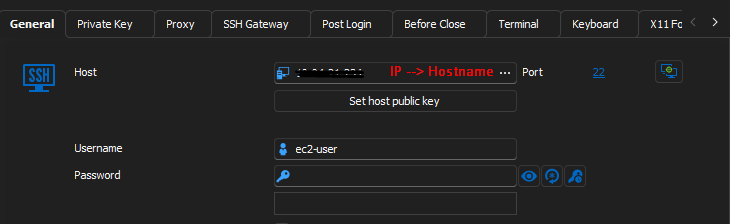
THX in advance
0fcc4670-f1e1-423c-b326-4813ac05f682.png
All Comments (3)
Hello,
It is not possible to update the Host property or any properties using an SQL statement as the information is encrypted in the database.
We recommend you sue PowerShell to update the Host property in the sessions.
https://docs.devolutions.net/powershell/Getting-started/installation/
You can find script samples in the forum's PowerShell section or in Github.
Let us know if you have any more questions about this.
Best regards,
Érica Poirier
Hi!
I'm not familiar with these scripts.
Can you identify a script that change the field "HOST\HostName" for all the occorrence from A to B - Where A and B are 2 column of a table.
THX
P.
Hello Pico,
This is a script that will get the IP from your CSV. If it matches the result of your entry exactly, it will change it to the corresponding hostname.
I also added a line to save the IP under the assets of the entry.
#check if the RDM PS module is installed
if(-not (Get-Module Devolutions.PowerShell -ListAvailable)){
        Install-Module Devolutions.PowerShell -Scope CurrentUser
    }

# Adapt the data source name
$ds = Get-RDMDataSource -Name "<data source name>"
Set-RDMCurrentDataSource $ds

#Adapt the vault name
$vault = Get-RDMVault | Where-Object {$_.Name -eq "<vault name>"}
Set-RDMCurrentRepository $vault

#import your CSV file
$csv = Import-Csv -LiteralPath "<path>"

for($i = 0; $i -lt $csv.Length; $i++){
    $sessions = Get-RDMSession

    foreach ($session in $sessions){
    If ($csv.ip[$i] -eq $session.Host){
        $session.Host = $csv.Hostname[$i]
        $session.MetaInformation.IP = $csv.IP[$i]

        Set-RDMSession $session

    }


    }
}
Update-RDMUI
Write-Host "Done!"
Best regards,
Patrick Ouimet