Login error AD with MAC

Hi, we are having a problem with the RDM software when adding a SQL Server data source from a MAC terminal. The integrated login (AD) does not work from Mac (from Windows it works correctly). Attached is the error. Note: Until a few days ago the database was on a SQL server 2019 and it worked even from MAC. Now the database is on a SQL Server 2022 and does not work.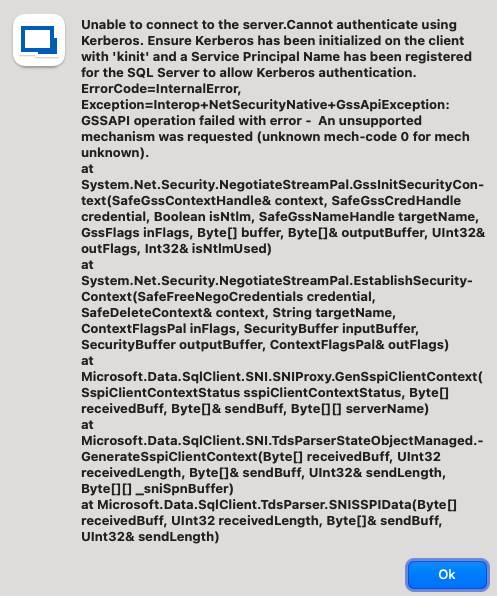
image.png
Recommended Answer
Hello,
Thank you for reaching out to Devolutions Support.
The error message “Unable to connect to the server. Cannot authenticate using Kerberos. Ensure Kerberos has been initialized on the client with 'kinit'” seems to indicates that Kerberos authentication might not be fully configured on your SQL Server.
Could you please follow the steps in this Microsoft documentation to set up Kerberos authentication?
https://learn.microsoft.com/en-us/troubleshoot/sql/database-engine/connect/using-kerberosmngr-sqlserver
If the issue persists after following these steps, feel free to reach out for further assistance.
Best regards,
Carl Marien
All Comments (3)
Hello,
Thank you for reaching out to Devolutions Support.
The error message “Unable to connect to the server. Cannot authenticate using Kerberos. Ensure Kerberos has been initialized on the client with 'kinit'” seems to indicates that Kerberos authentication might not be fully configured on your SQL Server.
Could you please follow the steps in this Microsoft documentation to set up Kerberos authentication?
https://learn.microsoft.com/en-us/troubleshoot/sql/database-engine/connect/using-kerberosmngr-sqlserver
If the issue persists after following these steps, feel free to reach out for further assistance.
Best regards,
Carl Marien
Hello,
I confirm that by following the guide the problem was solved.
Thanks!!
Hello,
I'm glad to hear that the issue was resolved by following the guide. If you have any more questions or need further assistance, feel free to reach out.
Best regards,
Carl Marien