Session groups
0 vote

I am looking to create session groups and can not figure out best way to handle this scenario.
here is my setup:
Location1
> primaryServer
> appsServer1
> appsServer2
> proxyServer1
> proxyServer2
Location2
> primaryServer
> appsServer1
> appsServer2
> proxyServer1
> proxyServer2
Most of the time I need to connect to either:
Primaryserver at various location at a time
or both apps servers at 1 location
or both proxy servers at 1 location
So for these I just manually open the ones I need.
But once a month I need to do linux patching across all servers and all locations(7) so my scenario is as such:
- "Primary Server" at locations(1,2,3,4) together and patch
- "appsServer1" at locations(1,2,3,4) together and patch
- "appsServer2" at locations(1,2,3,4) together and patch
- "proxyServer1" at locations(1,2,3,4) together and patch
- "proxyServer2" at locations(1,2,3,4) together and patch
- "Primary Server" at locations(5,6,7) together and patch
- "appsServer1" at locations(5,6,7) together and patch
- "appsServer2" at locations(5,6,7) together and patch
- "proxyServer1" at locations(5,6,7) together and patch
- "proxyServer2" at locations(5,6,7) together and patch
examples 1-5 are in time maintenance window 1 and examples 6-10 are in time maintenance window 2
I would like to create 10 session Groups that will auto-launch and connect the sessions based on the 10 mentioned above. This way I can tile them and broadcast to the group and patch 4 at a time.
I also do not want this to affect my normal single session connections I normally do day to day.
All Comments (7)
Hello,
Thank you for reaching out to Devolutions Support.
In your case, I would recommend exploring RDM's playlist feature.
Playlists allow you to create tailored groups to manage specific tasks, such as monthly patching.
For more information, please refer to this documentation: https://docs.devolutions.net/rdm/commands/edit/play-list/play-list-actions/
if you have any additional questions, concerns, or require further support, please let me know, and I'll be more than happy to help.
Best regards,
Carl Marien
Yes this looks to be exactly what I need. Setup and tested and works pretty well. some additional info comes out of it though.
This will work very well once https://forum.devolutions.net/topics/41350/tiled-windows--quad#200407 is released.
question 1. can you set a default view for these playlists? Currently, Tiled vertically would work best until above quad view is available. I do see there is an option for default view when broadcasting all is enabled and that may have to do but i wont always be broadcasting all so would be nice if they always opened in a specific view even when thats not my typical view.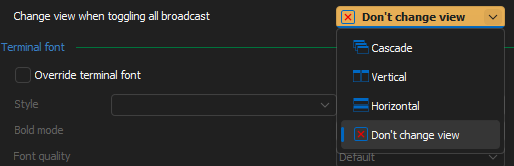
question 2. Can I open different windows of playlists to be open on different monitors?
example:
- Playlist "appsServer1" at locations(1,2,3,4) together open in window on monitor 1
- Playlist "appsServer2" at locations(1,2,3,4) together open in window on monitor 2
question 3. based on q2, if i can get two separated playlists open, can I have 2 separated 'broadcast all'? 1 for each window.
9105e675-42bf-4a7e-a8ee-6013654a3ba5.png
Hello,
Thank you for getting back to us.
Unfortunately, I have to say no to all your questions. Currently, the playlist feature only allows you to select all the desired entries and open them at once, but it doesn’t offer additional functionality.
However, I could transfer this post to the feature request forum, where our developers could review it and consider implementing it in the future.
Would you like me to do that?
Best regards,
Carl Marien
is there a setting to allow multiple instances of RDM open?
Otherwise yes, request forum would be helpful
Hello,
Yes, it is possible to run multiple instances of RDM simultaneously. Please follow these steps:
1. In your local RDM installation, navigate to **File > Settings > Advanced**.
2. In the options menu, enable the option to allow multiple instances.
Next, you'll need an additional installation of RDM to open a second instance. The portable version of RDM should be suitable for this purpose.
To set up a portable installation of RDM, please follow these instructions:
1. Download the .zip file from the following link: https://remotedesktopmanager.com/home/thankyou/rdmbin
2. Close your current RDM installation.
3. Create a new folder on your Desktop.
4. Extract the contents of the .zip file into the folder you created in step 3.
5. Open this folder and run **remotedesktopmanager.exe**.
Following these steps should enable you to run two instances of RDM simultaneously.
Additionally, as mentioned in my previous message, I will transfer this forum thread to the feature request section.
Best regards,
Carl Marien
with the standalone version.
- I assume I will need multiple stand alone versions if i want multiple instances open, example 4-5 open at the same time.
- Can I link them all to the same database of connections?
- can each instance have its own broadcast running at the same time (independent from each instance)?
Hello Patrick,
For your three questions regarding the "multiple instances" feature:
I assume I will need multiple stand alone versions if i want multiple instances open, example 4-5 open at the same time.
You don't necessarily need multiple installations/portable versions of RDM to do this. You can technically open the same one multiple times. The thing you have to be aware of is that sometimes there might be some performance issues or unintuitive behaviors, since both would use the same configuration files, the same cache files, etc. It's why we recommend using a portable instance, but you could also just use the same one and see if it works for your usage.
Can I link them all to the same database of connections?
Yes, there's no problem with that. I would recommend against it if you're using a non-advanced database like XML or SQLite as sometimes there may be issue when having multiple applications connected to the same file. It should work, but it's more that we can't guarantee you won't encounter certain issues.
can each instance have its own broadcast running at the same time (independent from each instance)?
Yes, each RDM instance will have its own broadcast group, so this is a convoluted way to achieve having multiple broadcast groups at the moment.
As far as the requests/missing features you've brought up in this thread, I can see three. Let me know if I understood properly:
Add an option for playlists to change the view mode when opening that playlist.
Question: Would you be fine if that was in File > settings and it applied to every playlist you opened?
Add an option in the playlist to open on a different monitor.
Question: I assume in your case you would like to open them "undocked", and all in the same window, similar as to when you're dragging out the tabs and reorganising them in an undocked window.
Add a way to make different broadcast groupings, rather than all of them being linked together
Making these changes is possible, but not a trivial amount of work. I would recommend using multiple instances of RDM to circumvent some of these missing features, while we see where we can fit this in our future roadmaps. If there's a feature specifically that would bring a lot of value to you out of those even if the other ones are missing, please let us know, it would be easier to slot in one improvement rather than three.
Regards,
Hubert Mireault