Yubikey Passthrough

Hi,
I did some searching and am not having any luck through the existing documentation. I'm looking to use my Yubikey on a Windows server. I've selected Smart Cards and WebAuthn for connected local resources. I've tried more than one destination and none of them are recognizing it. What am I missing/what do I need to change to make this work (I was hoping that WebAuthn would do it, but no luck there).
All Comments (9)
Hello,
Thank you for getting in touch with us. To better assist you, could you kindly provide us with the following information:
- Your current RDM version.
- The operating system you are using and its version.
- The data source you are utilizing.
- Screenshots of your RDP configuration without showing any sensitive information.
- Any additional information and screenshots you believe might be relevant.
Once we have this information, we will be better equipped to diagnose and resolve the issue.
Best regards,
Maxim Robert
It's a basic RDP configuration, nothing changed other than inherited credentials when first created. Since then just allowing Smartcards and WebAuthn. I can add any screenshots or verify any settings as needed.
Version - 2024.3.15.0 64-bit
Server 2022 on both sides
Data Source - SQL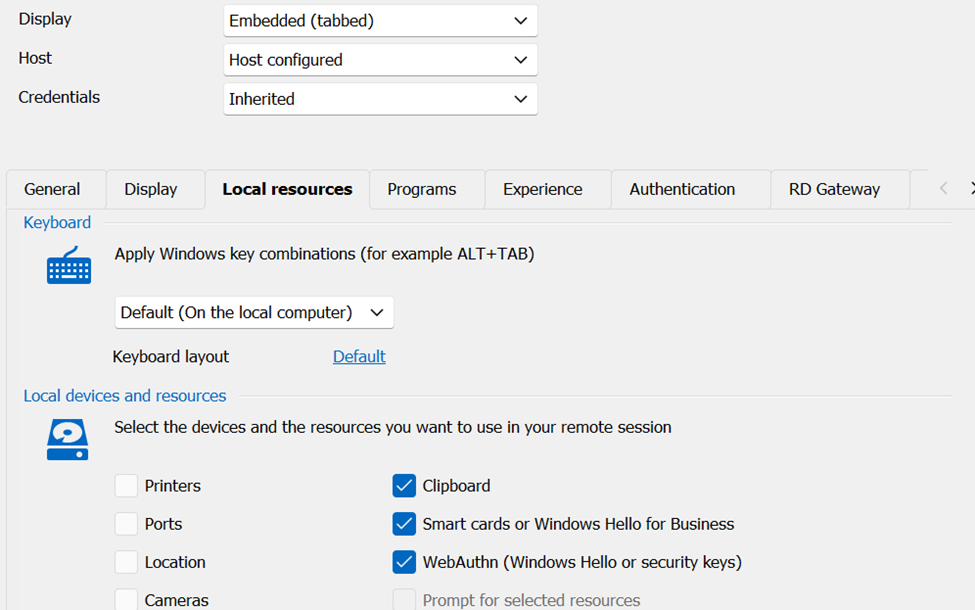
93d0df84-a1d1-47a5-9786-efe8c10bbe96.png
Hello,
Thank you for your response!
I'm letting you know that I'm performing some tests and will let you know with the right configuration to make this work.
If you have any other questions, feel free to let us know.
Best regards,
Maxim Robert
Thank you
Hello,
Thank you for being this patient!
Could you please provide me with the following information?
- Are you able to use the Yubikey on the server outside of RDM?
Thank you for letting me know. If you have any other questions, feel free to let us know.
Best regards,
Maxim Robert
Yes, it works fine natively with my laptop or with my phone. Is there any specific additional configuration; should it work with the settings I have? Was your testing successful?
Hello Timothy,
Thank you for your response!
I will need to perform further investigation. With the setting you put, if it is working outside of RDM, it should work with RDM. Have you tried on Microsoft Remote Desktop to see if the behaviour would differ with the right setting?
Thank you for letting us know. I'll keep you updated when I'm able to reproduce the behaviour. If you have any other questions, feel free to let us know.
Best regards,
Maxim Robert
We found a misconfiguration on our side, we are good. Thanks for looking into it, you can archive this.
Hello Timothy,
Thank you for letting us know. I'm glad to hear that you have found the solution.
If you have any other questions, feel free to let us know.
Best regards,
Maxim Robert