New popup when upgrading a client silently with a preconfigured .msi for the Data Source
New popup when upgrading a client silently with a preconfigured .msi for the Data Source

Hello all,
i am doing my monthly upgrade of our RDM Software, and this time im running into an issue that after the .msi installation update, that i am being asked to select the data source!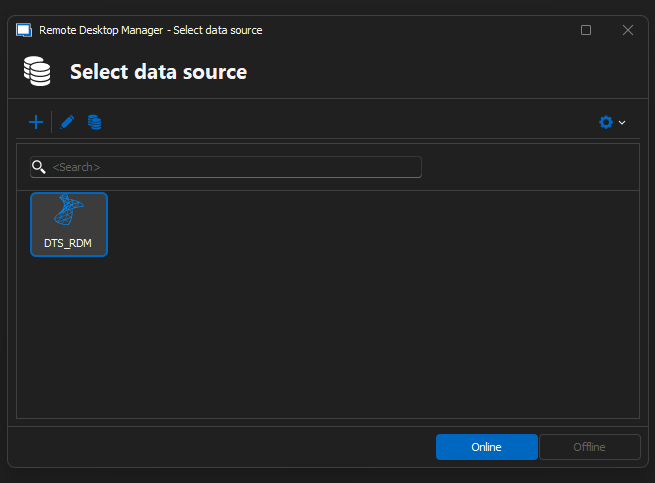
This was never needed. It always had auto loaded the configured Datasource in the .msi.
I have created the configuration with these checkboxes, for the same case the past months which always worked: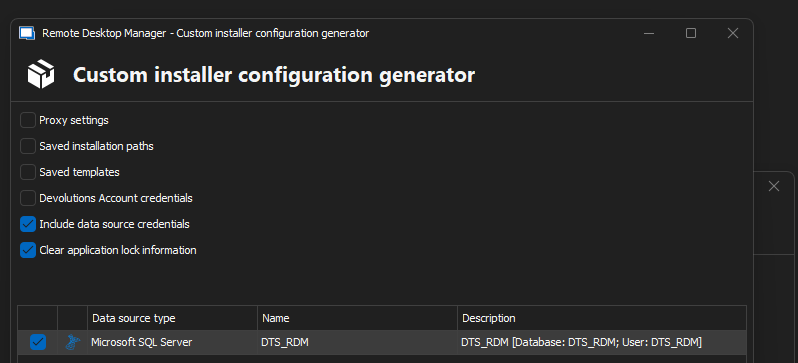
Currently i am on 2024.2.20 (i was able to update to this version with the config above without the popup on the first pic)
I tried to update to the latest one 2024.3.17.0 and i got the popup. I dont want it.
Am i doing smth wrong?
Thanks
ebf17553-0977-4b33-b39b-6258a7d013a2.png
{D6A0FF34-DDCD-4DBA-BE93-786672292A75}.png
All Comments (2)
Hello,
Thank you for reaching out to us regarding this,
I see, is it possible that you have the "On Start up" option set to "Prompt for data source" on the instance of RDM where you generated the package?
You can confirm this by going under "File" -> "Data sources" and looking at the bottom of this window.
You would need to change this and generate a new package with the desired configuration.
Best regards,
Samuel Dery
Hello,
Thank you for reaching out to us regarding this,
I see, is it possible that you have the "On Start up" option set to "Prompt for data source" on the instance of RDM where you generated the package?
You can confirm this by going under "File" -> "Data sources" and looking at the bottom of this window.
You would need to change this and generate a new package with the desired configuration.
Best regards,
Haa, that was it .. :D
It looks like i may have changed this by accident and i never realized it. I didnt know this option is also being configured in the .msi, but good to know, thanks!