RDM to Devolutions Server: Request timed out

Hello,
ee were forced to renew our infrastructure and therefore had to set up the Devolutions Server again. I now have a problem which mainly occurs at the beginning of the day, i.e. before the first connection. With my colleagues, however, this error appears every time RDM refresh the connection to the database, these colleagues are also not in the domain with their PCs, after a second refresh (F5) it also works for them. However, if they change the Vault or refresh after a few minutes, the error appears again.
There will surely be a setting option to solve this error. Do you know a solution?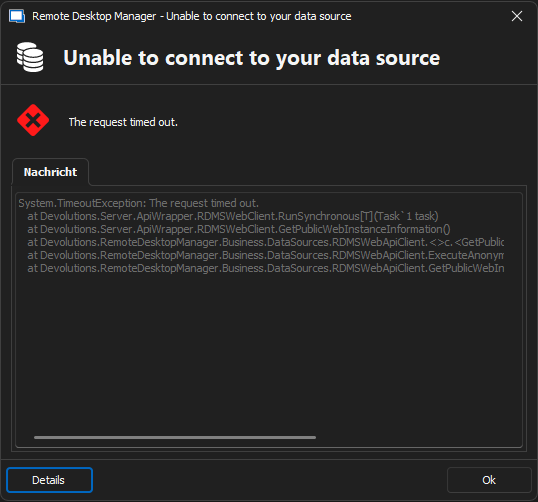
System.TimeoutException:
The request timed out.
at Devolutions.Server.ApiWrapper.RDMSWebClient.RunSynchronous[T](Task`1 task)
at Devolutions.Server.ApiWrapper.RDMSWebClient.GetPublicWebInstanceInformation()
at Devolutions.RemoteDesktopManager.Business.DataSources.RDMSWebApiClient.<>c.<GetPublicWebInstanceInformation>b__146_0(RDMSWebClientclient)
at Devolutions.RemoteDesktopManager.Business.DataSources.RDMSWebApiClient.ExecuteAnonymousAction[T](Func`2action)
at Devolutions.RemoteDesktopManager.Business.DataSources.RDMSWebApiClient.GetPublicWebInstanceInformation()
6408eace-ba15-4918-84bd-ea6e66c5c958.png
All Comments (33)
Hello,
What DVLS and RDM versions are you using?
Do you have relevant error messages in the DVLS Logs?
https://docs.devolutions.net/server/kb/how-to-articles/view-server-datasource-logs/
How do they access the DVLS instance with RDM? Do they need to connect using a VPN?
Best regards,
Érica Poirier
Hello,
Could you please check these 2 articles and make sure these IIS parameters are properly set for your DVLS Application pool?
https://docs.devolutions.net/server/kb/how-to-articles/recycle-server-application-pool-nightly/
https://docs.devolutions.net/server/kb/how-to-articles/configure-server-always-available/
Best regards,
Érica Poirier
Hello,
thank you for your message. We use RDM Version 2024.3.15.0 and DVLS 2024.3.7.0.
I will check the logs and other solutions after my return to office in a few weeks.
Hello,
What DVLS and RDM versions are you using?
Do you have relevant error messages in the DVLS Logs?
https://docs.devolutions.net/server/kb/how-to-articles/view-server-datasource-logs/
How do they access the DVLS instance with RDM? Do they need to connect using a VPN?
Best regards,
Hello,
Could you please check these 2 articles and make sure these IIS parameters are properly set for your DVLS Application pool?
https://docs.devolutions.net/server/kb/how-to-articles/recycle-server-application-pool-nightly/
https://docs.devolutions.net/server/kb/how-to-articles/configure-server-always-available/
Best regards,
Hello,
I have checked both links and the configuration of IIS is as requested.
We have updated Devolutions Server and RDM to the latest versions and the problem still persists.
We have also changed the authentication to Azure and have connected our devices to Intune, but the problem still persists as before. When changing Vaults, RDM freezes for a few seconds and then spits out the error:
System.TimeoutException: The request timed out.
at Devolutions.Server.ApiWrapper.RDMSWebClient.RunSynchronous[T](Task`1 task)
at Devolutions.Server.ApiWrapper.RDMSWebClient.GetPublicWebInstanceInformation()
at Devolutions.RemoteDesktopManager.Business.DataSources.RDMSWebApiClient.<>c.<GetPublicWebInstanceInformation>b__146_0(RDMSWebClient client)
at Devolutions.RemoteDesktopManager.Business.DataSources.RDMSWebApiClient.ExecuteAnonymousAction[T](Func`2 action)
at Devolutions.RemoteDesktopManager.Business.DataSources.RDMSWebApiClient.GetPublicWebInstanceInformation()
Then another reload and i can access the Vault.
Hello,
Thank you for your feedback.
Do you have relevant error messages in the DVLS Logs? This should help us determine what is causing this issue.
https://docs.devolutions.net/server/kb/how-to-articles/view-server-datasource-logs/
Thank you for your collaboration.
Best regards,
Érica Poirier
Hello,
Thank you for your feedback.
Do you have relevant error messages in the DVLS Logs? This should help us determine what is causing this issue.
https://docs.devolutions.net/server/kb/how-to-articles/view-server-datasource-logs/
Thank you for your collaboration.
Best regards,
Hello,
I forgot to mention that the logs are suspiciously clean. The only error is from a few minutes ago:
HttpRequestException - Der angegebene Host ist unbekannt. (cloud.devolutions.net:443)at System.Net.Http.HttpConnectionPool.ConnectToTcpHostAsync(String host, Int32 port, HttpRequestMessage initialRequest, Boolean async, CancellationToken cancellationToken)at System.Net.Http.HttpConnectionPool.ConnectAsync(HttpRequestMessage request, Boolean async, CancellationToken cancellationToken)at System.Net.Http.HttpConnectionPool.CreateHttp11ConnectionAsync(HttpRequestMessage request, Boolean async, CancellationToken cancellationToken)at System.Net.Http.HttpConnectionPool.AddHttp11ConnectionAsync(QueueItem queueItem)at System.Threading.Tasks.TaskCompletionSourceWithCancellation`1.WaitWithCancellation(CancellationToken cancellationToken)at System.Threading.Tasks.TaskCompletionSourceWithCancellation`1.WaitWithCancellationAsync(Boolean async, CancellationToken cancellationToken)at System.Net.Http.HttpConnectionPool.SendWithVersionDetectionAndRetryAsync(HttpRequestMessage request, Boolean async, Boolean doRequestAuth, CancellationToken cancellationToken)at System.Net.Http.HttpMessageHandlerStage.Send(HttpRequestMessage request, CancellationToken cancellationToken)at System.Net.Http.DiagnosticsHandler.SendAsyncCore(HttpRequestMessage request, Boolean async, CancellationToken cancellationToken)at System.Net.Http.HttpMessageHandlerStage.Send(HttpRequestMessage request, CancellationToken cancellationToken)at System.Net.Http.RedirectHandler.SendAsync(HttpRequestMessage request, Boolean async, CancellationToken cancellationToken)at System.Net.Http.DecompressionHandler.SendAsync(HttpRequestMessage request, Boolean async, CancellationToken cancellationToken)at System.Net.Http.HttpMessageHandlerStage.Send(HttpRequestMessage request, CancellationToken cancellationToken)at System.Net.Http.SocketsHttpHandler.Send(HttpRequestMessage request, CancellationToken cancellationToken)at System.Net.Http.HttpClient.Send(HttpRequestMessage request, HttpCompletionOption completionOption, CancellationToken cancellationToken)at System.Net.Http.HttpClient.Send(HttpRequestMessage request)at Devolutions.Server.V2.Infractructure.Services.TorExitNodesServices.FetchNodes()------------------------------------------SocketException - Der angegebene Host ist unbekannt.at System.Net.Sockets.Socket.AwaitableSocketAsyncEventArgs.ThrowException(SocketError error, CancellationToken cancellationToken)at System.Net.Sockets.Socket.AwaitableSocketAsyncEventArgs.System.Threading.Tasks.Sources.IValueTaskSource.GetResult(Int16 token)at System.Net.Sockets.Socket.<ConnectAsync>g__WaitForConnectWithCancellation|285_0(AwaitableSocketAsyncEventArgs saea, ValueTask connectTask, CancellationToken cancellationToken)at System.Net.Http.HttpConnectionPool.ConnectToTcpHostAsync(String host, Int32 port, HttpRequestMessage initialRequest, Boolean async, CancellationToken cancellationToken)
Hello,
Thank you for your feedback.
The TOR Client URL seems to be blocked by a proxy or firewall rule in your environment.
Could you disable the Block TOR Clients option in the Features section of the DVLS settings?
https://docs.devolutions.net/server/web-interface/administration/configuration/server-settings/general/features/
Or you could allow the Internet Endpoint related to the Block TOR Clients in your environment.
https://docs.devolutions.net/server/kb/knowledge-base/internet-endpoints-server/
Let us know if that helps.
Best regards,
Érica Poirier
Hi,
we do have the exact same error (timeouts) in our environment.
The logs are all clean.
RDM version 2024.3.18.0
DVLS version 2024.3.8.0
Updated to 2024.3.9.0
Let's hope that helps
No it didn't.
For some minutes changing vaults seemed to have speeded up, but then:
System.TimeoutException: The request timed out.
at Devolutions.Server.ApiWrapper.RDMSWebClient.RunSynchronous[T](Task`1 task)
at Devolutions.Server.ApiWrapper.RDMSWebClient.GetPublicWebInstanceInformation()
at Devolutions.RemoteDesktopManager.Business.DataSources.RDMSWebApiClient.<>c.<GetPublicWebInstanceInformation>b__146_0(RDMSWebClient client)
at Devolutions.RemoteDesktopManager.Business.DataSources.RDMSWebApiClient.ExecuteAnonymousAction[T](Func`2 action)
at Devolutions.RemoteDesktopManager.Business.DataSources.RDMSWebApiClient.GetPublicWebInstanceInformation()
Érica Poirier
Hello,
Thank you for your feedback.
The TOR Client URL seems to be blocked by a proxy or firewall rule in your environment.
Could you disable the Block TOR Clients option in the Features section of the DVLS settings?
https://docs.devolutions.net/server/web-interface/administration/configuration/server-settings/general/features/
Or you could allow the Internet Endpoint related to the Block TOR Clients in your environment.
https://docs.devolutions.net/server/kb/knowledge-base/internet-endpoints-server/
Let us know if that helps.
Best regards,
I have tried, but to no success. The performance of Remote Desktop Manager is really terrible now. Logging in/verifying takes way too long with multiple disconnects. Switching vaults is also associated with disconnections. Logs still without any noteworthy entry.
Hello,
Thank you for your feedback.
@mkrupa I have opened a case on your behalf and we will send you a link to book a support session.
Best regards,
Érica Poirier
Hello @einkauf4,
Thank you for your feedback.
How many entries do these vaults contain?
Have you tried increasing the Connection timeout value in the Advanced tab of the DVLS data source in RDM?
Best regards,
Érica Poirier
Hello Erica,
no, I did update the Database-Connection-Timeouts according to your knowledgebase.
I'll give this setting a try.
We've got 9 Vaults, the biggest hast 574 entries. The others are way under 100.
Regards,
Harry
Hello,
It is also important to keep in mind the age of the DB and the connections. The longer a connection exists and is used by users, the more logs it accumulates. To verify if you have a large number of logs in your DB, you can run the Top Table by Disk Usage from SSMS: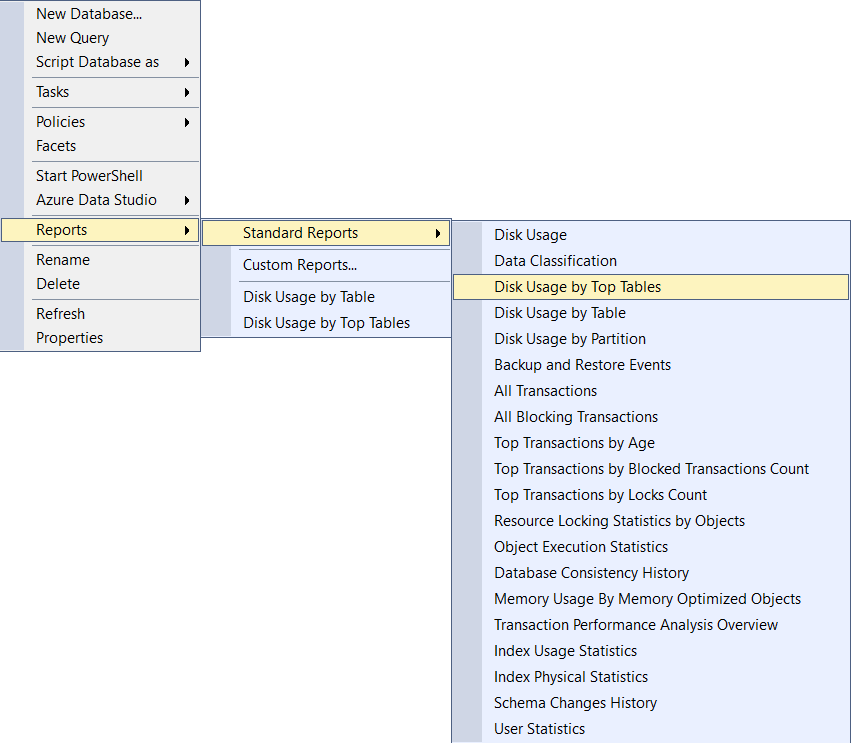
This should give you the # of records of each table. The dbo.ConnectionLog table is responsible for logging all entries logs. The more entries are stored under that table the more information is loaded by RDM when you are accessing a Vault. To prevent this we have the Log Cleanup option under the administration panel of the Devolutions Server. You can configure how long you want to archive and deletes your logs.
Keep in mind that archived logs are still accessible when selecting a filter that contains them. They will just not be loaded on the initial access of the vault which should make the process easier for RDM.
Feel free to reach out if you have any questions or need further clarification.
Best regards,
78c0441c-0da3-4475-b3f3-bf94280c2328.png
Hello all,
I was able to solve the problem together with walphonso in a support session. Our devices are all Intune managed devices and we don't have a Cloud PKI yet. The Devolution Server certificate could therefore not be verified. After adding the ROOT certificate to the trusted root certificate authorities of the computer, the problem was solved. RDM now does not encounter any errors when logging in or switching the vaults.
@walphonso Thank you again for your help.
Hi mkrupa,
thanks for your post. Where did you get the root cert from?
We have Active Directory joined servers and machines, so I could spread the cert easily.
Regards,
Harry
Hi mkrupa,
thanks for your post. Where did you get the root cert from?
We have Active Directory joined servers and machines, so I could spread the cert easily.
Regards,
Harry
The ROOT-Cert should already be rolled out in an onprem domain. However, we exported the ROOT cert on the Devolutions server (this is ONPREM and not in Intune) by calling up the Devolutions server administration page in the browser, opening the certificate viewer and exporting the ROOT cert there (click on the lock next to the URL -> “Connection is secure” -> certificate icon -> Details -> Select ROOT -> Export). This then had to be added to the computer's certificate management on the clients. It is important that it is in the trusted root certificates. The prerequisite is of course that you have created a certificate for the Devolutions Server / IIS and that the exported ROOT certificate is also the issuing authority of the Devolutions / IIS certificate.
I'm sorry to say, but that didn't work.
We're still facing timeouts on start of RDM or changing vaults.
Hello,
Since you are also having timeouts while changing vaults, could you confirm if you have a high number of records in your tables through SSMS with the report mentioned in my previous post?
Best regards,
Holy moly....
I've activated the cleanup to archive logs older than 3 months and delete older than 1 year.
After the cleanup the dbo.collenctionlog datasets dropped from 365k to 26k !!
Let's see if that solved the problem.
Best regards,
Harry
litte correction - the order has changed. The logs dropped to 13k ;)
Hello,
I'm glad to read this! Having a lot of records in the dbo.collenctionlog table can lead to performance issue in DVLS and RDM since all logs are loaded when opening a vault. When you are archiving logs, they will still be available but they will only be loaded by RDM or the browser when you select a filter that contains archived logs.
Best regards,
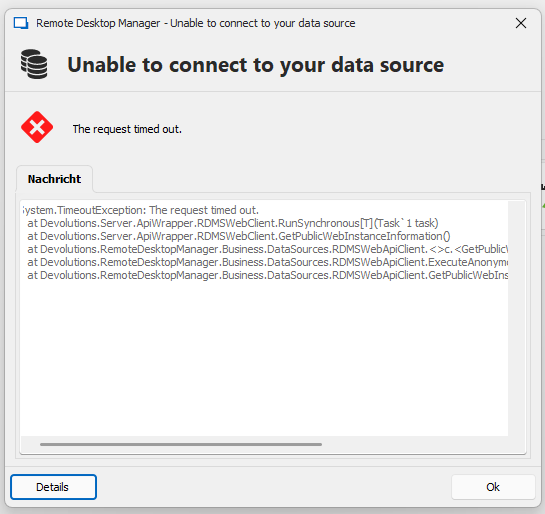
I'm sorry to say that it didn't help.
Just changed a vault....
Screenshot 2024-12-11 073521.png
Hello,
Would it be possible to confirm the number of entries you have in your vaults? We recommend keeping it under 4000 entries usually.
Also is the SQL server on the same machine as the Devolutions Server (SQL Express for example)?
We also have this knowledge base for preventing connection timeout: https://docs.devolutions.net/server/kb/how-to-articles/preventing-sql-timeouts-with-server/
Best regards,
Hi,
there is another SQL Express on the server, thats right. But the problem accours since one of the last updates.
Maybe it's something related to the Microsoft 365 auth?
This KB was the first thing we tried.
Best regards,
Harry
Hello,
I'm sorry for the delay in my response.
I don't think the issue is with the Microsoft authentication since you are not getting disconnected it's the requests that is timing out.
Would it be possible to confirm how many entries are present per vaults? You can use the diagnostic tools in RDM under the help tab to find it easily: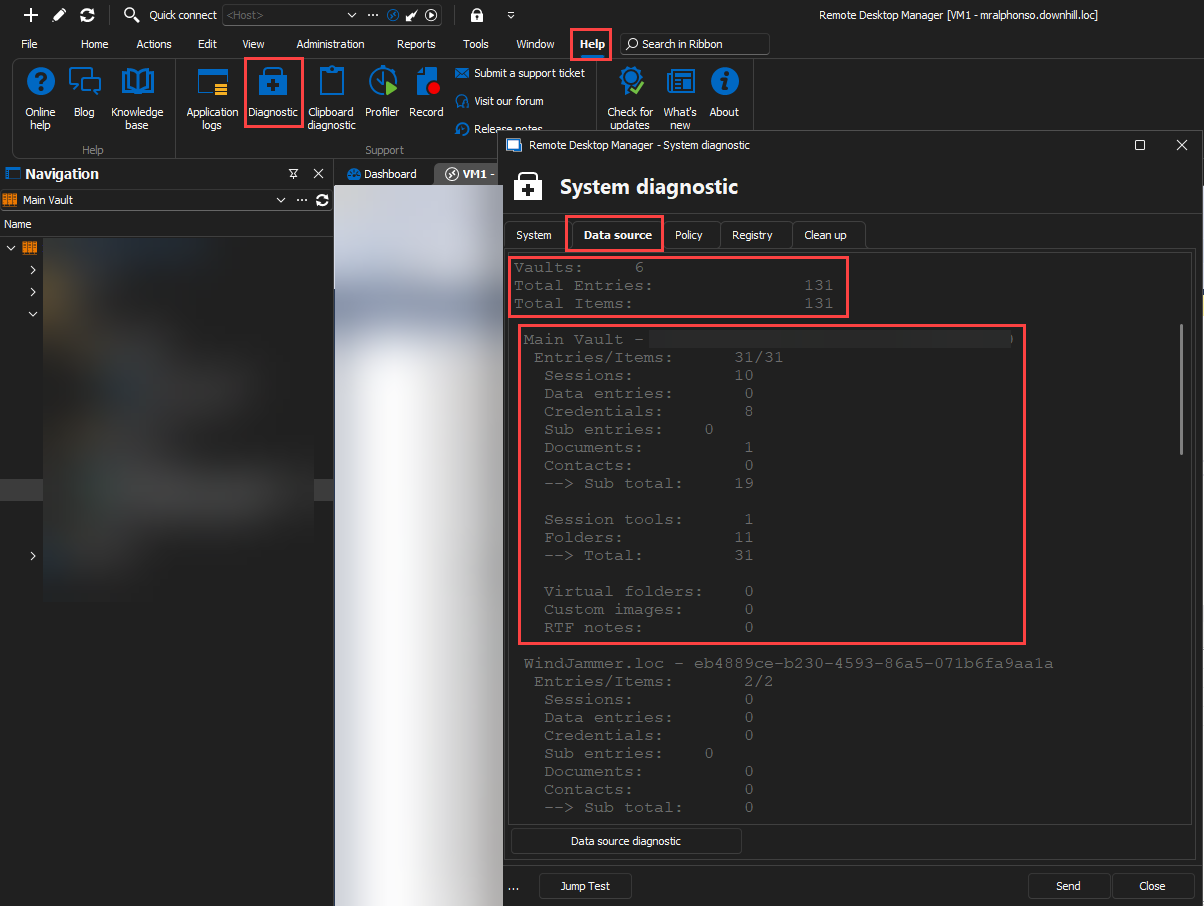
Best regards,
4cd08561-858a-4fb7-8a13-9526f4336c35.png
Hi,
here you go.
Thanks
Datasource-Diagnostic-RDM.png
Hello,
At this point I think the best thing would be to schedule a session together.
I will open the case for you, can I use the email configured in your forum's account to contact you?
Best regards,
Hi walphonso,
yes, that's ok. Thank you!
Hello,
Just to keep the thread up to date, I've opened a case for @einkauf4 and we've scheduled a session together to take a look at the issue.
I'll post in this thread once we are able to resolve the issue.
Best regards,