Powershell entry $HOST$ resolution of linked host hostname
Powershell entry $HOST$ resolution of linked host hostname
0 vote

Hello,
When configuring a powershell entry that is configured to use a linked host, passing the variable $HOST$ into a script retrieves the explicit value from said linked host's attribute, as opposed to resolving the attribute against the linked host.
For example, if the linked host's host attribute is 'server.domain.local', that is what the powershell entry script will see when using $HOST$ in a parameter. However if the linked host's 'host' attribute is instead set to '$NAME$.domain.local', then the PowerShell entry will resolve the $NAME$ against itself instead of the linked host, and $HOST$ ends up becomming '<powershell_entry_name>.domain.local'.
Would it be possible to change the behaviour so that the PowerShell entry retrieves the static attribute called 'HostResolved' instead of 'Host' from the linked entry? I'm not sure of a scenario where a variable on a 'linkee' entry resolving to the 'linking' entry would be utilized?
Please let me know if you would like any additional info.
Thanks
Joe
All Comments (17)
Hello,
I feel like it might be a bug, honestly. The variable resolving in this case should base the complete "chain" of resolving (a variable being used in another variable) on the entry you're executing against. We will have to investigate to see what we can do to improve this behavior. I've opened a ticket.
Regards,
Hubert Mireault
Thank you Hubert.
Hi Hubert,
Was there any update on this one?
Thanks
Joe
Hello,
This is still on our task list, we have to be careful not to break anything with variable resolving as it's quite a sensitive part of the application. At the moment I can't give you an estimate for when we'll be working on this but it's assigned to one of our developers.
Regards,
Hubert Mireault
Hello,
We've investigated this case and we would like your input.
In RDM, when using linked entries, variables that are in the "Linked connection" (in this case, your Host) are resolved as if they were a part of the main entry (in this case, the Powershell session).
For example:
- If you link a credential to an entry, and the credential’s username is set to $CUSTOM_FIELD1$:
- Fetching the username from the main entry will use Custom Field 1 of the main entry.
- Fetching the username directly from the credential entry will use Custom Field 1 of the credential entry.
This behavior is expected and aligns with how most users work with variables.
To work around this, we have some variables that specifically target linked entries values, such as $CREDENTIAL_LINKED_CUSTOM_FIELD1$.
In my previous example, setting $CREDENTIAL_LINKED_CUSTOM_FIELD1$ in the username field of the credential entry, would yield the following results:
- Copying the username from the main entry the credential is linked to would give you the Custom Field 1 of the credential entry.
- Copying the username from the credential entry would give you an unresolved variables
If we are trying to maintain this flow, we could introduce a new $HOST_LINKED_NAME$ variable for your usage, which you could place in your '$NAME$.domain.local' ('$HOST_LINKED_NAME$.domain.local'). The host entry itself would no longer have a valid host on its own, but as long as this host is only used through other entries (linked host), it would resolve properly (this would also prevent the host from properly showing up in the UI or overview for the host entry).
Would this still fit your workflow?
Regards,
Jafran Majeau
Hi Jafran,
Thanks for looking into this, and glad to see some activity on this thread. I'm not sure that the work around proposed would be of much help for the following reasons:
1) A 'host' type entry may have sub entries that are either set to inherit host from parent, or use $PARENT_NAME$. If the parent object was using an unresolvable $HOST_LINKED_NAME$ as the in host attribute, then sub entries probably wouldn't work
2) One of the key advantages to using inheritance and variables is that it enables defining static data in one place. For example, lets say there is a server/host whose fqdn is server1.domain.local. The host entries name can be set to 'server1', then the host attribute can be set to $NAME$.domain.local, and multiple sub entries can inherit the host/fqdn to be used whichever way is applicable. When a hosts' connection structure is setup this way, it is very simple to retarget an entry in a scenario where server1 is upgraded and becomes server2, or when duplicating a host entry with multiple sub entries, in either case there is just a single change required to the name field. Using $HOST_LINKED_NAME$ in the way described sound like it would result in duplicate host entries being needed, each with 'server1' statically defined somewhere, and would likely cascade into other areas causing inconvenience such as when running reports for example.
3) The ability to link an entry (i.e. PowerShell entry) to another host entry is very convenient when inheritance is inapplicable, such as linked entries being located elsewhere in the vault folder structure. An example being, a root folder called Scripts which contains the PowerShell entries, and another separate root folder called 'Servers' which contains the host entries. When a host entry is linked, and that host entry credential or host attribute is changed (i.e. to a different IP address, or new fqdn), the entries linking to that host pickup the change/s automatically. Similar to the prior point, sounds like separate dedicated host entries would need to be maintained/updated where the $HOST_LINKED_ETC$ variables are used.
You mentioned the existing behavior 'aligns with how most users work with variables', could you share an example scenario of where linked host variables resolving back against the linking entry would be utilized? If there is a need to resolve a variable against a linking entry, wouldn't it be simpler to just define that explicitly in the entry instead of looping back via a linked host entry?
Please let me know if you would like any additional info.
Joe
Hello,
Linked Host are fairly new (relatively speaking) in our structure. What I've described as "usual expected workflow" is more how linked credentials have been expecting to work. Regardless of that, we would still be interested in providing you with something that can help your workflow.
We could add an option (File - Settings) that forces a linked host entry to resolve its own variables before being used. This would mean you would get different results from the same entry across different users (those with the options activated and those who don't), but it would provide the behaviour you are looking for.
Would that be an acceptable workaround for you?
Regards,
Jafran Majeau
Hi Jafran,
Thanks, yes that workaround would be sufficient. If it were possible to set it on the data source (Hub/DVLS) that would be even better, as the setting wouldn't then need to be manually enabled on multiple RDM client instances.
Joe
Hi Jafran,
Additionally, managing the setting on the data source side would probably be necessary if the capability/workaround ever need to be available in WebUI or Workspace.
Joe
Hello,
We've added the system settings Resolve variables in linked host. It can be found in the Advanced section. This is currently planned with the upcoming 2026.1 version, but we will see if we can make it part of an earlier version.
Regards,
Jafran Majeau
Sounds good, thanks Jafran
Hello,
Thank you for being this patient!
If possible, could you update your RDM to the latest version (2026.1.12.0) and see if the problem persists? This version should resolve your issue.
Latest Version: Download RDM
Please let us know if this works or if you encounter any issues.
Best regards,
Maxim Robert
Hi Maxim,
Attempted to test this with 2026.1.12, but don't see and option for 'Resolve variables in linked host' in the RDM Settings\Advanced section or on the advanced tab of the PowerShell entry.
Joe
Hello jm2,
As specified in my last response, this setting is located in the System Settings - Advanced section.
Regards,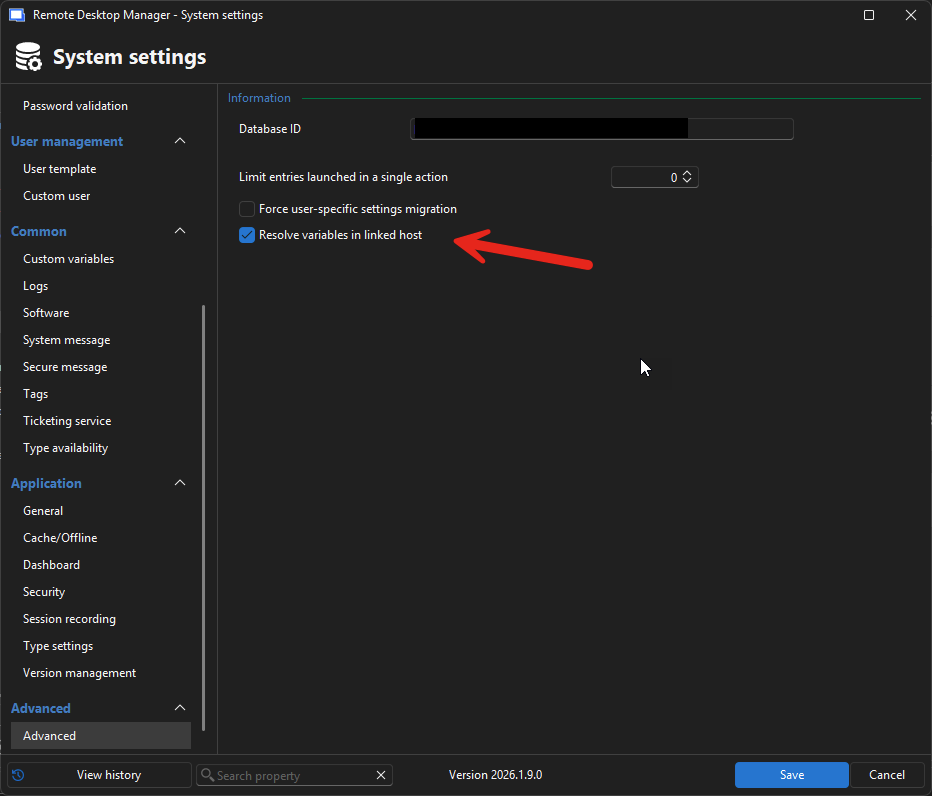
Jafran Majeau
18c18858-5480-484b-9285-7b912e9cf478.png
Hi Jafran,
Is System Settings available when using a Hub DataSource?
Thanks
Joe
Hello @jm2,
The editing system settings are indeed not available at the moment in the Hub data source.
We will enable this option in the backend.
Best regards,
sounds good, please let me know when I can test via a Hub Data source
