Database getting lost and coming back randomly per RDM launch
Database getting lost and coming back randomly per RDM launch

Hi,
I've experienced a weird situation, I by mistake pulled power from my machine, when I relaunched my RDM it was completely empty all my entries were gone. Luckily I didn't have too many entries so I was able to recreate everything. A few days later I had a power outage, and surprisingly when I relaunched RDM I got back my original entries, those ones that I lost on my first power loss.
I've not been able to consistently reproduce this (I tried killing the process to imitate power loss), but I do know that randomly I sometimes either of the 2 DBs.
I've unfortunately not have the brains at the time to always record the DB path used, but I for sure don't have 2 DB folders in my AppData.
All Comments (14)
Hello,
Thank you for reaching out to us regarding this,
Could you please specify the version of RDM you are currently using?
What type of data source are you using?
If you are using a SQLite data source, you can go under %LocalAppData%\Devolutions\RemoteDesktopManager and look for files that by default would be named Connections.db do you have more than one?
Best regards,
Samuel Dery
I've solved where my 2 DBs are. I found I have one in appdata\local and one in appdata\roaming. I confirmed using SQLite viewer that indeed those are the 2 DBs.
Now the question is when does RDM use which folder?
RDM v: 2024.2.17.0 64-bit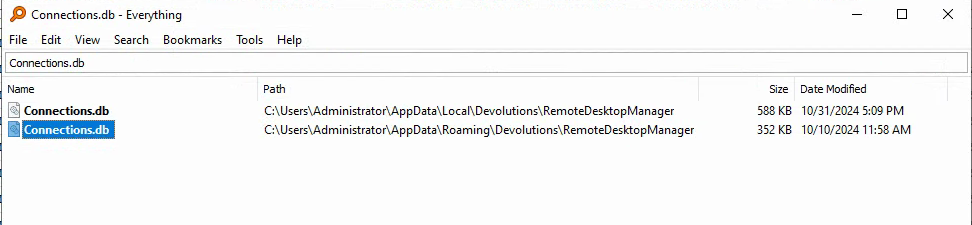
du59Mkxzat.png
Hello,
Thank you for your reply,
I would have to assume the first file is the correct one as the other has not been modified since 10/10/2024 and is somewhat smaller.
If you go under "File" -> "Data sources" you can view the "Database" field of your data source and confirm which one it is pointing to.
Best regards,
Samuel Dery
Question is why is RDM randomly switching between the 2 databases?
Hello,
Thank you for your reply,
It's difficult to say and without being able to reproduce finding the cause would be difficult, under File -> Data sources do you currently have the two databases added as different SQLite?
Let me know,
Best regards,
Samuel Dery
Hi Samuel,
At this time and all times I confirmed I only ever had 1 entry under data sources.
Hello,
Thank you for your reply,
I see, next time you encounter the issue can you go under "File" -> "Data source" and validate what the "Database" field is set to? This would not normally change by itself and the default path should be the Local one.
Best regards,
Samuel Dery
I just had this again, I had to kill RDM (since it was open for too long and freezing up the machine I RDP'd into) and when launched, it chose the "roaming" folder (confirmed by checking the database path).
I wonder if it has to do with RDPing... Will do some testing.
Confirmed. If opening RDM while RDP'd into the workstation it picks the roaming folder for the DB. I believe this might be unintentional.
Hello,
Thank you for your reply and my apologies for the delay,
Are you using the same Windows User in both cases?
Let me know,
Best regards,
Samuel Dery
Yes. Same windows user.
Hello,
Thank you for your reply,
I see; that is indeed odd; could you confirm if this is a Terminal Server environment? From my understanding, RDM will use the Roaming profile in such a case.
Can you provide me some additional details on your setup, you are sometimes using the workstation directly and I'm guessing you are connecting to it using RDP when working remotely and encountering this behavior?
Would this be correct?
Let me know,
Best regards,
Samuel Dery
Hi Samuel,
Sorry for my late response, I've somehow managed to miss the email notification.
For more context: It's not a terminal server, it's a regular windows 10 workstation. Also, what you describe is how it's used, I sometimes use the workstation directly and when working remotely I connect to it using RDP.
If I may ask, any specific reason why not always use the roaming folder?
Hello,
Thank you for your reply,
If you'd like, in your LocalAppData you can create an Override.cfg and point it to the Roaming folder, we have the following regarding this:
https://docs.devolutions.net/rdm/installation/client/configuration-file-location/#override-the-default-path
With this, it will always use the roaming folder.
Let me know if this helps,
Best regards,
Samuel Dery
