Opening a website with an active Devolutions Gateway

Hello everyone,
I have a problem opening websites with the Remote Desktop Manager or Devolutions Launcher in Windows.
The connections are provided by a Devolutions Server Cluster.
RDM, Launcher and DVLS have the current version, which was available on 26.10.24.
When the website is opened with active Devolutions Gateway in connection details, I get a blank page or after the timeout the error ERR_PROXY_CONNECTION_FAILED.
The connection is established via Microsoft Edge as the browser engine and the connection is displayed embedded.
If I remove the Devolutions Gateway from the connection, the website is displayed correctly.
Calling up the website on the DVLS server directly works. The firewall should therefore not play a role.
This behaviour is reproducible. This behaviour also occurs with a completely new system on which only RDM + .NET 8.0 + EdgeWebview is installed.
I have also tried other browser engines in the connections, but unfortunately without success.
However, if I open the same connection from the same data source in the macOS version of the Remote Desktop Manager, the connection works without errors.
Where could I have made a mistake?
Thanks in advance
Alex
All Comments (5)
Hello Alex,
Thank you for reaching out to our forum. This behavior seems unusual. I tested it on my end, and everything is working as expected. Please follow these steps to retrieve logs from your RDM application and send them to us:
1. Navigate to **RDM > Help > Profiler > Debug only**.
2. Click on the three dots and enable the following options:
- API
- Debug
- Embedded32
- Failed SQL commands
- Http browser linker
- Http response
- Show log silent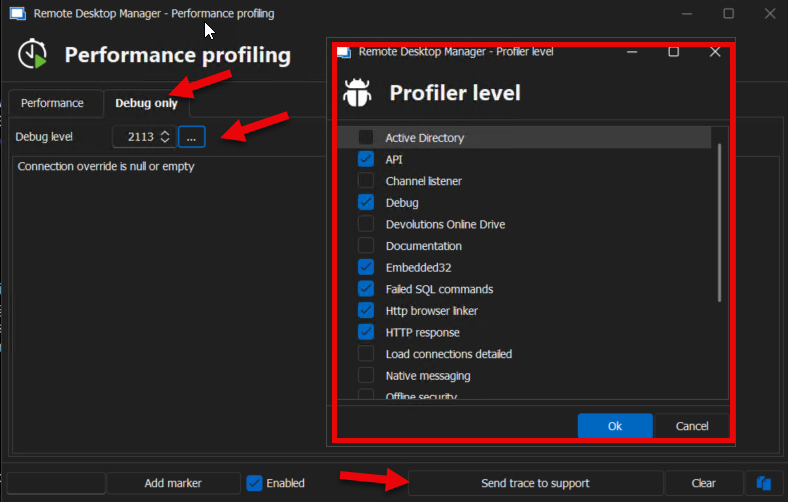
3. Press **OK**, then minimize the profiler.
4. Attempt to open the web session that’s failing with the Gateway. Once the error occurs, return to the profiler and click **Send trace** to send the logs to **service@devolutions.net** with the subject "Logs for Maudi."
Let me know if you need any further assistance.
Michel Audi
1.png
hello michel,
I have sent the logs as described.
In the meantime, I have already continued testing and was able to narrow down the “error” problem somewhat.
We have problems with systems that have the Microsoft Baseline Security GPOs.
The problem does not seem to occur on systems that are not “hardened”.
The problem is which of the many GPO settings is causing the problem. Therefore an analysis of the logs would be very helpful for me.
Many thanks
Alex
Hello Michel,
I no longer believe that it is due to the GPOs.
We have two Citrix environments (we are in the middle of a migration). At the one location the access to websites works and at the new future location it unfortunately does not work.
It doesn't work on a standalone system either.
The commonality between the two non-functioning systems is that they are Windows Server 2022. Windows Server 2019 works.
I hope the logs sent provide a better analysis.
Many thanks in advance
Alex
Hello Michel,
I think I've found the error.
We have a DVLS server cluster with a gateway farm consisting of two Devolutions gateways.
For this constellation, I have created a service group on the firewall that contains HTTPS and TCP/8181. However, I realized that TCP/7171 is still needed for everything to work properly.
I have tested it successfully.
But what exactly are these ports used for?
HTTPS is clear.
TCP/8181 is for accessing the DVLS gateway, which then forwards the data to the destination via the defined protocols. (here the gateway URL is the same as the URL of the HTTPS access - runs via load balancer)
TCP/7171 is unfortunately not very clear to me from the documentation. (here the stored TCP host name is the FQDN of the respective system - does not run via load balancer as the host name of the system is unique)
Many thanks for this too
Alex
Hello Alex,
Thank you for your feedback! I’m glad to hear it’s working for you now. I didn’t initially discuss ports and protocols since you mentioned it was already functioning on macOS, which led us in a different direction.
Feel free to reach out if you have any further questions.
Best regards,
Michel Audi