RDP via Azure Bastion (native client) broken after update to 2024.3.16.0 when using Inheritance
RDP via Azure Bastion (native client) broken after update to 2024.3.16.0 when using Inheritance

After installing RDM v2024.3.16.0 on Oct 30, 2024 all our RDP connections using Azure Bastion failed to open.
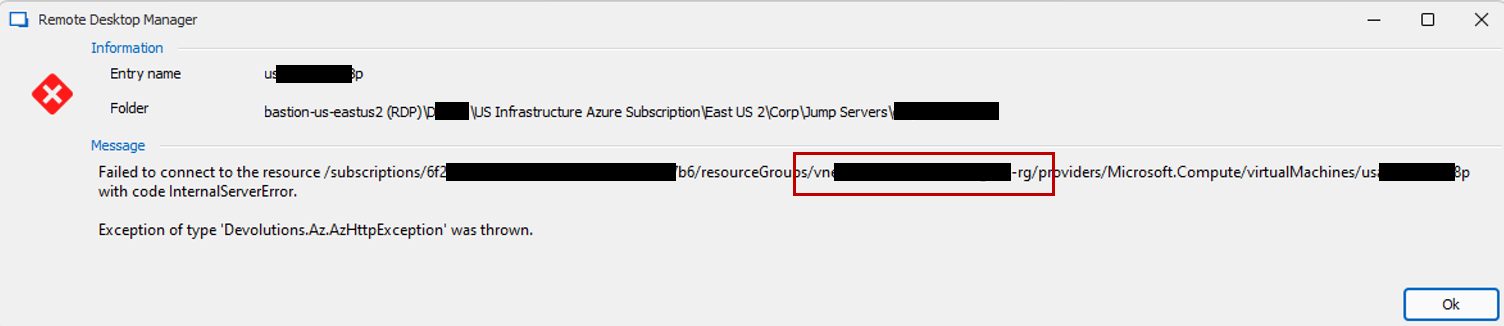
Error message: Exception of type 'Devolutions.Az.AzHttpException' was thrown.
We noticed this occurs if the VPN/Tunnel/Gateway Connect setting is configured as "Inherited".
We also noticed within the error message that the Resource Group specified in the resource path was erroneous.
If we switched the gateway from Inherited to a manually specified gateway the issue no longer occurred.
Rolling back to version 2023.3.15.0 resolved the issue.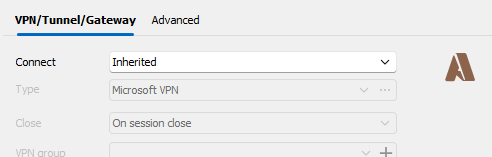
370ba516-b8a3-4e5e-9a7c-644111faf5ee.png
538aea8e-d8ce-4718-82aa-dbb22e14b9e6.png
All Comments (17)
Hello
First, I'm really sorry for the inconvenience.
The good news is that I know exactly where this regression was introduced. I helped review the change that lead to this, and I thought we tested the relevant scenarios, but that is obviously not the case. So once again, I apologize for that and will work on straightening this out ASAP.
It would help to know some extra detail: I assume you're overriding the resource group on the server(s) you're connecting to. Do you define it directly on the connection entries, or is it e.g. inherited from a parent entry? Are you using variables here?
For now I'm afraid I don't have a workaround, hopefully you can remain on 2024.3.15 until this is resolved.
Thanks and kind regards,
Richard Markievicz
Hi i am also running into this issue.
What i have is the azure bastion item is configured on the parent folder and then have sub folders for subscriptions and resource groups
like this:
parent_folder
├── sub1
│ ├── resourcegroup1
│ ├── resourcegroup2
│ └── resourcegroup3
├── sub2
│ ├── resourcegroup1
│ ├── resourcegroup2
│ └── resourcegroup3
└── sub3
├── resourcegroup1
├── resourcegroup2
└── resourcegroup3
with inheritance set for the subcriptionID, Resourcegroup and tunnel.
final servers look like this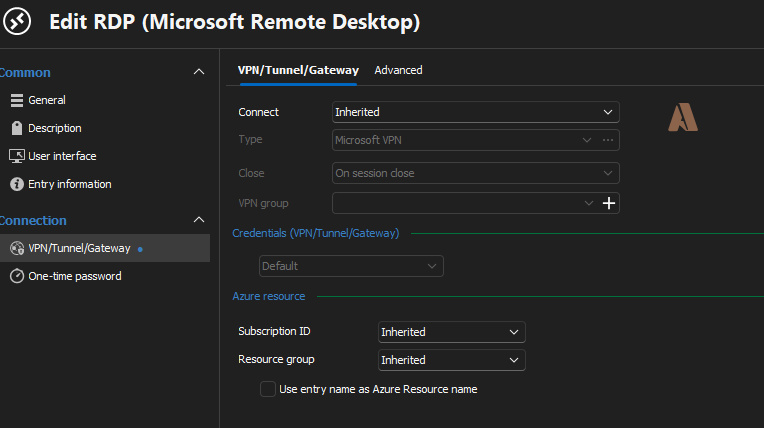
I reverted to the 2024.3.15.0 version so no urgent issues at this moment for me.
Kind Regards,
08e2eeac-9e8e-41ec-ad52-631cabcba3d9.png
That is correct.
We set the resource group on the server connection.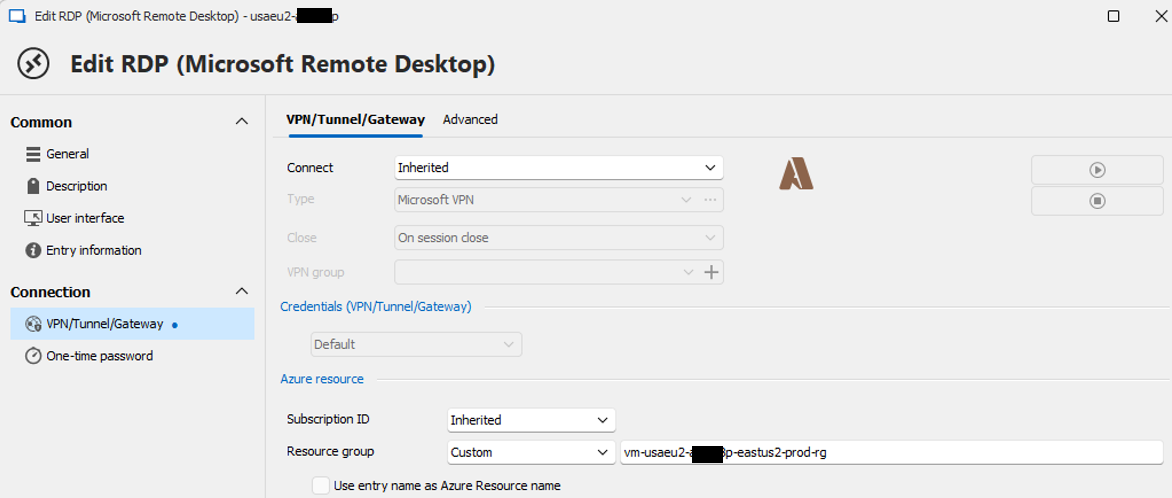
5e4ede25-ab15-40f8-8340-7cbaa67d193e.png
Hello
My apologies for the slow response here, but I've been trying unsuccessfully to reproduce the problem.
Like I wrote in my earlier post, we did make changes here, and at the time we tested this exact scenario to try and be sure that nothing was broken. Obviously that testing was insufficient, but replicating a simple setup on my side still doesn't recreate the issue; so I'm guessing there is something specific about your particular setups that we have overlooked.
On my side I created a simple structure like this:
Root
Azure Bastion
Folder (set to "always connect" the Azure Bastion and overriding the resource group)
RDP (set to "inherit" the VPN and "inherit" the resource group)
And when I connect, I properly see the overridden resource group being used to connect to the RDP host.
So, like I wrote, I think we must be missing something that's particular to your setups and while I'm continuing to try and identify what that is, I'd appreciate any help you can give.
The ideal scenario would be if you can export your sessions (or a subset that demonstrates the issue); excluding any credentials, and send the .rdm to me. That could be via PM or ideally to service@devolutions.net (mentioning this forum thread so the data is routed to me).
Failing that, if you could detail precisely a subset of your configuration that demonstrates the issue:
- The Azure Bastion VPN
- The folder VPN and Azure configuration
- The RDP VPN and Azure configuration
At the same time, you can generate a corresponding log file of the failure by opening "Help > Profiler", switching to the "Debug Only" tab and setting a "Debug Level" of "1". Leaving the profiler window open while reproducing the issue will generate a log in the profiler window which will, importantly, show the resolution of the host Azure resource info.
Like I said, I'll continue investigating on my side, but this would be really helpful to see what I'm missing. And as always, please don't hesitate to post back with other questions or comments.
Kind regards,
Richard Markievicz
Hi Richard,
i recreated the structure you made but that also did not work for me.
I will make a test environment where i can export & debug the issue later today.
Kind Regards,
Jolan
Hi Jolan
Even if you can export a .rdm file with a basic structure that doesn't work (can even be the one I sent you) that will be helpful. You can also produce the profiler logs I mentioned in my earlier post. If you are using "dummy" data (i.e. subscriptions and resource groups that don't really exist), this is still valid - try to launch the connection, it won't work of course, but the profiler output will still show the resolution of the subscription and resource group. That will be useful.
Please let me know if you have some questions
Kind regards,
Richard Markievicz
Hi Richard,
I have sent both the RMD file and the profiler logs to service@devolutions.net.
When looking at the Profiler output i think i know what is going wrong.
in the latest versions i think the retrieval of the bastion host is ok but when preforming the API call for the virtual machine it seems to use the bastion's resource group instead of the resource group that it should inherit.
Kind regards,
Jolan
Hello
Thanks for the update. I just tried this again on my side and couldn't reproduce it - I'll wait for the service team to forward me the files you submitted and take another look.
It occurs to me that this might be specific to the data source - can you let me know what kind of data source you are using in RDM?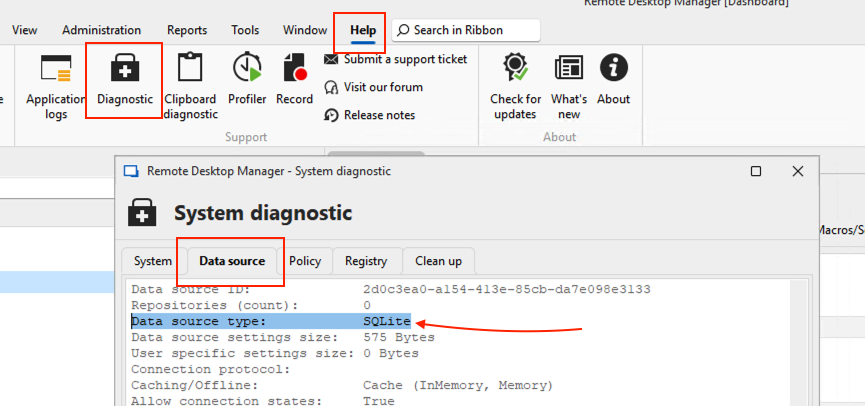
Thanks and kind regards,
Richard Markievicz
Screenshot 2024-11-12 at 12.29.38.png
Hi Richard,
I am using SQLite datasource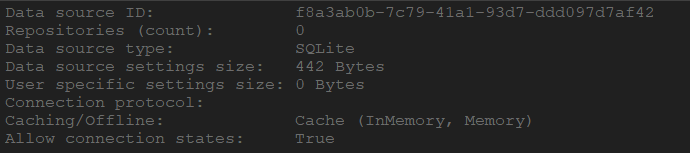
Kind regards,
Jolan
6ebee858-ba4a-4dd1-9d3d-446e2fc1704c.png
Hello again
Thanks for the assistance with this, I've found the issue with the help of the data you sent me. I've submitted a fix to the RDM team and I'll keep you posted on when that will be available.
Thanks for your patience and sorry again for the inconvenience
Kind regards,
Richard Markievicz
Hello again
This should be fixed in the next minor update of RDM 2024.3. Once again, thanks for your patience and sorry for the inconvenience.
Don't hesitate to post again with further questions or comments.
Kind regards,
Richard Markievicz
Hi Richard,
I noticed there was a new update available 2024.3.19.0 64-bit and decided to give it a try since it had this in it's release notes.
but for me the issue still occurs.
Kind Regards,
Jolan
7c75b92d-17fb-413b-a55c-345375e9e4e8.png
Hello Jolan
My apologies for that, this should be corrected for 2024.3.20. I had an oversight on my side.
Thanks for your patience
Kind regards,
Richard Markievicz
Hello Richard,
I just tested todays release and can confirm that my issue is fixed with this release!
Kind Regards,
Jolan
Hello Jolan
Great news! Once again, sorry for the inconvenience and please don't hesitate with further questions or feedback.
Kind regards,
Richard Markievicz
Confirmed as well. v2024.3.20 is now working as expected.
Hello
Thanks for the confirmation of the fix, and again I do apologize for the inconvenience.
Don't hesitate with other questions or feedback.
Kind regards,
Richard Markievicz