HP iLO entry

hello please would you mind to explain how to use that
i put the ip address, username and password in
it shows that it is connecting to https://my-ilo-ip-address
but at the end it shows page about the esxi related host
which says that to manage that host you have to got to https://my-esxihost-ip-address
i did not find doc about the HP iLO entry meaning, i thought it had really to do wioth the https://my-ilo-ip-address
but going to the Web entry https://my-ilo-ip-address I do see the actual iLo mgmt I have always known
thank you
All Comments (5)
Hello,
Thank you for reaching out to Devolutions Support.
Could you please specify the type of the session you are trying to use and clarify exactly what you are trying to achieve?
Best regards,
Carl Marien
Hi Carl, thank you, maybe I have to rephrase something.
What does the "HP iLO" entry achieve differently than the Web entry https://iLo-ip-address (in my case https://57.47.3.171) ?
I have an ESXi server (57.47.3.170) whose iLO is at 57.47.3.171
I create a new "HP Integrated Lights Out (iLO)", pointing to the related IP address (57.47.3.171)
I open the session, it shows "Connecting to 57.47.3.171:443", which just is https://57.47.3.171, like the above Web entry brought as an example
However, in the end it lands on the ESXi host main page itself (where you can read that if you want to manage that host you have to go to http://57.47.3.170
Hello
I have a thought about what the problem might be.
We actually have two distinct iLO entries:
Remote Management and Monitoring - HP Integrated Lights Out - iLo (Web)
Remote Connections - HP Integrated Lights Out (iLO)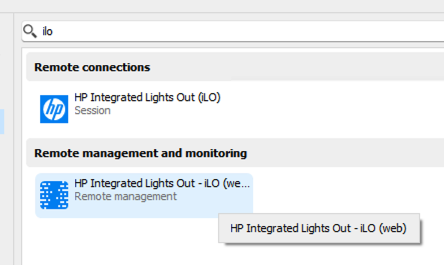
The first is basically a customized "Web" session with some enhancements to better support the HP iLO management page(s).
The second is a native connection directly to the iLO virtual console.
If you are using the second, you're connecting directly to the console of the iLO - and since the machine is running the ESXi hypervisor, that's what you see. If the server has an OS installed (e.g. Windows) you'd be connected to the desktop like RDP or VNC (or, maybe a black screen if the server is powered off).
I hope I explained that well, but please let me know if something isn't clear or you have other questions
Kind regards,
Richard Markievicz
Screenshot 2024-10-30 at 15.14.52.png
I believe you couldn't explain it better.
I just wonder where I should have looked to find those inner details by myself (I mean which web page or pdf I had to study from)
Thank you a lot again!
Hello
Good, I'm glad that turned out to be the answer!
I'm not sure where there is documentation around this, specifically the native iLO session type is brand new in 2024.3 and might not be covered by our documentation yet.
The categories should give a hint here but there is some crossover when we talk about systems such as iLO.
I'll bring this up with the documentation team.
In the meantime, please don't hesitate with further questions or feedback!
Kind regards,
Richard Markievicz