Linked (vault) credentials not available in Templates

I use templates, for the most part, for quick connect sessions. We have hundreds of switches and servers and it's just easier to slap in a name into the QC box and go. However all of my templates stopped working correctly after updating to 2024.3.13.
Not sure if this was intentional or a new bug introduced. I figure bug since I still have Linked (Vault) in the actual individual sessions. Didn't see anything in the release notes and updated to the latest 2024.3.15 in hopes that it was already fixed.
Just bringing this to your attention since I didn't see any other reports of it, yet.
All Comments (12)
Hello,
Thank you for reaching out to us regarding this,
Could you confirm which type of entry templates you are using? Is it RDP entries?
I would also like to confirm which version of RDM you were using previously?
Let me know,
Best regards,
Samuel Dery
So I don't have the Linked (vault) option on any of the templates that I use: RDP, SSH, file explorer, command line, SCCM 2012 remote, and Telnet.
Not sure what I was using before I updated to 2024.3.13 as I don't update super regular. Typically once a month or so... more or less when I reboot my machine for updates. Only updated to 2024.3.15 to see if the newest version fixed the issue.
Hello,
Thank you for your reply,
I see, I've been able to reproduce the behavior, I will open a case with our development team regarding this and keep you updated with any news I receive,
Best regards,
Samuel Dery
Gracias
Hello,
The Linked (vault) option will be available once again in version 2024.3.17.0.
Regards
Jonathan Del Signore
Thanks, guys. As always, excellent service.
Hello @Jonathan Del Signore , just wanted to follow up on this - did we confirm the issue was fixed?
The reason I ask, is currently in templates it seems that although the "Linked (vault)" option is there, and sort of works, it doesn't let us select entries from the linked vault credential selection (if it is the type of credential entry that supports such selection).
For example, with a credential entry for a Keeper vault, normally when we select "Linked (vault)" , a little link will appear underneath where we can either select a specific entry from the Keeper vault to use every time, or by default we can not select anything and it will prompt us to select an entry from the Keeper vault on connection.
However, with the current behavior it seems that with templates, the link that normally appears to let us select a specific entry from the linked vault is not present: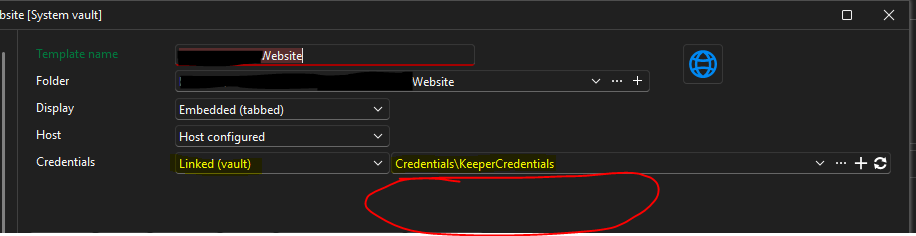
So the only option is to have it prompt every time (that part does seem to work, but the majority of times we use this credential vault we will be selecting a specific entry from it to use ahead of time, as opposed to having it prompt us every time).
Unfortunately I don't know if it was always this way (or ever since this option was added back in the version you mentioned) or whether this is a new issue, since I really just started testing this scenario (using linked vault credentials inside templates) today.
This is v2026.1.16 using SQL Server data source.
Any help is appreciated.
Best regards,
David Willis
3893a170-b220-4fba-8f90-ecccd88afac5.png
Hi David,
It looks like another issue was introduced specifically with the dynamic credential linking. We'll open a ticket and let you know once we have an update.
Regards
Jonathan Del Signore
We found the issue. A fix will be included in version 2026.1.19.0.
Regards
Jonathan Del Signore
Hi Jonathan,
That's great to hear, thanks for the quick response!
Maybe this is already included in your fix, but I just noticed the same issue actually seems to be happening for any entry I create in a user vault (as opposed to in a shared vault).
Entries I create in the default/shared vault in our data source still give me the option to select a specific entry when I link a credential entry like Keeper to it. But entries I create in the user vault are doing the same thing as the templates I mentioned above - I can select the Keeper entry but not a specific record. This is happening with entries created from default local settings (i.e. default template settings defined in file -> templates -> local default settings), not from any shared or local entry template.
Just wanted to let you know, in case that wasn't on your team's radar yet.
As always, thank you for the support and responsiveness!
Edit - Slight correction, it seems to be happening specifically with user vault entries that are using "Linked (vault)" credential entries (where the linked cred vault entry exists in the shared vault). In that scenario, it lets us choose the entry but not a specific record. If we use the "Linked (user vault)" option instead to choose a similar credential entry that lives in our user vault, then it does properly display the link to select a specific record.
Best regards,
David Willis
Yes I just confirmed that the same fix also applies to entries that use 'Linked (vault)' from the user vault, so it should all work fine in the upcoming .19 version.
Thanks for letting us know!
Jonathan Del Signore
Excellent, great to hear!
Thanks again!
Best regards,
David Willis