Activity Logs - PasswordList - The activity logs doesn't show which credentials was used in the PasswordList
Activity Logs - PasswordList - The activity logs doesn't show which credentials was used in the PasswordList
1 vote

Hello,
we are using Password Lists extensivly.
For Auditing reasons we want to check, wheter certain passwords are used.
With entries of type Username/Password the Activity Log lists which user has used a password.
When the password is in a password list, Activity Logs show only that the password list was used, but not which credential.
Please add in Activity Logs the information for the specific credential.
Regards
Stefan

All Comments (14)
Hello,
This is not supported for now. I will create a ticket to add this to the log. It might just be the name at first, but eventually, we could improve this with the specific report.
David Hervieux
Hello David,
thank you.
This feature is quite important for us. We must know, which passwords of an password list e.g. with emergency accessaccounts, are used, that we can change them afterwards.
Thanks in advance and regards
Stefan Hörz
Hello David,
do you have an update here for me?
regards
Stefan
Hello,
We have increased the priority of the ticket. We will keep you updated on any progress.
Best Regards,
Michaël Beaudin
Hello,
The password list item name will be added to the activity logs in version 2024.3.21.0.
Regards
Jonathan Del Signore
Hello Jonathan,
thank you for your change. I installed just now your new version 2024.3.21.0. (Server is 2024.3.9.0).
I wonder why I see the list item name in some folders and not in others.
Any idea?
Regards
Stefan

ca82bb3f-bcd5-4c1b-993d-4d67edc2fa6f.png
8dd4c298-f844-4e7c-9aae-d28acae6df48.png
Hello Jonathan,
one more test result.
As we are using RDM for many years, some entries are existing longer.
Adding a new Password List object, the password list item is shown in activity report.
The other password list objects are quite older.
Is it possible, that password list object has changed internally and your change is only working for the new entry type?
regards
Stefan
Hello Jonathan,
one more point.
The name field in Activity Log is not enough, because it's not unique and doesn't identify the credential.
We need host, user and domain as well.
regards
Stefan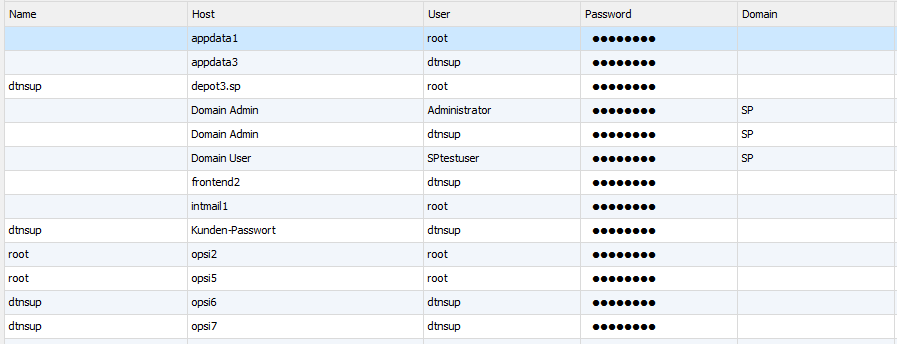
6545d8d1-cfbf-47a4-984b-07c6b6309f3c.png
Hi Stefan,
We'll open a ticket to add more details to the message.
As for the older password lists that aren't displaying the name, I'm still not sure what would be the cause, but we'll investigate and let you know as soon as we have an update.
Regards
Jonathan Del Signore
Hello,
We've added the fields you asked for to the logs, which will be included in version 2024.3.26.
Also, the issue with older password lists was that the "Name" field didn't exist back then. With the added fields, this shouldn't be an issue anymore.
Regards
Jonathan Del Signore
Hi Jonathan,
Thank you - that is working fine.
One more question to this.
Viewing a password in Devolutions Server Web Access this event appears not in the Activity log. Where can I find this event?
Regards
Stefan
Hello Stefan,
I tested with RDM 2024.3.27 (Server 2024.3.11)
When viewing a password from a password list from both RDM or the web interface, it's logged under the activity logs for me.
Would it be possible for you to update RDM and DVLS?
If it still doesn't work, could you create a new password list? You mentioned: "The other password list objects are quite older." Maybe this is related?
Keep us posted!
Best regards,
Marc-Antoine Dubois
d6529758-7c04-42ec-8a9a-b426138090e8.png
Hi Marc-Antoine,
I've updated RDM Client to 2024.3.27 an Server to 2024.3.11.
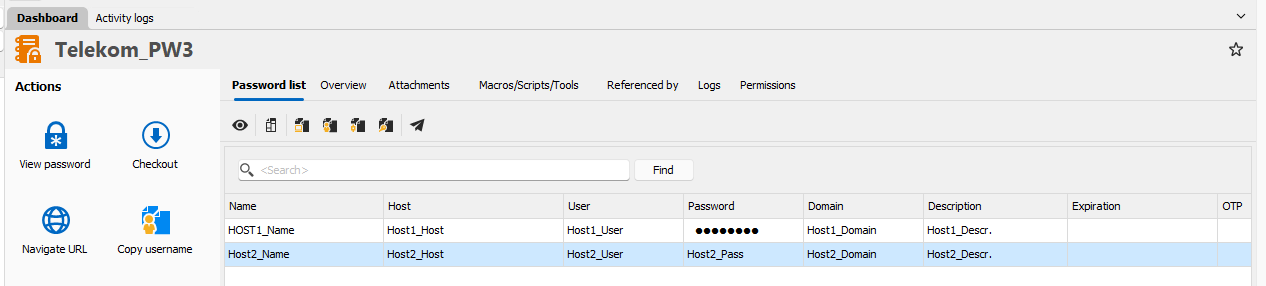
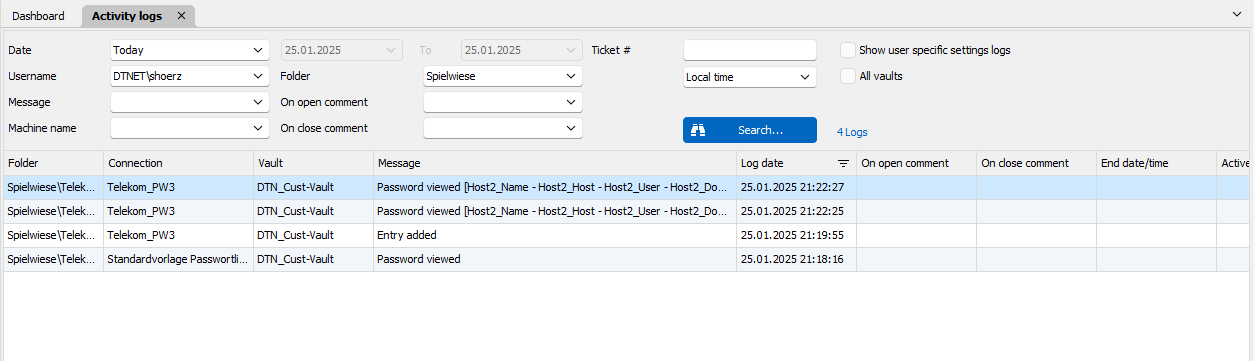
Then I created a new PL with two entries.
I've viewed Entry 1 by web interface and entry 2 by RDM.
Only entry 2 is logged.
Regards
Stefan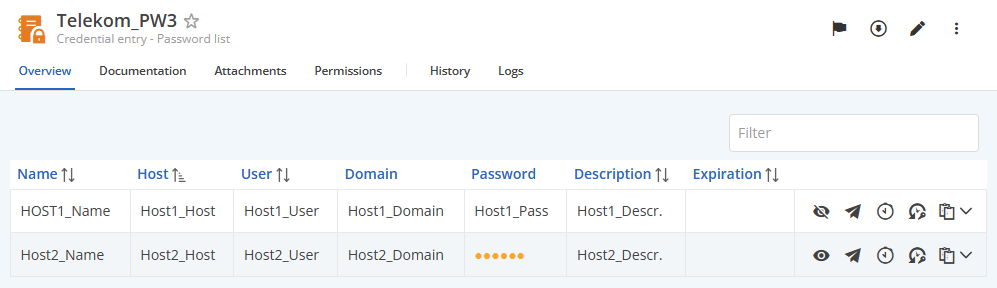
f3c89a52-aad0-4692-883f-f1bcd2d5067b.png
026165cc-648f-4ba7-8ce2-aff011416de8.png
905a2787-896c-4bb3-a513-93df03cdd6da.png
Hi Stefan,
For now, I get a different behaviour compared to you.
I didn't notice initially because I didn't fill all the fields, but when I view passwords from the DVLS web interface, only the host and user are shown.
All fields are listed when I view passwords from RDM.
For reference, my configuration: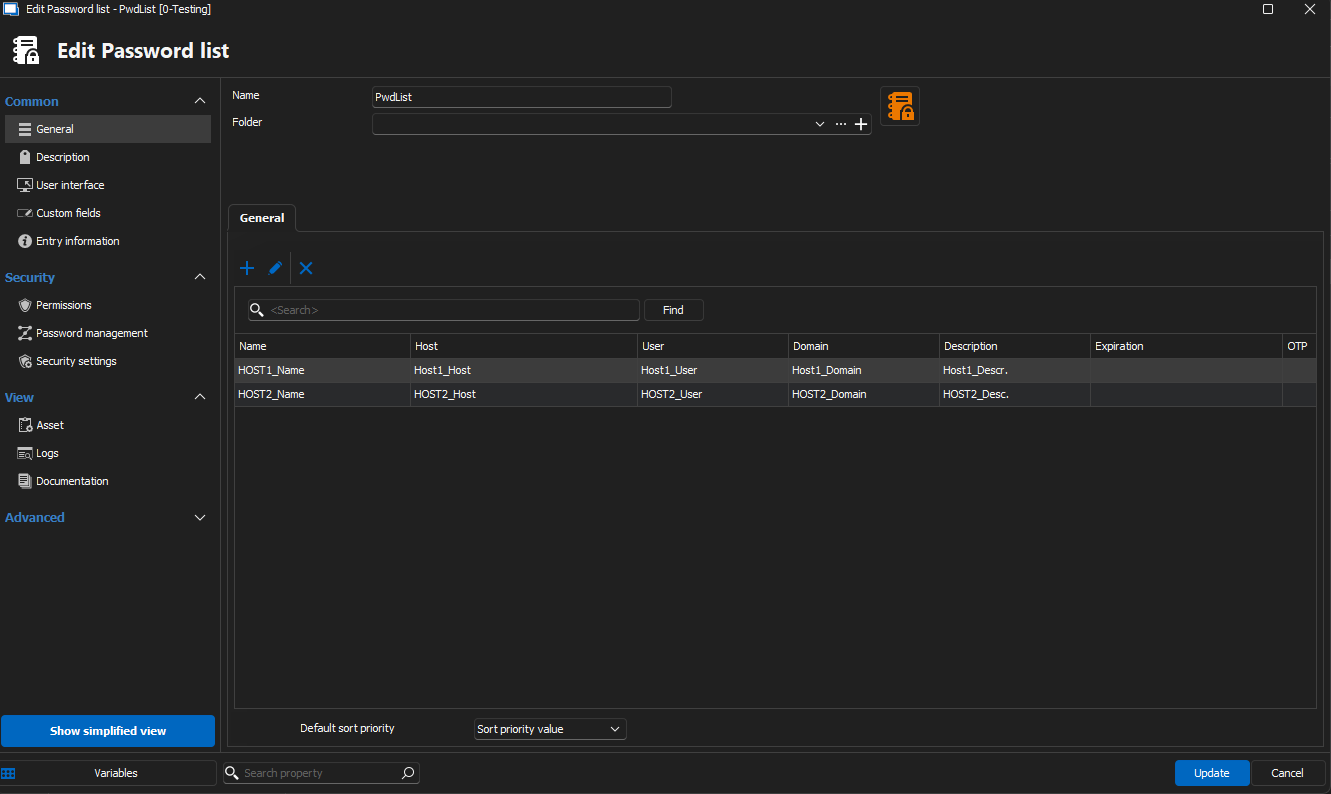

I asked QA to try and reproduce the issue about the missing fields.
I will open an investigation to see if QA is able to reproduce the "View password" not creating a log when done from the DVLS web.
Best regards,
Marc-Antoine Dubois
32051c91-4ecb-4f28-bc19-318b29dc6d12.png
b374a67a-ca75-4f26-bafd-4f3df7bccc5d.png