RDM 2024.3.13 playlist cli shortcut

Hello,
I'm using RDM in my office and at customer sites. When in office I'm using a startup playlist, but when I'm out I'd like it to start without any sessions.
But in playlist editor there is not the Session ID or Command Line shortcut, as there in normal sessions.
Thanks in advance
Best regards
Davide
All Comments (4)
Hello Dadep,
Thank you for getting in touch with us. To better assist you, could you kindly provide us with the following information:
- Your current RDM version.
- The operating system you are using and its version.
- The data source you are utilizing.
- A screenshot of your Playlist Management.
- Have you tried to set it as a Macro under the Playlist Editor?
- Screenshot of the Session ID or Command Line shortcut you are referring to.
Once we have this information, we will be better equipped to diagnose and resolve the issue.
Best regards,
Maxim Robert
- Your current RDM version. 2024.3.14.0 64bit
- The operating system you are using and its version. Win10 Pro
- The data source you are utilizing. sqllite v1.149
- A screenshot of your Playlist Management. See attachments
- Have you tried to set it as a Macro under the Playlist Editor? I don't know how to do
- Screenshot of the Session ID or Command Line shortcut you are referring to. See attachments
My goal is to have a shortcut to launch rdm with my playlist when I'm in office and a second shortcut to launch rdm without any session (or simply unconfigure the startup playlist and run the standard rdm desktop icon).
Found this post, but I don't understood how to do (my playlist obviously runs multiple sessions, some web, other rdp)
thank you
kind regards
Davide
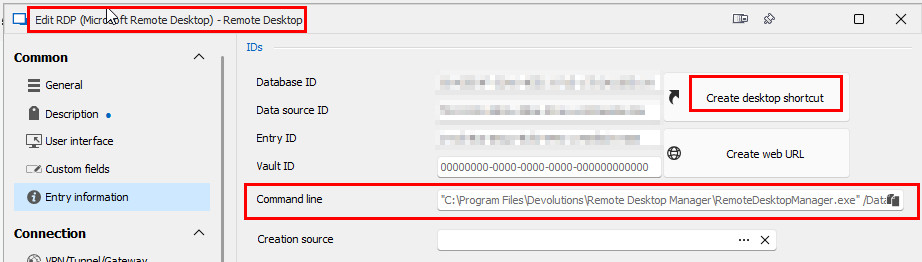
I havce found the xml playlist configuration file, but I see that every entry has its own ConnectionID. I would have expected the entire playlist to be identified with its own id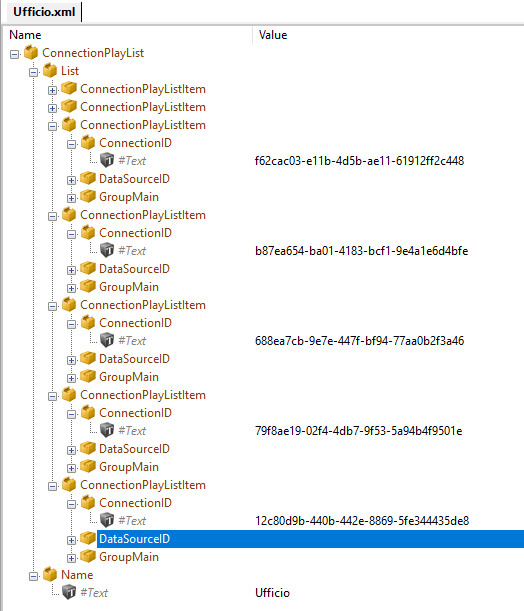
playlistxml.jpg
playlist.jpg
rdp_Session.jpg
FOUND THE SOLUTION
I created a playlist type entry containing all my office sessions. In this way I have the Shortcut button in Entry Information.
Whereas before I had created the playlist starting from the Ribbon Edit/Playlist/Create Playlist.
PlaylistSession.jpg
Hello Dadep,
Thank you for your responses!
I'm glad to hear that you found the solution! If the problem reoccurs or you have any other questions, please let us know.
Best regards,
Maxim Robert