Capture certain keypresses in RDM - or how do I get the bottom bar with the magnet back?
Capture certain keypresses in RDM - or how do I get the bottom bar with the magnet back?

There are certain Windows key combinations that don't work inside an RDP session when using RDM. I recall there being a 'magnet' at the bottom of the screen that would grab or capture those keystrokes. I have turned off so many of the status bars in RDM that I can't get to that magnet....nor can I find the way to bring it back.
How can I toggle that capture setting in Settings, or how can I get the bottom bar back that has the magnet?
Thanks for any assistance!
All Comments (7)
Hello,
I believe you might have toggled off the status bar of RDM.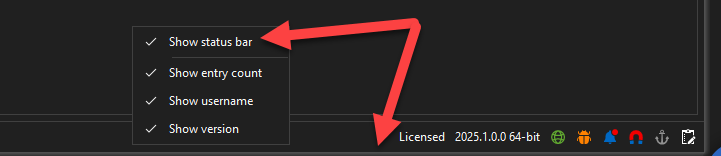
To get it back you could try to reset your Windows Layout.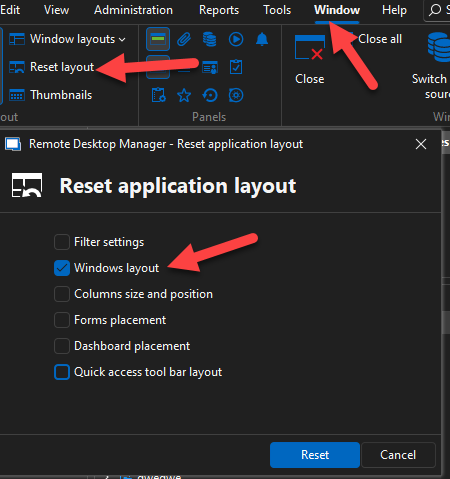
Please do let me know if this works for you.
Best Regards,
Michaël Beaudin
876afdca-d9cf-4447-ab9e-955da29006a0.png
7d2a2cbc-7bc2-4392-96ee-a67a12a1f8a3.png
Thanks. That was what I was looking for. Was digging through settings...
Is there a toggle somewhere for the status bar at the bottom? Or just through resetting the view?
Hello,
We do not have a setting for this. Usually it would always be visible and brought back through resetting the view if it was removed.
We have quite a few features inside the status bar and it is therefor not the usual workflow to toggle it off.
Best Regards,
Michaël Beaudin
This one "status bar" removes and re adds the bottom bar of the RDM display (where the magnet and globe are).
Thanks
Iain
Version 2026.2.13.0 64-bit
Data Source SQL
abe71377-ea50-40c9-846a-a6fe799cac5d.png
Thanks for the precision iaing I had forgotten about this toggle button. I appreciate your input.
Best Regards,
Michaël Beaudin
Thanks to all for the suggestions. Do like the toggle button and also see that ALT+F7 toggles it.
Reason I turn it off is to have as much 'real estate' for the remote sessions as possible....so I have the ribbon, menu bar, and status bar hidden - but that stemmed when I had a 1400x900 screen, now with 4k and other higher resolution laptop screens.....not so much of an issue. I'll give the status bar a try and see what I have been missing. :)
Hello,
Thank you for your feedback.
We will mark this thread as resolved. Do not hesitate to contact us again if you experience other issues.
Best Regards,
Michaël Beaudin