Auto Disconnect RDP Idle Sessions in RDM
0 vote

I am looking for the ability to have a session get disconnected/closed after 15 minutes of idle time. I am mainly looking at this as we are Utilizing DLVS-Gateway, and I would like the session to not take up resources if/when users forget to disconnect. I would even take if the Session window has not had "focus" for 15 minutes to auto disconnect.
I saw the option to add a max amount of time the session can be alive, but that then disconnects people even if they are actively using the session.
All Comments (6)
Hello,
I will add this to our to-do list, but it's not easy to do. We have to track that there is no activity, and it is usually much easier to do on the server than on the client. I'm not sure that we could detect inactivity accurately. I will investigate what the possible solutions could be for that.
Regards
David Hervieux
Hello,
Thanks for your reply - and investigation. I will say I do mostly care about this in regards to DVLS-Gateway, so even be able to detect inactivity through the gateway would be beneficial to close inactive sessions connected to the gateway. Not sure if it is easier to detect inactivty from the gateway side instead of the Client but just a thought.
Regards,
Dylan
Hi Dylan,
Even if we could detect true session inactivity at the network level through Devolutions Gateway, the best we could do is drop the network connection, but this would not logout the session in the RDP server. Is this really what you want? The various layers of transport have keep-alive mechanisms to prevent the network connection from becoming completely idle, even if there is no user activity. There is no way we can know that the session is truly idle from the point of view of Devolutions Gateway.
Best regards,
Marc-André Moreau
Hey Marc-André,
It was just an idea on how to detect idle time. I did not think about the keep-alive mechanics you mentioned. I’m not sure what the best approach would be to accomplish this goal. I do know that our end users often connect to several devices through the gateway and then forget to disconnect or log off. During this time, resources are consumed by the gateway to run and record the session. Ideally, we can remind users to avoid keeping idle sessions active and to close out sessions when not in use. However, I would like to find a way to solve this that does not rely on the users.
Hi Dylan,
There are group policies to enforce session time limits on the RDP server, this is probably a more appropriate solution: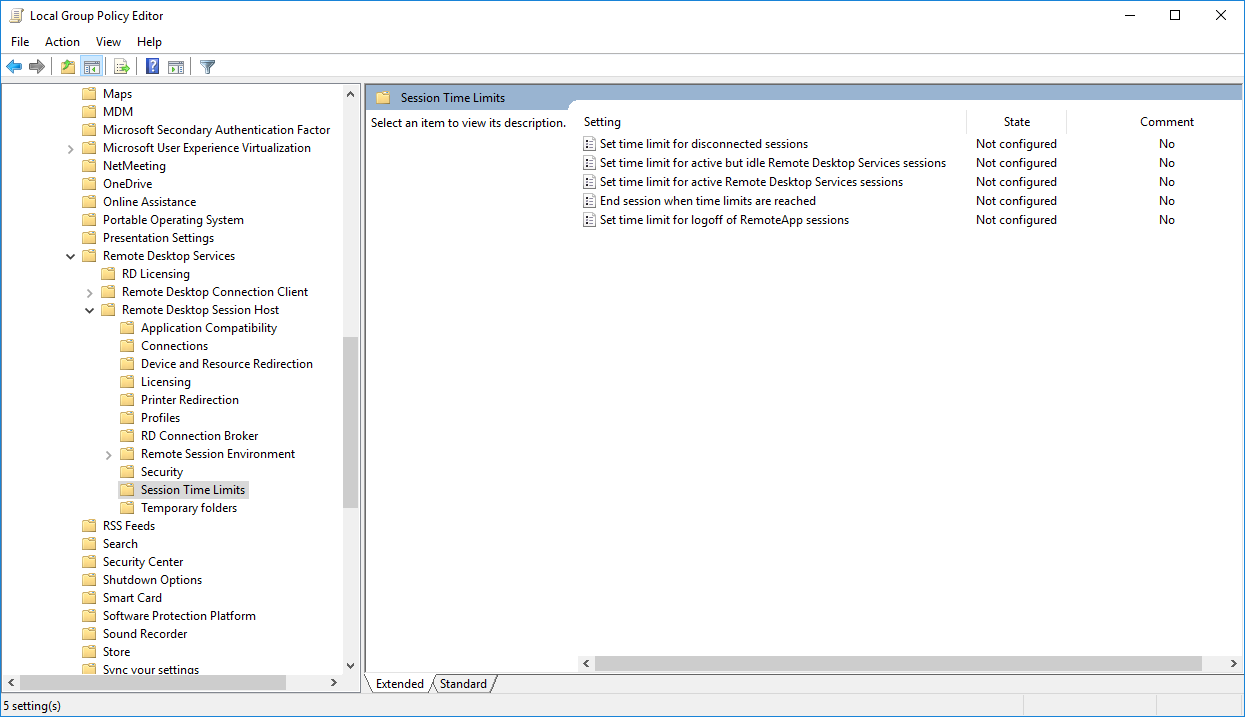
https://woshub.com/remote-desktop-session-time-limit
Best regards,
Marc-André Moreau
94c32da5-b925-474f-b969-74e9ff55b998.png
Hey Marc-André,
That Solution does seem to have potential to accomplish the same problem! Appreciate you sharing that, along with documentation behind it. I will give it a try.
Regards,
Dylan