Improved "Launch Jump Session"
0 vote

Love the jump feature.
Comes in very handy, only negative is the process to launch a session via a jump session sometimes requires clicking through several menus!
Please could you look at an option to make it quicker and simpler to launch them.
Thanks
Iain
Version 2026.2.13.0 64-bit
Data Source SQL
All Comments (7)
Hello,
Thank you for your request. We will see what we can do to improve the flow for jump.
In your case, do you only have one jump machine, or do you have multiple ones? If you have only one, then it shouldn't be too difficult to reduce the amount of needed clicks.
Regards,
Hubert Mireault
So depends on the vault. On my main vault which I use the jump session a lot it looks like this..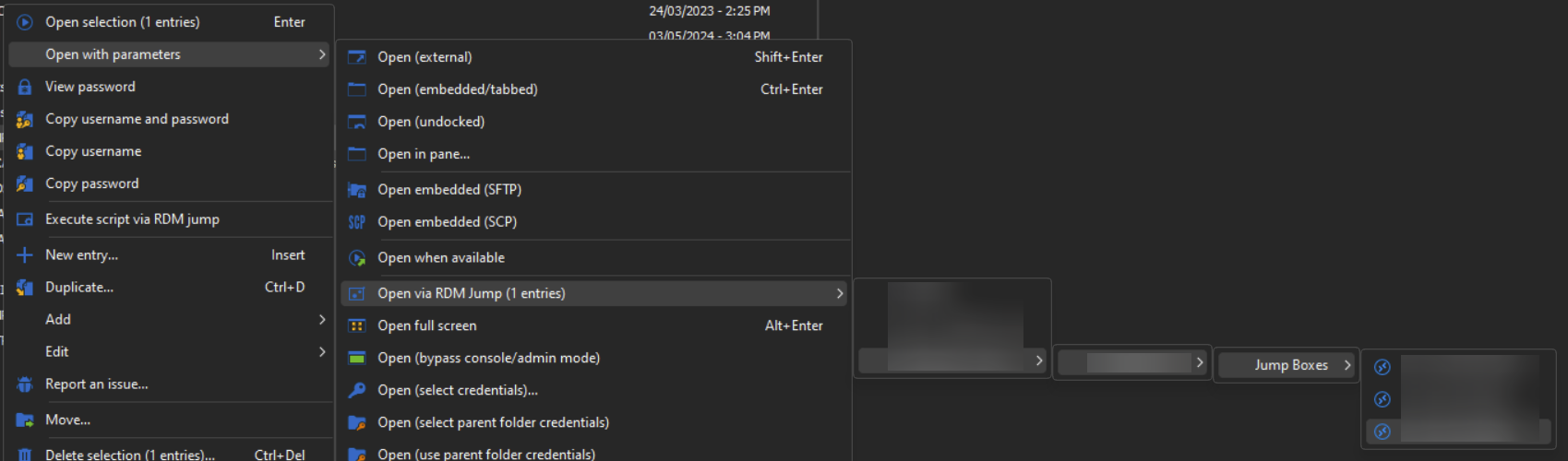
Thanks
Iain
Version 2026.2.13.0 64-bit
Data Source SQL
d04a2ba8-9ee5-47a8-b229-e343b5adcfdb.png
Hello,
Would it work for you if there was an option to show additional buttons in the dashboard to open the entry with jump? We currently show the "Direct (no jump)" button when there's a jump configured on an entry, but we could have a way to include three new buttons in the dashboard that perform the same things as the context menu:
- Inherited, which forces the "inherited" jump mode. Same as the existing one in the context menu.
- Open via RDM jump, which prompts the window to select the jump mode you want to use. It might be a good idea to rename this, as it wasn't clear what it did at a glance. It would act the same as the existing button in the context menu.
- "Open with specific jump host". The name isn't determined yet, but it would work this way:
- If there is only one available jump host, always choose it to avoid prompting for no reason
- If there is more than one available jump host (as is your case from your screenshot), you would be prompted with a tree similar to the one in the navigation pane, with a search bar included, which should make it much easier to get to your jump host, instead of clicking through multiple folders to get to the correct one.
Let me know what you think of this suggestion.
Regards,
Hubert Mireault
Hi Hubert,
That all does sound far more convenient, would certainly improve the work flow for launching a session.
Thanks
Iain
Version 2026.2.13.0 64-bit
Data Source SQL
Thank you for the feedback, I will open a ticket with these details. We will post back here when we have an update.
Regards,
Hubert Mireault
Hello,
We've added the option Show jump options as buttons, which can be located in File - Settings - User Interface - Dashboard.
This will provide the behaviours mentioned by HMireault.
You can expect these changes with the upcoming 2025.1.11 version.
Regards,
Jafran Majeau
Thank you
Thanks
Iain
Version 2026.2.13.0 64-bit
Data Source SQL