Constant Crashing when closing terminal sessions.

Disabled
I'm having trouble finding others with this issue. I'm running the most current version of Windows 10, .NET 8, and Remote Desktop Manager. This has been happening for a long time for me. Any assistance on this would be amazing and appreciated.
System.InvalidOperationException:
  Value Dispose() cannot be called while doing CreateHandle().

  at System.Windows.Forms.Control.Dispose(Boolean disposing)

  at System.Windows.Forms.Form.Dispose(Boolean disposing)

  at DevExpress.Utils.Win.StickLookAndFeelForm.Dispose(Boolean
  disposing)

  at DevExpress.XtraSplashForm.SplashFormBase.Dispose(Boolean disposing)

  at DevExpress.XtraWaitForm.WaitForm.Dispose(Boolean disposing)

  at
  Devolutions.RemoteDesktopManager.Forms.FrmWaitProgress.Dispose(Boolean
  disposing)

  at System.ComponentModel.Component.Dispose()

  at DevExpress.Utils.DisposeHelper.Dispose[T](T& object)

  at
  DevExpress.XtraSplashScreen.ThreadManagerBase.ThreadEntryPointCore(ThreadParameters
  params)

  at
  DevExpress.XtraSplashScreen.ThreadManagerBase.ThreadEntryPoint(Object params)

  at System.Threading.ExecutionContext.RunInternal(ExecutionContext
  executionContext, ContextCallback callback, Object state)
--- End of stack trace from previous
  location ---

  at System.Threading.ExecutionContext.RunInternal(ExecutionContext
  executionContext, ContextCallback callback, Object state)
System.InvalidOperationException: Value
  Dispose() cannot be called while doing CreateHandle().

  at System.Windows.Forms.Control.Dispose(Boolean disposing)

  at System.Windows.Forms.Form.Dispose(Boolean disposing)

  at DevExpress.Utils.Win.StickLookAndFeelForm.Dispose(Boolean
  disposing)

  at DevExpress.XtraSplashForm.SplashFormBase.Dispose(Boolean disposing)

  at DevExpress.XtraWaitForm.WaitForm.Dispose(Boolean disposing)

  at
  Devolutions.RemoteDesktopManager.Forms.FrmWaitProgress.Dispose(Boolean
  disposing)

  at System.ComponentModel.Component.Dispose()

  at DevExpress.Utils.DisposeHelper.Dispose[T](T& object)

  at
  DevExpress.XtraSplashScreen.ThreadManagerBase.ThreadEntryPointCore(ThreadParameters
  params)

  at
  DevExpress.XtraSplashScreen.ThreadManagerBase.ThreadEntryPoint(Object params)

  at System.Threading.ExecutionContext.RunInternal(ExecutionContext
  executionContext, ContextCallback callback, Object state)
--- End of stack trace from previous
  location ---

  at System.Threading.ExecutionContext.RunInternal(ExecutionContext
  executionContext, ContextCallback callback, Object state)
All Comments (2)
Hi,
I think that the "Wait progress mode" option was created for the few users that had that type of issue a few years back, set it to status bar for the intended workaround.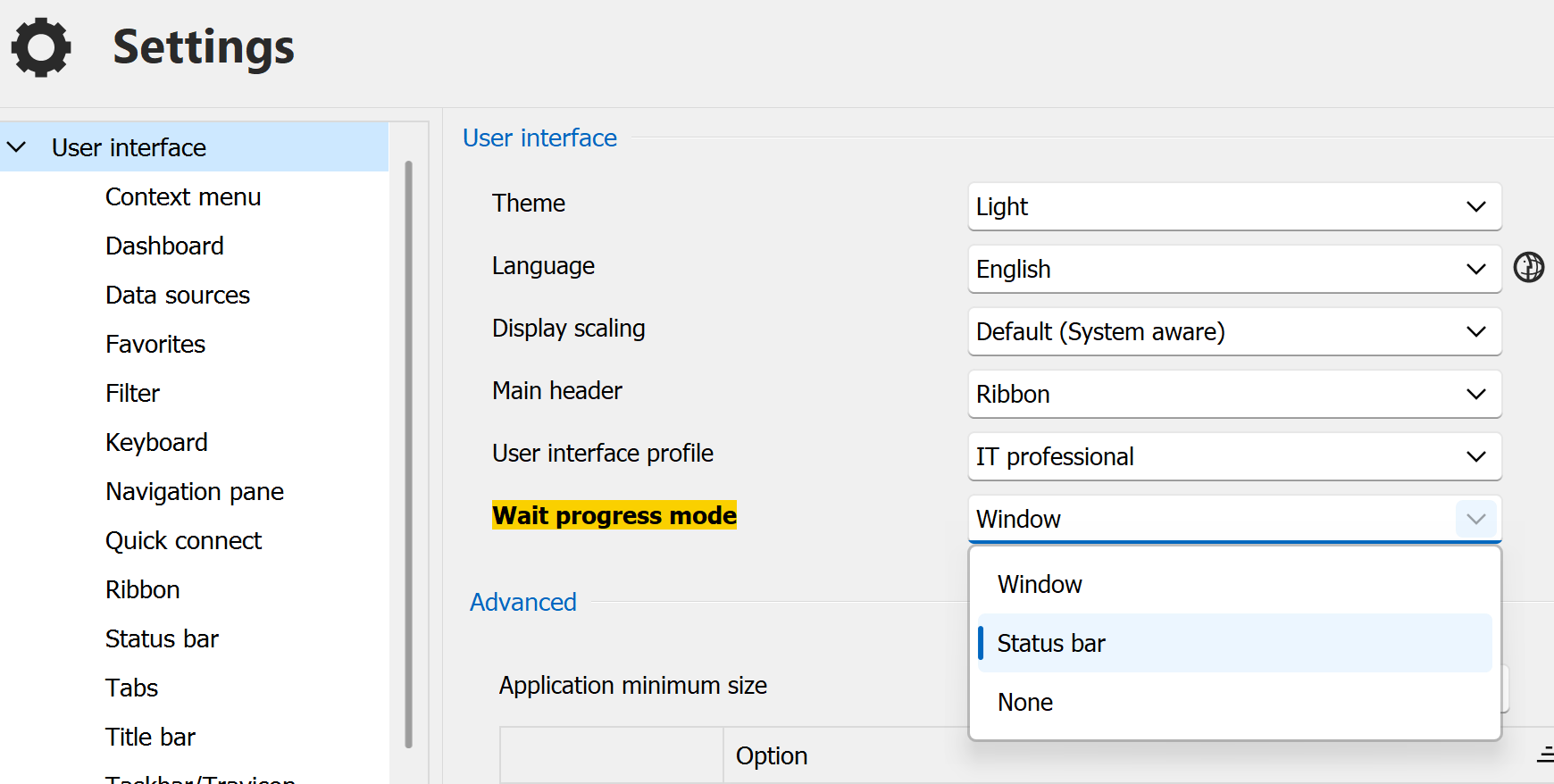
You will need a few days to get used to looking in the status bar but some users even prefer it.
edit : added the name of the option and fixed typos
Please let us know how that works out.
Maurice
d594d83b-645d-475c-a757-e60ebaa6ebaa.png
Disabled
This seems to work perfectly. Thank you!