Password Manager Pro - Unable to create new entries

Hello,
Since upgrading to 2024 .2.20.0 and even in 2024.3.13.0 we are unable to add entries into RDM which are PMP credentials.
I have it configured as the same, but the Resource section and buttons remain greyed out.
The API has been added to the Keys file too, and the resource has been shared with the API user in PMP. 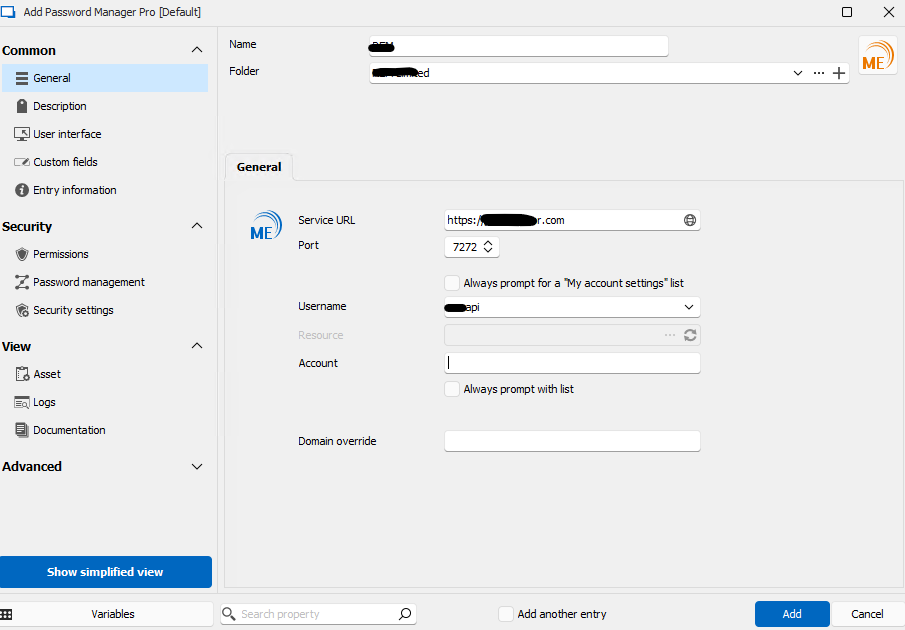
Thanks
Screenshot 2024-10-10 094715.png
All Comments (5)
Hello Michael,
Thank you for contacting us about this matter!
I'm investigating this to see if I can make this entry work. In the meantime, could you please provide me with the following information?
- Which Data Source are you using in RDM?
- Does checking the option "Always prompt for a 'My account settings' list" and/or "always prompt with list" allow you to add the entry?
- Do you have any error message showing when after trying to add the entry?
Thank you for letting us know. If you have any other questions, feel free to let us know.
Best regards,
Maxim Robert
Hello Maxim,
- Which Data Source are you using in RDM?
We are using Devolutions Server as the Data Source.
- Does checking the option "Always prompt for a 'My account settings' list" and/or "always prompt with list" allow you to add the entry?
Yes, the entry saves and when viewed does list the resource and credentials.
- Do you have any error message showing when after trying to add the entry?
"Credential is required" is left empty or Always prompt with list is not chosen.
Regards,
Michael
Hello Maxim,
Is there any update to this bug?
Regards,
Michael
Hello Michael,
Thank you for your response, and sorry for the delay,
I've provided the information to our QA and Development team for further investigation. I will let you know with more details as soon as possible.
If you have any other questions, feel free to let us know.
Best regards,
Maxim Robert
Hello Micheal,
Thank you for being this patient!
After providing the information to our QA Team, a ticket was opened with the development team to fix this issue. I will let you know when the fix will be available.
Thank you for your collaboration. If you have any other questions, feel free to let us know.
Best regards,
Maxim Robert