RDM 2024.3 Issues

Hi guys,
currently we have an issue with the RDM versions 2024.3. at least .12 and .13.
When we upgrade the RDM clients we can't link the personal vaults anymore. E.g. when I use a RDP connection from the team vault and open it with my personal administrative account I get this message and will be prompted with the MS RDP login prompt: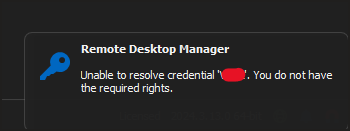
Same issue with the browser plugins. I can use the "public" credentials but not the ones from my personal vault.
Is there a known issue? I couldn't find anything about that
grafik.png
All Comments (10)
Hello,
Just to make sure we're reproducing the same issue as you do, could you please confirm if you're starting the session using the "Open (Select credentials)..." action?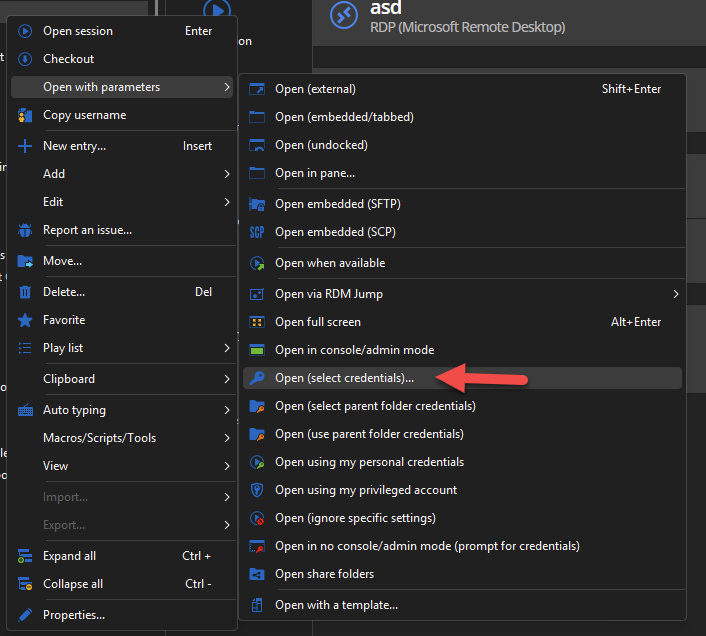
Regards
Jonathan Del Signore
b2c4bd7b-4c67-4685-ade7-07c726077ff6.png
Hi,
yes that's exactly what I am doing when I don't want to use the "shared" credentials
Perfect thank you, we've opened a ticket and are currently working on a fix.
We'll update this thread once we confirm the fix version.
Regards
Jonathan Del Signore
Hello,
A fix is now ready and will be available in version 2024.3.14.0.
Regards
Jonathan Del Signore
Hi Jonathan,
thank you!
best regards
Hi Jonathan
When will the version with the fix be available?
Best Regards
Martin
Hi Martin,
The build is in progress so it should be available later today.
Regards
Jonathan Del Signore
Hi Jonathan,
the update is available and the Issue within RDM is resolved, thank you.
But the browser plugin still can only access the public vault, not the personal one
best regards
Valerij
Hi Valerij,
We're currently looking into the browser plugin issue. We'll let you know as soon as we have an update.
Regards
Jonathan Del Signore
Hello,
User vault credentials should be usable again in version 2024.3.15.0.
Please let us know if you still encounter any issues.
Regards
Jonathan Del Signore