OTP seed is disclosed in password list although "View sensitive information" = disallowed
OTP seed is disclosed in password list although "View sensitive information" = disallowed

Hello,
with the permission "View sensitive information = disallowed" OTP seed is not allowed to be seen by an user.
This works for an OTP entry as well as for an Username/Password entry.
But it doesn't work for an OTP seed in password list.
Here OTP seed is revealed to the user although "View sensitive information" right is disallowed.
(Password list > Properties > Edit password with OTP > Tab OTP > Key: Reveal password shows OTP seed).
Please fix.
I'm using Devolutions Server 2024.3.3 and RDM Client 2024.3.12
Regards
Stefan
All Comments (7)
Hello Stefan,
Thank you for reaching out to us regarding this,
I will do some testing on my end to see if I can reproduce this behavior,
I will keep you updated with any news I have,
Best regards,
Samuel Dery
Hello Stefan,
Thank you for your patience,
I've been able to reproduce the behavior you describe, I will open a case with our development team and keep you updated with any news I receive,
Best regards,
Samuel Dery
Thank you, Samuel.
may I ask you one question related to this.
Which entry or information is treated as "sensitive information"? I haven't found a list in documentaion.
Regards
Stefan
Hello,
Starting from RDM 2024.3.14.0, the password list's OTP section will work the same as the other OTP entry where you cannot reveal the key if you are not an administrator or vault owner.
The reveal of the OTP key is an exception where the user's permissions do not matter. It is solely impacted by whether you are an admin or not and this change had not been done for the password lists OTP section.
Best Regards,
Michaël Beaudin
Hello Michael,
thank you for your swift answer and your quick solution.
I'm wondering that you can stop the disclosure of sensitive data with changes in the client.
As Devolution Server is a highly secure data source I would have expected that permissions are controlled by server not by client.
So is this right also for other permission settings that RDM client has access to all data independently of user rights?
regards
Stefan
Hello,
To answer any concerns you might have about RDM receiving the data here is some information :
- If you wish to have access to the offline mode we have no choice but to send the sensitive information as encrypted data so it can be used while offline. This is the case in a vault with a "Security Level" of "Standard"
- If you do not need offline access to the vault then it would be best to use the "High" security level. In this mode the passwords and the sensitive data are not sent to RDM unless you perform an action which requires that information, in which case the password or sensitive data will be fetched for a 1 time use.
- You will still see the dots in the password fields of your entry properties but they will only be placeholders. The password is not actually hidden in the field and it will be fetched from the server once you click on the reveal button.
- Since a few major versions of DVLS, vaults are created as high security by default. You can validate which mode your vaults use by going in Administration -> Vaults -> Edit a selected vault (see screenshot below)
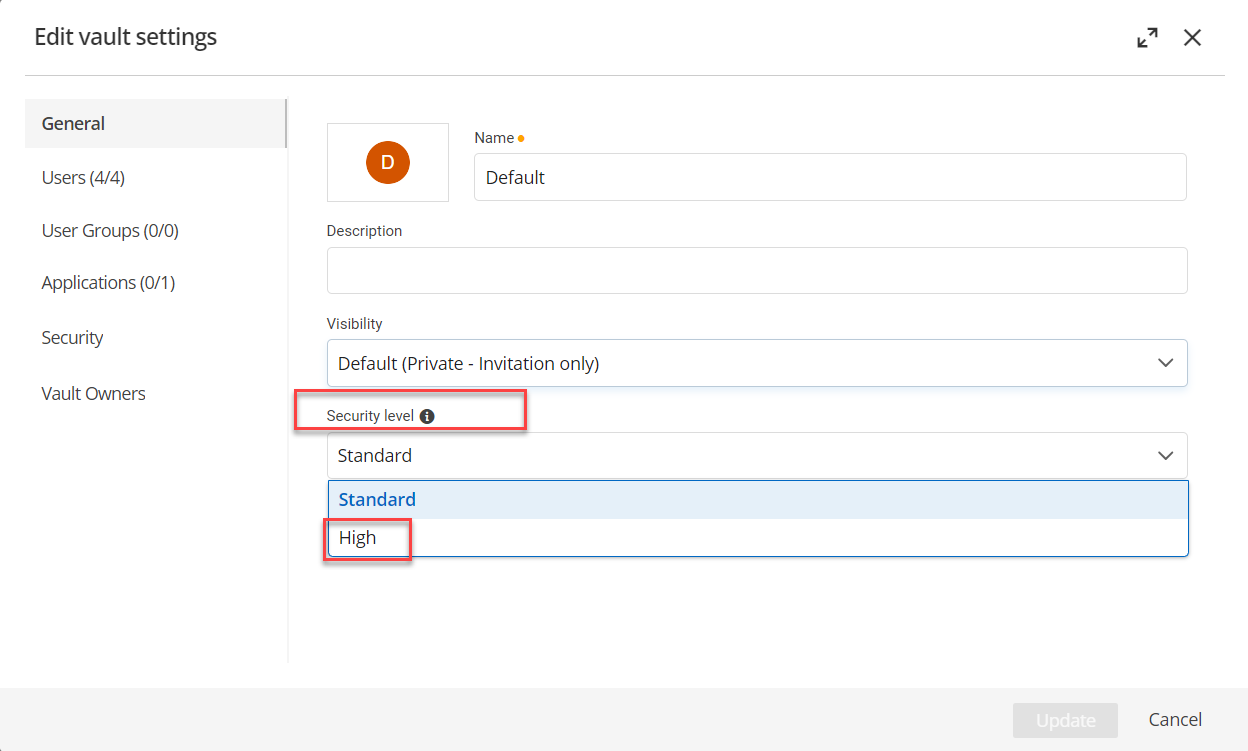
Hopefully this can answer your concerns. If anything was unclear please do let me know.
Best Regards,
Michaël Beaudin
dc3da0dd-c978-4a10-9226-6a0fadabbaae.png
Hello Michael,
thank you very much for your comprehensive reply. Yes, this fully answers my question.
Parts of the vault we need offline. So with this knowledge, we will split our vault into one for offline use and one for credentials that are more critical like break glass or emergency access accounts. This vault we switch to security level "High".
Thank you and regards
Stefan