Website Entries - Username and passwords no longer resolving
Website Entries - Username and passwords no longer resolving

Good morning folks.
It seems in the latest version of RDM, it no longer resolves variables for certain Website entries. I have a few vCenter GUI entries, and they no longer resolve.
Let me preface with: No changes were made to any entry settings between these versions. All Vault entries and User Specific Entries are the exact same and have not changed.
Works:

Does no longer works:
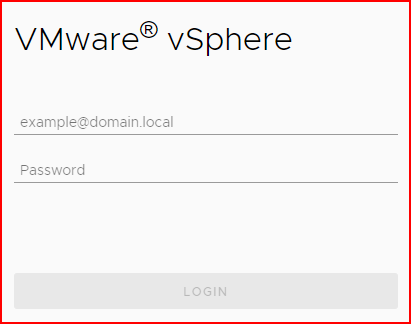
I also took video of the process in action, but cannot upload it here due to proprietary information. If you need those uploaded, please shoot me a private link as usual.
Also, the option to open with parameters has the same reaction as shown above (and in the videos) for both versions: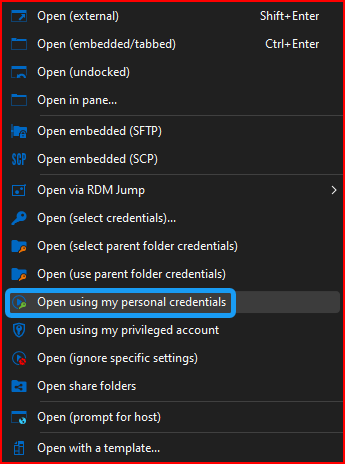
Thank you!
--- Chuck
Overgaard, AZ (-7 MST / Zulu Year-Round)
RDM Version: 2025.3.11.0 64-Bit - MSSQL - Daily Usage
RDM Version: 2025.2.28.0 64-Bit - MSSQL - VM
6d727a29-9ba6-42d0-b295-d30854210019.png
323fdf18-88df-4d6e-86de-7a895b206d1e.png
9a72a966-c234-4431-b286-e37f8f60883c.png
e21d7def-8f82-42ca-bdaf-328e4685a348.png
9120a04a-923a-47a2-b046-32267c5f7525.png
All Comments (8)
Hello,
From what I can see in your screenshots, it isn't that some variables are not resolved but more so that the username and password are not filled in to the website automatically. Is this correct?
When it comes to our website entry, we have not recently performed any changes which affect the auto fill process. However, we have received a few reports of certain websites not being able to perform the autofill. So far all of these websites end up being internal websites on which we cannot do any testing as we cannot access them.
As of now any such case was fixed simply by adding an "Autofill delay" to the entry. Could you confirm if doing so changes anything for you? You should try with a big delay like 2000ms or more just to make sure of if it can fix your issue and then lower it to something more reasonable if it works.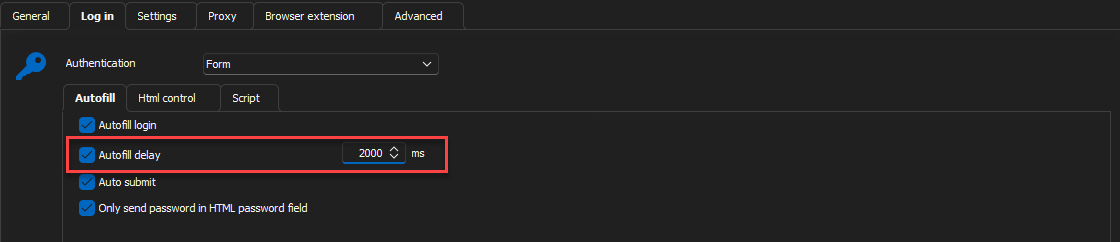
Another thing you could test to help us pinpoint the issue is related to a delay issue is using the manual autofill button in the embedded website
If this is the issue, we might have to activate the delay by default on all website entries since, as mentioned earlier, no change was done in our autofill process. Since it works for you in an earlier version, this leads me to believe this might have to do with an update of the external library we use for embedded websites.
Please keep us updated on the results of your tests regarding the autofill delay.
Best Regards,
Michaël Beaudin
3f39bdd1-3b02-474d-b049-51e09f7dac2b.png
8d145616-9eec-4313-a93b-589d39403c45.png
Good afternoon.
I forgot to add the current config settings I have for all Website entries: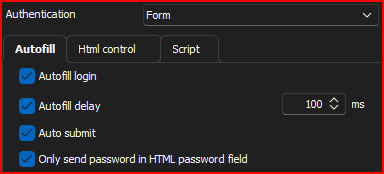
That is what has worked like a champ since day one.
I made a change on two of the assets that are not working. One is now set to 300ms and the other 500ms. Neither of which show any different reaction other than just loading the empty page:
When attempting the Auto-Fill option, I get the following results with no further reaction from RDM:
Hope this helps.
--- Chuck
Overgaard, AZ (-7 MST / Zulu Year-Round)
RDM Version: 2025.3.11.0 64-Bit - MSSQL - Daily Usage
RDM Version: 2025.2.28.0 64-Bit - MSSQL - VM
1d035b40-ec15-488c-a36d-2b1398646d2e.png
d84ea3f5-c503-4eb8-b209-7fcc676433e5.png
897c3c3f-c8b4-44a3-bbe8-00f546c7b82d.png
Hello,
The fact that the autofill button in the embedded view works lets me believe that the feature should work as they use the same code to fill in the controls.
The reason the autofill isn't working properly for you is most likely that some event or background work is still ongoing on the website or is still being handled by the webview2 component while our code is trying to complete the autofill. This makes it so the autofill will not work as the website isn't ready to receive such information.
We are considering adding a delay of 1000ms by default on any autofill action even if the setting isn't checked. In your case if you had 100ms then it would become 1100ms. A 1000ms addition when opening a session is seamless and should help with this type of issue.
On another note, do you have one of your website entries which aren't working that isn't an internal website and on which we could actually try the autofill on our end?
It would be tremendously helpful as we could try to debug the issue and see if we can know what is interfering with the autofill. Every time a user brings up this issue it is always an internal website which we cannot test on and therefor cannot reproduce.
What I would like to know:
- Does it work with a really big delay (more than the 300 or 500 mentioned above)? I would like you to start with something outrageous like 10 000ms and if it works lower it down progressively until it stops working and let me know the value it stopped working at.
- Do you reproduce on a publicly available website which we could test on?
Best Regards,
Michaël Beaudin
You know, you put me on the right track with something here...
The few that I was having an issue with, I started messing with the auto fill delay way higher than the 100ms.
I found that 3,000ms is the sweet spot. The ones that were not auto populating are almost instantaneous now when the website appears.
The ones that were working with 100ms, have a delay to hit the 3,000ms before auto populating.
So it seems something, somewhere changed between the versions. However, a simple increase in the auto fill delay to minimum 3,000 resolves the issue as a workaround.
Thanks for pointing me even further down the right track.
--- Chuck
Overgaard, AZ (-7 MST / Zulu Year-Round)
RDM Version: 2025.3.11.0 64-Bit - MSSQL - Daily Usage
RDM Version: 2025.2.28.0 64-Bit - MSSQL - VM
CORRECTION: Just as I posted this, I updated two other sites that did not like 3,000.
They were auto populating and returning invalid creds.
I changed the delay to FOUR thousand ms and that took care of the issue.
So sounds like 4,000 is the sweet spot for website entries.
--- Chuck
Overgaard, AZ (-7 MST / Zulu Year-Round)
RDM Version: 2025.3.11.0 64-Bit - MSSQL - Daily Usage
RDM Version: 2025.2.28.0 64-Bit - MSSQL - VM
Hello Chuck,
Two more things I would like to know.
- Do you have a publicly available website on which we could test the behavior?
- Are you using Chrome or Edge as an embedded website?
One thing that could have impacted you is if you used chrome as an embedded browser. We have recently gotten rid of the Essential Objects engine we had for the embedded chrome websites to use WebView2 instead. The reason for this is that EO did not update regularly and had security issues that were not resolved promptly forcing us to change.
At the moment the only difference between Edge and Chrome in RDM is the user agent which communicates with the website and lets it know which browser is being used.
If that is what is causing the difference in the required delay for your autofill then there isn't much that can be done at the moment.
Best Regards,
Michaël Beaudin
Hello Chuck,
Two more things I would like to know.
- Do you have a publicly available website on which we could test the behavior?
Unfortunately, all the vCenter sites that we utilize the connections for are all internal. I will try a couple of our externally available websites to see if I can get them to fail as well.
- Are you using Chrome or Edge as an embedded website?
I did have Google Chrome specified for each of the sites. I have changed it back to Default (which on my machine is Edge). However, I was getting the same issue with the populating and timing.
One thing that could have impacted you is if you used chrome as an embedded browser. We have recently gotten rid of the Essential Objects engine we had for the embedded chrome websites to use WebView2 instead. The reason for this is that EO did not update regularly and had security issues that were not resolved promptly forcing us to change.
At the moment the only difference between Edge and Chrome in RDM is the user agent which communicates with the website and lets it know which browser is being used.
If that is what is causing the difference in the required delay for your autofill then there isn't much that can be done at the moment.
Best Regards,
--- Chuck
Overgaard, AZ (-7 MST / Zulu Year-Round)
RDM Version: 2025.3.11.0 64-Bit - MSSQL - Daily Usage
RDM Version: 2025.2.28.0 64-Bit - MSSQL - VM
Hello,
From the fact that you used Chrome before, I believe there is a good chance that the old embedded website engine we used (Essential Objects) might be better at handling the autofill in certain internal websites compared to the current embedded website engine (WebView2).
As mentioned earlier in this thread, this change was made for security reasons so I cannot guarantee going back to the previous short autofill delay times of Essential Objects at the moment.
We might be able to find a workaround or something we implemented wrongly if we find a website which we can access to test this issue. However, without anything to reproduce the issue on our end, the delay will remain the best solution at the moment.
Best Regards,
Michaël Beaudin