Add-on for Microsoft's Remote desktop app
0 vote

Hello,
for some customers the "normal" RDP does not work, so I need to use the Remote Desktop app by Microsoft.
It would be great if it were possible to open it embedded in RDM.
Thanks
Riccardo
All Comments (3)
Hello,
You can configure in your RDP entry in RDM the version you'd like to use. Can you try setting it to "MSRDC" and seeing if it works for you?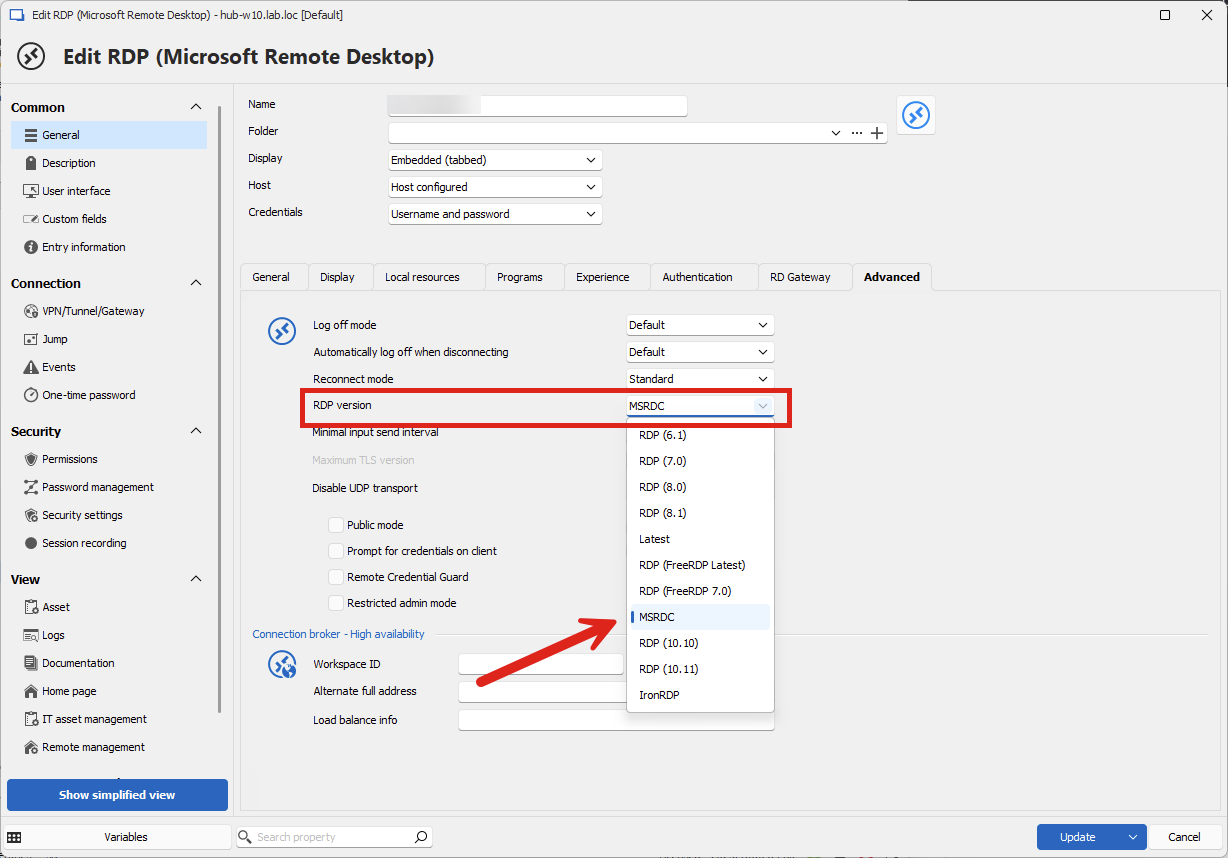
This is also configurable in File > Settings > Entry types > Sessions > Remote Desktop, if you would like to apply this to all of the entries by default on your machine.
Regards,
Hubert Mireault
33cfc6d2-385c-4415-968f-b99cf9fac776.png
Hello,
thanks for replying, now I have the following error: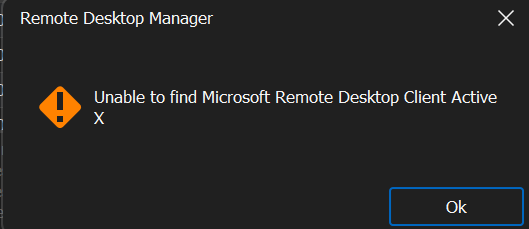
System.IO.FileNotFoundException: rdclientax.dll not found
at Devolutions.RemoteDesktopManager.Frames.Embedded.FreEmbeddedRDP81.InitializeClient(RDPVersion rdpVersion)
at Devolutions.RemoteDesktopManager.Frames.Embedded.FreEmbeddedRDP81..ctor(EmbededConnectionResult embededConnectionResult, RDPVersion rdpVersion)
at Devolutions.RemoteDesktopManager.Business.Connectors.EmbeddedRemoteDesktopConnector.NewFrame(EmbededConnectionResult connectionResult, RDPVersion rdpVersion)
at Devolutions.RemoteDesktopManager.Business.Connectors.EmbeddedRemoteDesktopConnector.CreateFrame(EmbededConnectionResult connectionResult)
------------------------ extended stack ------------------------
at Devolutions.RemoteDesktopManager.Business.Connectors.EmbeddedRemoteDesktopConnector.CreateFrame(EmbededConnectionResult connectionResult)
at Devolutions.RemoteDesktopManager.Business.Connectors.EmbeddedConnector.Connect(Connection connection, OpenConnectionMode openConnectionMode)
at Devolutions.RemoteDesktopManager.Managers.ConnectionManager.OpenConnection(Connection connection, OpenConnectionParameter parameter)
at Devolutions.RemoteDesktopManager.Managers.ConnectionManager.OpenConnections(Connection[] connectionList, OpenConnectionParameter parameter)
at Devolutions.RemoteDesktopManager.Managers.ActionManager.DoOpenConnection(Connection[] currentConnections, OpenConnectionParameter openConnectionParameter, IConnectionSource source)
at Devolutions.RemoteDesktopManager.Managers.ActionManager.OpenConnections(Connection[] currentConnections, OpenConnectionMode openConnectionMode, IConnectionSource source, Boolean checkOpenedConnection)
at Devolutions.RemoteDesktopManager.Frames.ConnectionViews.FreBaseConnectionView.OpenConnection(Connection[] currentConnections, OpenConnectionMode openConnectionMode)
at Devolutions.RemoteDesktopManager.Frames.ConnectionViews.FreConnectionTreeListView.OpenOnDoubleClick(Boolean isEmbedded)
at Devolutions.RemoteDesktopManager.Frames.ConnectionViews.FreConnectionTreeListView.<>c__DisplayClass242_0.<OnDoubleClick>b__0()
at Devolutions.RemoteDesktopManager.Managers.ThreadManager.PushTimer_Tick(Object sender, EventArgs e)
at System.Windows.Forms.Timer.TimerNativeWindow.WndProc(Message& m)
at System.Windows.Forms.NativeWindow.Callback(HWND hWnd, MessageId msg, WPARAM wparam, LPARAM lparam)
at Windows.Win32.PInvoke.DispatchMessage(MSG* lpMsg)
at System.Windows.Forms.Application.ComponentManager.Microsoft.Office.IMsoComponentManager.FPushMessageLoop(UIntPtr dwComponentID, msoloop uReason, Void* pvLoopData)
at System.Windows.Forms.Application.ThreadContext.RunMessageLoopInner(msoloop reason, ApplicationContext context)
at System.Windows.Forms.Application.ThreadContext.RunMessageLoop(msoloop reason, ApplicationContext context)
at Devolutions.RemoteDesktopManager.Program.Main(String[] args)
62d74bb7-362d-4a91-83fb-e14f51e514be.png
Hi,
How have you installed MSRDC? It really needs to be MSRDC with the MSI installer: https://learn.microsoft.com/en-us/azure/virtual-desktop/users/connect-windows?pivots=remote-desktop-msi#download-and-install-the-remote-desktop-client-msi
The new "Windows App" or any of the Microsoft Remote Desktop apps from the Microsoft Store are not supported. They're installed with an MSIX which prevents us from directly accessing the RDP ActiveX DLL from Remote Desktop Manager, and that's unfortunately by design. When you install MSRDC with the MSI, we can find the DLL and load it directly.
Best regards,
Marc-André Moreau
