External Editor for SSH File Explorer

I changed the editor for some files (.sh, .ini,...) in SSH file explorer to notepad++ but realized RDM does not saved the edit I made so now I want to change the editor to the default editor of RDM but don't know where to do it. I searched through the settings and find nothing like that. How can I change the editor for those files?
All Comments (4)
Hello Solar,
Thank you for contacting us on that matter!
Could you please provide us with the following information?
- A screenshot of the settings that you have changed.
- How do you configure it with Putty or outside of RDM?
- Is there any other information that you think could be relevant?
Thank you for letting us know. If you have any other questions, feel free to let us know.
Best regards,
Maxim Robert
OK, here is a step by step of what I do
- I connect to a server using RDM SSH terminal
- I open SFTP pane
- I click to open a file (e.g start.sh)
- A window open and ask me to select an app to open the file
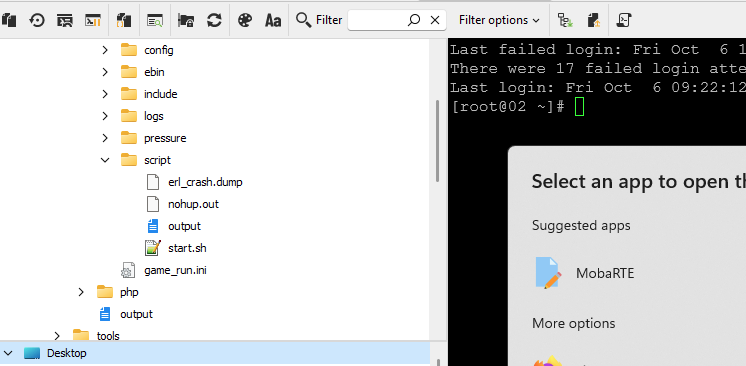
- I chose notepad++ or notepad and click "always" to always open this file type using this app.
- I edit the file and saved
- I open the file again and realized it's not saved. I think it's I probably choose the editor RDM does not support.
- I want to choose another editor for that file type but RDM don't let me choose again because I choose "always" and there no when in the app let me change that.
There are 2 issues here:
- The edit I made does not saved.
- I can't changed the editor after choosing "always".
Edit: it's a windows setting so I search in wrong place. I can change it now. Still the the first problem remain. Sometime I can open the file directly (double click the file) and edit it and it will be upload to the server. Sometime I have to right click and select edit for it to work. Sometime both way doesn't work.
a1f78e69-5803-4ba5-9b76-e4e8fc836af9.png
Hello,
Thank you for your response!
I've opened a case regarding your issue and sent you some information so that you can schedule a session with me so that I can look directly at your issue.
Please let me know if you haven't received the email to schedule the session. If you have any other questions, feel free to let us know.
Best regards,
Maxim Robert
Hello Solar,
The issue where some file edits were not saved has been fixed. This fix is expected to be included in version 2024.3.27.0.
Best regards,
David Godin