Browser Windows mixed sign in credentials (Websites)

In the new Version 2024.3.10.0 64-bit i have noticed that the Browser windows or Websites no longer have separate credentials.
For instance.
it used to be that i can have multiple different MS365 Tenants open each in there own Tab each signed in with there own credentials.
Now if i open a second web it automatically uses the sign in credentials in MS365 that where used in the first one if i sign out and sign in with the new details then the first windows is also signed in with the new user details. I have noticed this for both Chrome and Edge.
I suppose in the past each web tab had there own profile thereby keeping the sign ins separate. now it as if thy are all in the same profile.
This is very annoying as i often have to work on the same site for multiple different clients.
All Comments (6)
Hello,
Is the Private session (incognito) option set to Default or Disabled in the Website entries?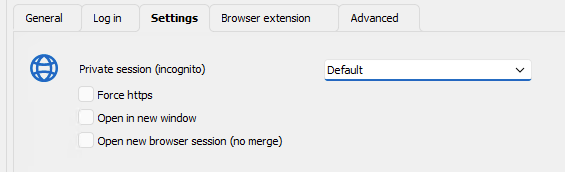
If it is set to Default, ensure that the Private session (incognito) option is set to Enabled in File - Options - Entry types - Sessions - Website. This setting is what the Default value refers to.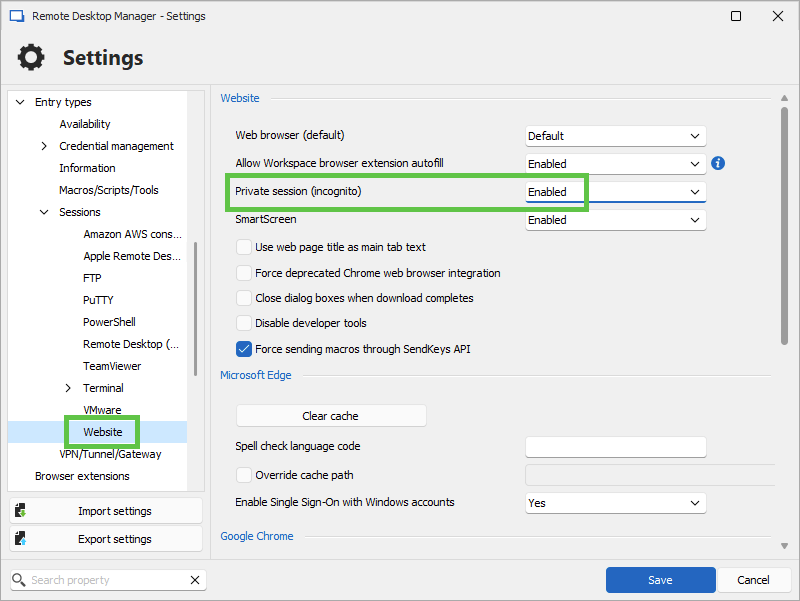
Let us know if that helps.
Best regards,
Érica Poirier
3845eab8-f73b-4ed5-9ee4-82e2fd01d46b.png
502f926d-5d46-4e47-b5b8-a7cd85f4c573.png
Hello Ingo1,
To follow up on my colleague's response,
You could also try using Edge and setting up the option "Profile name" under the properties of the entry > Advanced > "Profile name" and see if it works. 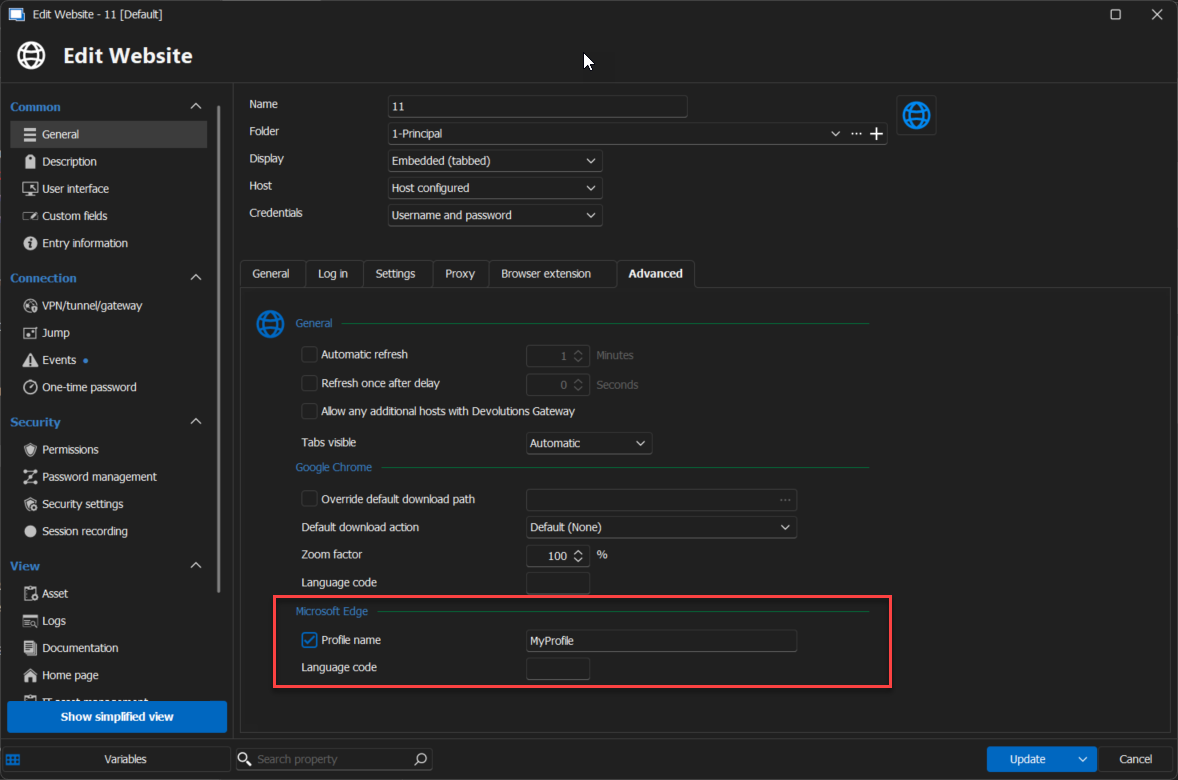
Please let us know if this is not working. If you have any other questions, feel free to let us know.
Best regards,
Maxim Robert
2024-10-01_16-53-50.png
Hi
Thanks for your replies.
As i have close to 200 webpage tabs this is a rather big exercise.
I have reverted back to version 2024.2.21.0 64-bit
and all is back to normal.
I will now first have to go through all the settings and change them before i can upgrade to the new version it seems.
Hello Ingo,
Thank you for your response!
Could you please provide us with a screenshot of how you configured it in version 2024.2.21.0?
Also, could you please provide us with a recording showing the behaviour in version 2024.2.21? I will send you the information to provide us with the recording in a direct message.
Thank you for letting us know. If you have any other questions, feel free to let us know.
Best regards,
Maxim Robert
Hi,
I have uploaded the files in the link that you send me thanks.
The 2 screenshots are the basic setup for almost all my website configs. (Done in Version 2024.2.21
Then i have made a recording in version2024.2.21 showing that i can have multiple tabs open for MS365 signed in with different users.
and when i sign out and back in it only shows me the sign in for that one page/ User
I have also made a recording in version 2024.3.10 where you can see that if i open the second tab for a different user it is still signed in on the user of the first tab.
Hope this helps
Let me know if you need anything else
Hello Ingo1,
Thank you for your response!
Could you please provide us with the following information?
- Did it use to work in RDM with embedded Edge instead of Chrome in version 2024.2.21.0?
With the recent update of RDM to version 2024.3, RDM now uses Edge backend for Chrome-embedded web entry. So, in RDM with version 2024.3, you'll need to use the Profile option sent before in the forum. Or, with the incognito option, it will use the cache of the current entry.
Thank you for letting us know. If you have any other questions, feel free to let us know.
Best regards,
Maxim Robert