Clipboard functionality

Hello,
I am a support tech for ScreenConnect trying to do some research on an issue a mutual partner of ours brought to our attention. They mentioned they spoke with RDM support already, but I'd prefer to speak to the horse itself :P
In terms of the Clipboard functionality, and it's encryption:
Does RDM encrypt Usernames/Passwords to the point where it can detect that the copied text from RDM is attempting to be shared external of the local machine utilizing CTRL - V, and therefore block the clipboard entry from sharing?
For context, I am attempting to copy/paste a Username/Password from RDM into a ScreenConnect remote session with CTRL-V - which fails.
While CTRL-V does not seem to work through a session, Send Clipboard Keystrokes (a feature of ScreenConnect) can send the password just fine to the remote device. Which makes sense, because I can see the clipboard entry in plain text in the clipboard history.
I can imagine, or at least hope, that my confusion is becoming more apparent: Why would sending Keystrokes work and not CTRL-V?
If I copy anything else on my local machine (not in RDM), I can CTRL-V to my remote session without issue - Including my own password manager (Norton) which does not encrypt the clipboard. Which leads me to believe it has something to do with the encryption process.
I am not attempting to point fingers, rather discern where the issue resides. The mutual partner says, "CTRL-V used to work just fine, and now it doesn't". Potentially indicating a change made on either ScreenConnect's side or a recent change on how RDM handles clipboard functionality with respect to encryption. I will be reaching out to my own developers as well - but figured I would get a conversation going here as well.
Any help is much appreciated!
All Comments (4)
Hello,
I have taken a quick look at our code and I believe we haven't changed anything in our clipboard process recently.
I have not installed ScreenConnect yet but one thing I have noticed through testing is that I can reproduce this issue with the Windows search bar but I can paste properly in a chrome browser, notepad, etc.
Also if I only do "Copy Username" or "Copy Password" instead of "Copy Username/Password" I can paste in the Windows search bar without issue. Could you please confirm if a regular "Copy Username" or "Copy Password" from the RDM application works in ScreenConnect? 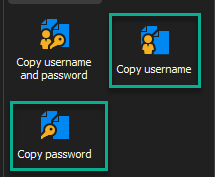
If pasting into ScreenConnect with these 2 clipboard actions works properly then I believe what is happening is that the ScreenConnect application cannot process the extended clipboard we generate when copying "Username and password". In that specific case we stack 2 different values in the clipboard meaning you would have to press Ctrl + V twice (once for the username and once for the password). I believe that this clipboard format is most likely being rejected by the ScreenConnect application.
Another thing to consider is that, by default, we clear the clipboard after 10 seconds as it contains sensitive data. If it takes more time than that to copy from RDM to ScreenConnect you will have nothing in your clipboard. (screenshot of the bottom right of RDM for reference below). 
Hopefully this can help for now. I will forward this thread to our developer who usually handles anything related to the clipboard and ask for his feedback to see if he has any additional insight to provide once he returns from vacation.
Best Regards,
Michaël Beaudin
e7e9d2ab-8d92-4871-9ecc-bc6fe97a60b0.png
8f976c39-ed5a-45a1-bcda-4723919069d4.png
Hey Michael,
Thanks for the quick feedback!
I attempted your request (normal Copy Username / Normal Copy Password) and those do not get through either. Windows Search Bar, notepad, or anything else that I tested with relative quick accessibility.
It is worth noting that we have a Session debugger, if you will, that can tell me when the Copy function has been triggered - seen below. The results in this screenshot are of successful captures of the copy to clipboard function. I get the same kind of entries from RDM, however, unlike copying something outside of RDM where the logging of the action is nearly instantaneous, the RDM Copy function takes several seconds for this action to be logged in my trace.
This may tie into your mention of the extended clipboard process that your application does. The outputs are almost identical, barring the location information of where the Copy function took place on the machine - web browser v. file explorer v. RDM v. etc. ("Change from DIFFERENT process 236.... ; raising event..."). Its ultimately probably going to be a compatibility thing, I would venture to say.
I was thinking perhaps the RDM clipboard process might be removing itself during that "pause" in my trace. However, it doesn't appear that there is an expiration process of the copy action built into RDM (or self-cleaning process) as the copy from RDM stays in my clipboard history. At least no settings that I can see from quickly poking around. To be fair, I simply downloaded the free version to do a quick test, and have not familiarized myself with the product to that depth.

aec2f7da-b481-4c5c-961a-04b56bcb6ff3.png
0039b737-a505-4e55-b49f-86cdbbbd49f3.png
@kcrommy
Hi, Stéfane here. I'm the one who wrote the RDM clipboard code. Having this discussion will be very helpful/insightful. I just got back from vacation so please give me a few days to catch up on emails and I will get back to you.
Best regards,
Stéfane Lavergne
Hi @kcrommy,
RDM has 2 clipboard methods (Legacy & Paste once (Secure)).
Legacy - We put the value into the clipboard, wait 10 seconds (configurable), then clear the clipboard.
Paste once (Secure) - We use "delayed clipboard rendering" by calling the Clipboard APIs from Windows directly. When you start a copy action in RDM, we send clipboard formats* to the clipboard and wait for a process to request the content for a given format. Once we get a request, we analyze who/where it's coming from. We then either supply the value or not. If we supply the value, we immediately clear the clipboard.
Additionally, in RDM we have 3 copy actions (Copy username, Copy password & Copy username & password). The first two can either use Legacy or Paste once (Secure) whereas Copy username & password must always use Paste once (Secure).
So for testing purposes, I would see if you configure RDM to use Legacy then use the Copy username, Copy password. Does it work?
Does RDM encrypt Usernames/Passwords to the point where it can detect that the copied text from RDM is attempting to be shared external of the local machine utilizing CTRL - V, and therefore block the clipboard entry from sharing?
No, we don't encrypt the clipboard content, we use delayed rendering.
Why would sending Keystrokes work and not CTRL-V?
My guess is, with delayed rendering, we send the username, ScreenConnect requests the value, we supply the username and then clear the clipboard. So by the time the user tries to CTRL+V he is faced with an empty clipboard.
You have a few choices.
- Configure RDM to
Legacyand disable theCopy username & passwordas it will never work in this scenario. - Add a delay on the ScreenConnect process, say 10 seconds, to see if it helps. This will delay the clear giving the user time to CTRL+V within the ScreenConnection session. Info: https://docs.devolutions.net/rdm/kb/rdm-windows/troubleshooting-articles/clipboard-diagnostic/
* Clipboard formats include CF_UNICODETEXT+ the formats here: https://learn.microsoft.com/en-us/windows/win32/dataxchg/clipboard-formats#cloud-clipboard-and-clipboard-history-formats
Stéfane Lavergne