EntraID dashboard login not possible after upgrade

Hi,
after the latest update 2024-03-10, i ran in an authentication error in the EntraID dashboard: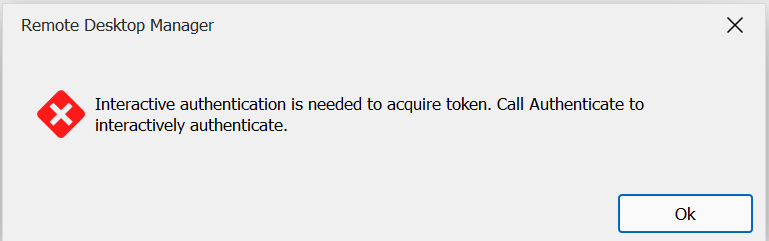
What i´ve tried so far:
After opening the Entry, the browser opens the M$- Login with positive Feedback, but in RDM the error is still there.
Created a whole new Entry- same result.
Is there a way to fix this?
Thanks in advance!
BR
Tom
Screenshot 2024-09-26 101213.png
All Comments (9)
Hello,
Thank you for reaching out to us about this matter!
My name is William and your post has been assigned to me.
I was able to replicate the issue on my side. It looks like the issue is present in version 2024.3.10.0 but not in the 2024.2.21.0. I'll send the information to our development team and see if they are able to find what might be causing this issue. I'll let you know as soon as I have more information.
Best regards,
Hello,
An internal ticket has been opened with our development team to assess potential solutions. However, it's important to note that we are unable to provide a precise release date due to the intricate nature of our release process, which encompasses Build, Quality Assurance, and Release stages. Rest assured that we will be in touch as soon as we have an update to provide.
In the meantime, if you'd like to stay updated on the latest fixes, improvements, and release notes, you can access our Release Notes page by following the link below:
RDM Windows - https://devolutions.net/remote-desktop-manager/release-notes/.
Best regards,
Hi thkaminski,
I've been able to reproduce the issue. Unfortunately, in the process of investigating this issue, I somehow fixed it for me, and cannot reproduce at the moment.
That being said, I've made to small additions that, when the next version is available, I'd like you to try (one after the other, and not both at the same time, so I can establish which, if any, fixes the issue for you).
First, I've added a "Clear authentication records" button. This should delete saved authentication records, and force a re-authentication. I'm not quite convinced this would solve the issue for your since, in theory, in the settings view, we ignore currently saved records.
The second addition is a new option "Let RDM handle re-authentication". I'd like you to uncheck this setting and try to authenticate again. This one is a bit more promising, since the underlying behavior this setting controls is what solved the issue for me. As a note, once fix, in theory this setting could be checked again, and it should continue to work.
I'd like you first to try the first option and, if it doesn't solve the issue, try the second afterwards.
Both additions will be available under the same page in the application settings (Settings -> Entry Types -> Sessions -> Microsoft Entra ID):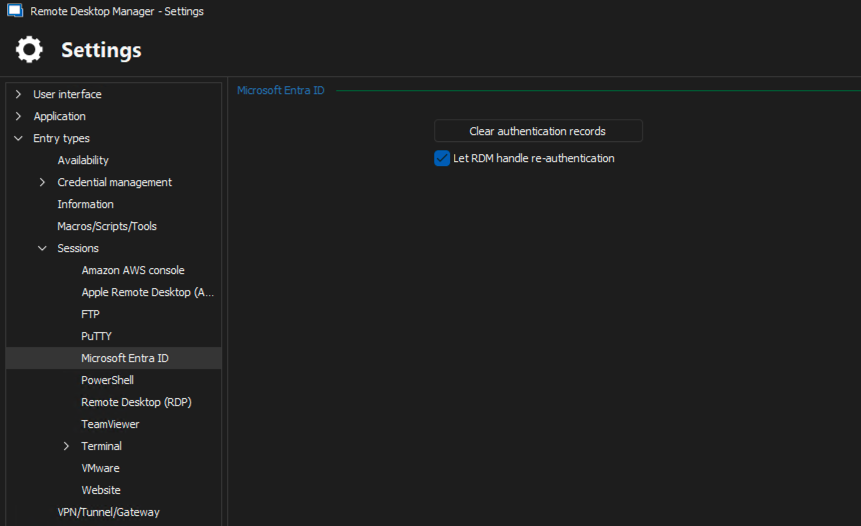
Best regards,
Xavier Fortin
MicrosoftEntraIDOptions.png
Hello Xavier,
i´ll try this when the next release hits and I´ll let you know.
Thanks for you work!
BR
Thomas
Hi again!
In the end, I did find a way to reproduce the issue. I realized that revoking the sessions of the user (something that can be done in Entra ID) lead to the same behavior. So I was able to continue my investigation.
You can scrap what I said in my previous message. I've removed the added checkbox, but kept the clear records button since I still believe this can be useful.
And so, you can expect a fix in the next release of RDM!
If the issue persists nonetheless, please, to get back in touch!
Best regards,
Xavier Fortin
Thanks for answering, you made my day. If I want to know more, I will ask by starting my own thread. When I had an essay due, I decided to try Academized’s academized.com/pay-for-essay pay-for-essay service. The essay was delivered on time and was exactly what I needed. It helped me stay on top of my academic work without sacrificing my sports commitments. Highly recommend for busy students!
Hi thkaminski!
The fix should be available in the latest version of RDM Windows. If the issue persists nonetheless, please do tell me.
Best regards,
Xavier Fortin
Hi,
login worked like a charm.
Thanks again!
Thomas
Glad to hear it! Do not hesitate to reach back if you have any other issues!
Best regards,
Xavier Fortin