Weird behavior after disconnecting from RDP

Hi,
Over the last days i have a weird issue with my installation 2024.2.15.0
I connect to a host it open the RDP connection (external not tabbed) and the RDM closes (minimizes to tray) as it should be and has always for me.
When i close the RDP connection (log off from the host) the RDM re-opens(!!) and i can see it in my task bar!!! And not only that but it has the menu a bit messed up.
See below the screenshot, the Navigation bar is not docked but it is floating over the other tabs!!!
The normal ls like this docked and as it was for years.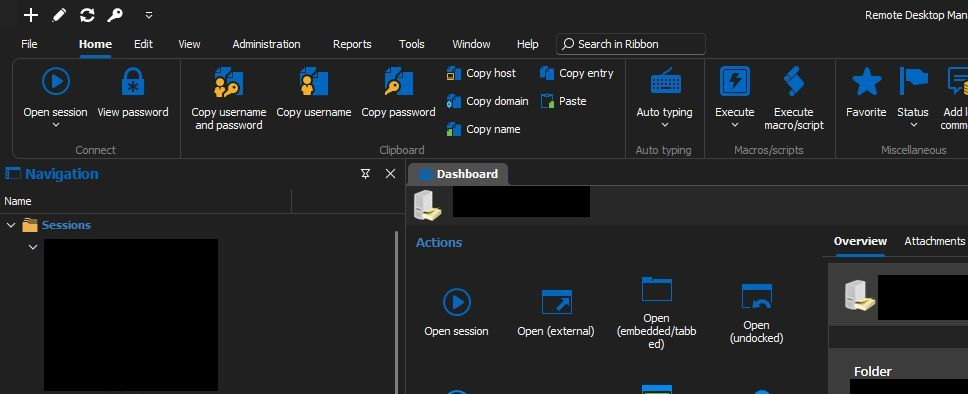
What changed ?????
Thanks
-Vassilis
RDM for Windows 11
Purchased Enterprise Edition v2026.x
38708c63-dbc1-4205-8a93-46b4dbb4c355.png
bf1999bc-6cc2-4945-9f21-9e7c269c1f38.png
All Comments (11)
Hello,
Thank you for contacting us on that matter!
Would it be possible for you to create a portable installation of your version of RDM and see if this issue still occurs? To do so, you will need to do the following:
(Close RDM)
1- Download the .zip file below:
https://cdn.devolutions.net/download/Devolutions.RemoteDesktopManager.Bin.2024.2.21.0.zip?_gl=1*5ltmsf*_ga*NTQ1MTkxOTQwLjE2OTgwODYxNjY.*_ga_P11646PR82*MTcyNzI2ODg3OC4xMTEwLjEuMTcyNzI3MTk5My4zOS4wLjA.
2- Create a new folder on your Desktop
3- Extract the content of the .zip file into the folder created at #2
4- Go to this folder once the .zip file has been extracted and run remotedesktopmanager.exe
5- Connect to your data source
This test will allow us to rule out your local installation of RDM as a possible cause for this issue.
Please let us know if the problem persists on this installation. If you have any other questions, feel free to let us know.
Best regards,
Maxim Robert
Hi, Sorry for the delayed answer.
I have tried in the past the test with the portable application but it messed up with my installation, do not know that but i i do not have the time now to play with that now.
Can we checked something in logs ? As i said that happened suddenly without updating version in RDM.
I'm sending you a PM with a link for a videocast of what tis happening. I have comments on the video as well so you can pause to read them. It may give you an idea on what is happening and figure it out.
let me know if you can see the video.
Regards,
Vassilis
RDM for Windows 11
Purchased Enterprise Edition v2026.x
Hello,
Thank you for your response!
I've sent you a direct message with the information on where to send us the recording.
Then, I will investigate the recording and let you know with more details afterwards. Please let us know when the file has been uploaded.
Thank you for your collaboration. If you have any other questions, feel free to let us know.
Best regards,
Maxim Robert
I just uploaded to your portal.
Thank you very much.
RDM for Windows 11
Purchased Enterprise Edition v2026.x
Hello,
Thank you for the information!
Unfortunately, I was unable to reproduce your issue. I've open a ticket and sent you the information to schedule a session so that I can have a look directly at your issue.
If you haven't received an email please let us know. If you have any other questions, feel free to let us know.
Best regards,
Maxim Robert
Thanks Robert! i got the email and scheduled a meeting.
THank you very much for your excellent support
-Vassilis
RDM for Windows 11
Purchased Enterprise Edition v2026.x
Hello,
Thank you for your collaboration!
I'm posting an update on this to let you know that a ticket with our development team has been opened and we will let you know with more details as soon as possible.
If you have any other questions, feel free to let us know.
Best regards,
Maxim Robert
That is perfect Robert.
I will be waiting for the dev team and the fix.
regards,
Vassilis
RDM for Windows 11
Purchased Enterprise Edition v2026.x
Hello, here is the annoying guy again 🤷♂️
Is there any progress status, is the fix in "pending", "testing", "commit" , what type of phase are we talking about.
I want to go to the .3 version but only with the one with the fix.
Thank you!
-Vassilis
RDM for Windows 11
Purchased Enterprise Edition v2026.x
Hello Vassilis,
Thank you for following up on this issue!
The ticket with the development team is still being investigated, and a potential fix is being tested. I will let you know with more information as soon as possible.
If you have any other questions, feel free to let us know.
Best regards,
Maxim Robert
Got the new version
YES it is fixed !!!!!!!!!!!!!!!!!
you people are awesome !!!!!!! best support i've seen in such products !!!
thank you
RDM for Windows 11
Purchased Enterprise Edition v2026.x