Devolutions send for RDM
0 vote

With reference: https://forum.devolutions.net/topics/41658/devolutions-send-in-rdm
Can this be added as ribbon button in RDM, or maybe right up the top next to quick connect? This would be an awesome feature. I'm so sick of our staff using onetime pass code websites. I'd much rather them utilise RDM where we can control it.
All Comments (7)
Hello,
If you go in Tools -> More tools, you can find a Devolutions Send button which links to the website. From there, you can right click to pin it so that it shows up in your ribbon directly: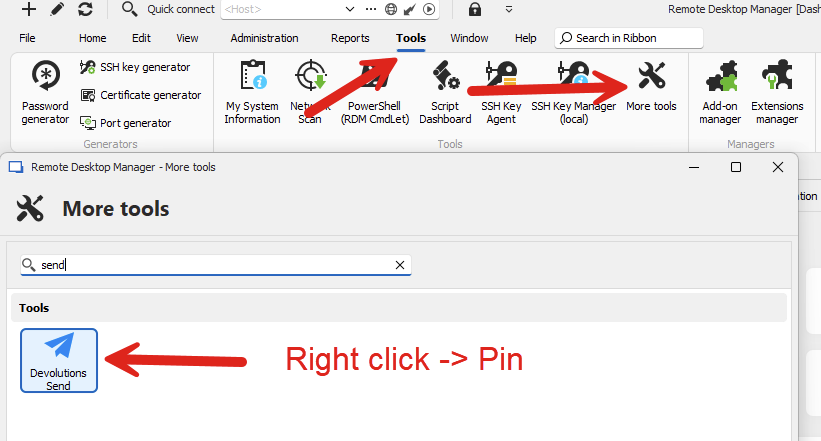
It will then show up directly in the tools:
From there you can even right click this button to add it to the top bar where the quick connect is.
Let me know if this helps.
Regards,
Hubert Mireault
acbac451-dcc9-4654-b0d6-158f558ee3c9.png
e703d3e1-6530-4459-b658-fbe49efc9950.png
Is there a way I can push this out (in top bar) to all users? Perhaps through custom installer?
Hello,
I think you might find some success by sharing your RemoteDesktopManagerLayout.lyt and RemoteDesktopManager.ext files, though they may contain other settings as well. This is not available through the custom installer at the moment.
Regards,
Hubert Mireault
Hence the feature request :)
Can you confirm sharing those files with your users works to get this button available in that way? I want to be sure this would actually be the appropriate way to improve the custom installer.
Regards,
Hubert Mireault
I'm reluctant to do that because it will effectively overwrite other settings, customisations or configurations that they have in place.
I can't find it now, but I swear the custom installer used to allow you to deploy all the settings that were in place for the person who created the custom installer. We found this useful so that users would get all the correct settings. For example, the expand sub-folders on a search is a pretty important feature for us so that when you search for a folder you get all the connections underneath (annoyingly can't be done in UI).
Even a group policy option to add it to the top bar would be handy. In fact this would probably be ideal as it means no other settings are overwritten.
Hello,
When you generate a custom installer, it should indeed come with the configuration from the machine on which you generated it. You get a few customizations as to what is/isn't included: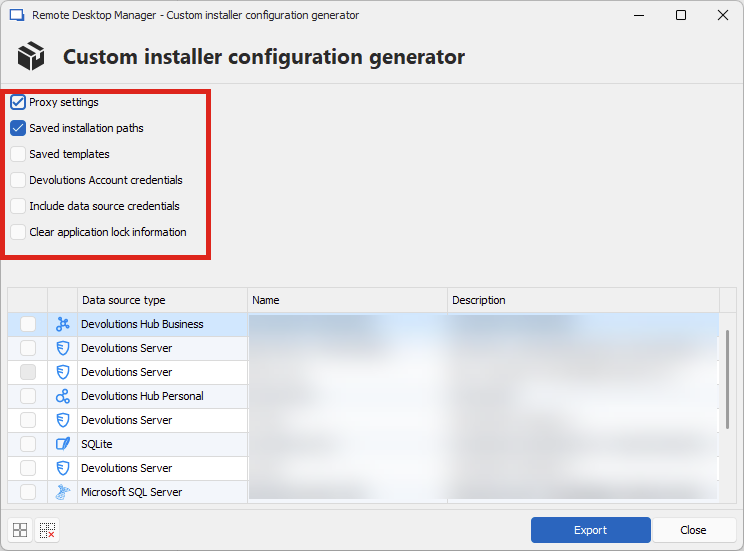
Other than that, I believe everything else in the RemoteDesktopManager.cfg file will be carried by default. Unfortunately it doesn't currently include other files like the EXT or LYT files so this is why I believe in this case it wouldn't work.
As a quick change, we'll add it by default in the ribbon (to avoid having to manually pin it, this will be in our next minor version 2024.3.11.0), and I will open an additional ticket to see about a GPO to automatically add it in the top bar where the quick connect is. I hope that for now, adding it to the ribbon will help your users' workflow.
Regards,
Hubert Mireault
e9ee1172-99ed-4c8d-9f7f-4051444bd01a.png