Unable to setup TOTP with Microsoft Account

When trying to add an OTP entry in Remote Desktop Manager for a Microsoft Account, I'm presented with the following warning message. I've tried taking a screenshot of the QR code as well as manually entering the Account name and Secret key. Either way the warning message is still present. After creating the OTP entry in RDM and going back to the Microsoft website to verify that it has been setup correctly, Microsoft's website says that code is incorrect.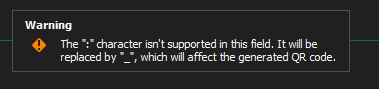
I blocked out my email address and added an arrow to hopefully point out that a colon is necessary as it is part of the account name. 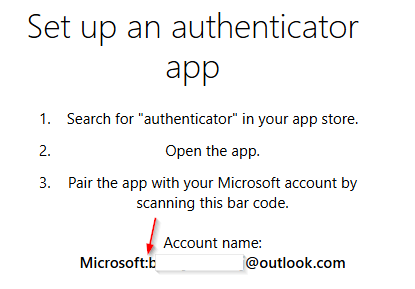
This used to work in RDM a few years back because I used it all the time. But I re-setup all the security on my Microsoft account and when trying to do this, it no longer works from RDM.
rdm-otp-issue.png
microsoft-account-mfa-colon.png
All Comments (3)
I attempted to create an OTP credential entry in Remote Desktop Manager I have running on a different machine. After creating the entry and trying to verify it on Microsoft's website it worked.
I also tried to go to a different website that requested a one-time passcode and it said my code was wrong.
So my issue now is that Remote Desktop Manager on one of my machines isn't able to correctly generate a TOTP code.
Does anyone know how the TOTP codes are generated? I'm thinking there's someone at the machine level that's affecting it.
Before anyone asks, YES, I did run a virus scan.
I figured it out. It had nothing to do with Remote Desktop Manager. The computer that was having an issue wasn't able to contact an NTP server for a week and the clock slowly became skewed. After forcing a sync with an NTP server, the TOTP codes were consistent across all machines and worked when attempting to use them at multiple services after testing.
Hello,
Glad that you were able to find the issue! Let us know if you have any further questions!
Best regards,
Etienne Lord