Execute scripts in an RDP session from the “Script Dashboard.”
Execute scripts in an RDP session from the “Script Dashboard.”

Is there a method to run scripts within an RDP session using the “Script Dashboard”?
It's like the excellent "Execute command from palette" feature in an SSH session.
Remote Desktop Manager Licensed 2024.2.19
Clients: Windows 11
Datasource: Microsoft Azure SQL
All Comments (5)
Hello,
There should be the "execute (custom)" that lets you choose against what entries to run your script: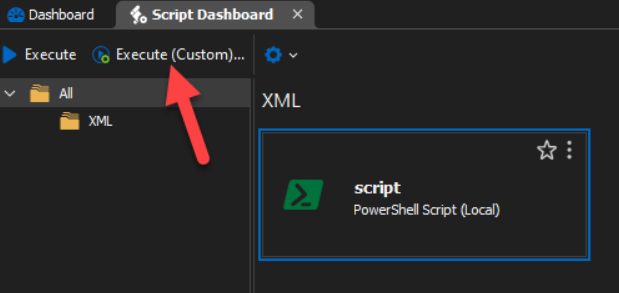
If this doesn't work for what you're trying to accomplish, could you further describe your scenario? Maybe I'm missing something. It would also be useful to know how you currently proceed to do this.
Regards,
Hubert Mireault
300f233e-e95a-4832-a530-80080840cb22.png
I can’t get that to work.
I am trying to find a way to run code from the script dashboard within the RDP session I am currently logged into.
Example:
Log into a Windows server via RDM.
I want to run a PowerShell script inside that RDP session.
The script is stored in a Vault in RDM.
Is this possible? If so, what steps are needed to achieve it?
Hello,
Thank you for the additional information.
This is not possible through the script dashboard at the moment, but it's possible through the 'RDM jump' feature.
What it requires is the following:
- Install the RDM Agent application on your remote machine. You can find more information about it here: https://docs.devolutions.net/rdm/overview/the-devolutions-platform/rdm-agent/
- Connect to your remote machine through RDP using RDM
- Right click your RDP in the tree, then select "Execute script via RDM jump"

From there you will be prompted with a window where you can write a script to execute, or use one that already exists.
Can you let me know if this works for you?
Regards,
Hubert Mireault
a2aa5fa3-251f-48aa-9275-f3ac4f30677d.png
I overcomplicated it; I only need the content of the scripts, and that hade bin solved If there were a “Copy to Clipboard” button on the scripts in the Script Dashboard it would solve what I wanted.
Ah, I think that would indeed be much simpler if that'd work for you. I will open a ticket for this and we will try to do this quickly. I've opened a ticket.
Regards,
Hubert Mireault