Partially resolved using existing feaures] Web Session Persistant Isolated storage / containerisation (similar to how Firefox Multi-account container addon works)??
Partially resolved using existing feaures] Web Session Persistant Isolated storage / containerisation (similar to how Firefox Multi-account container addon works)??
0 vote

I use Web session entries a fair bit in RDM but it would be ideal if each web entry would have its own or have a common shared storage that could be assigned to web entries to share. mainly for its cookies and site settings etc so authentication persists. Unless I'm missing something that would allow what I'm thinking of to work already, I've had to use InPrivate sessions then use the web extension autofill for authentication.
Basically, if you have ever used the FireFox addon Multi-account Containers you will understand what I'm thinking, although it would be even better if something could be setup within RDM itself which would allow any selected browser type to be able to do something to the Firefox only addon.
My use case would be to be able to setup account containers for different companies or just to share various users per container, this way web services used in web entries would already be authenticated for quick access that could also be complimented by the web extension autofill again for reauthorisation purposes.
I hope I've managed to get my idea across as intended so I look forward to replies, again even replies if I have completely missed an existing method to do this in RDM?
JK
Devolutions Force Member (and Long time Devolutions Fan)
All Comments (27)
Hello,
If you are using Edge in embedded mode, there is a setting to set the profile: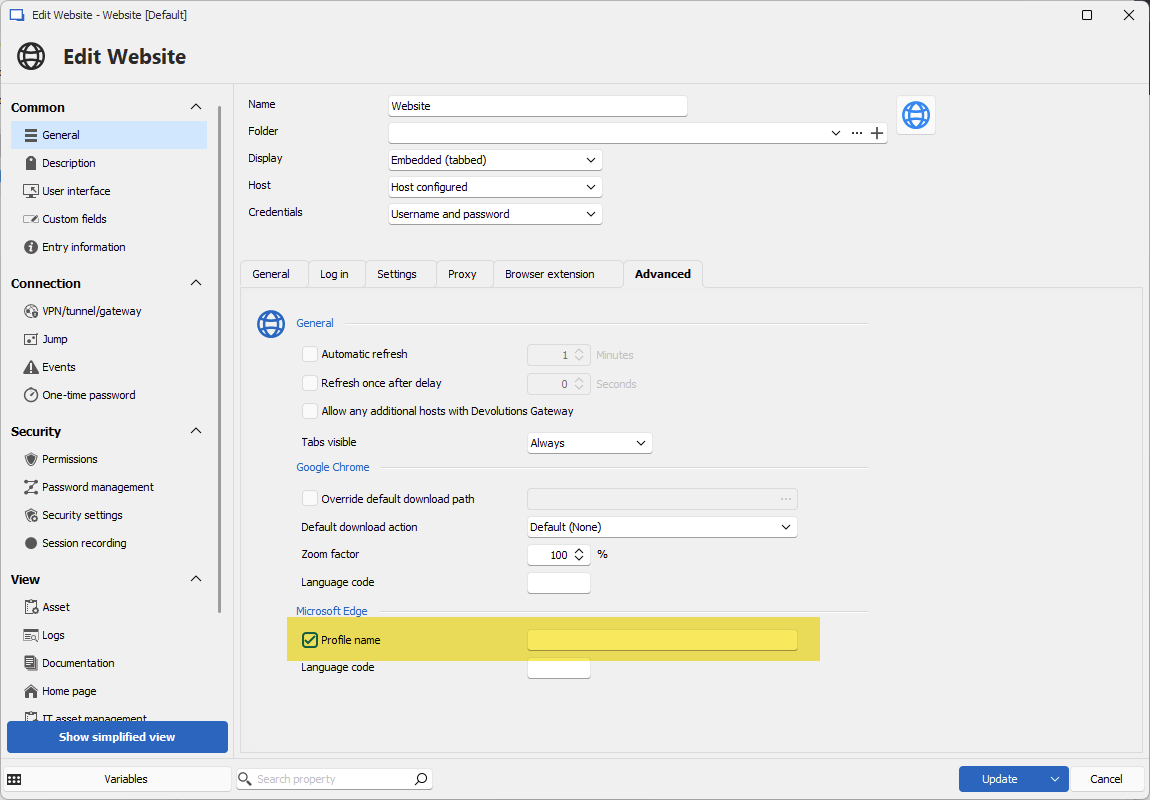
If you configure the same profile for multiple entries, they should share the same cookies and settings. Can you try it out and see if it works for you?
Regards,
Hubert Mireault
e7f79b65-0223-4388-902c-906f65bb4fdf.png
OK, that's a setting I've missed. I'll play and get back to you, in theory it should work.
JK
Devolutions Force Member (and Long time Devolutions Fan)
First few attempts, it doesn't seem to be doing much as after setting a profile name on an entry for an embedded edge session it still pulled the hosts credentials again rather than what I would have assumed would have been an empty profile requiring sign in etc.
JK
Devolutions Force Member (and Long time Devolutions Fan)
Hello John,
I tested on my end, using the Devolutions forum as the website:
- I configured my website entries to edge, and entered two different profile strings: "Prof1" and "Prof2".
- I opened the first entry, logged into my account.
- I closed the first entry then reopened it, and I confirmed that I was still logged into my account
- I opened the second entry, and I was not logged into my account
So for me, it seems to work as expected.
Are you using any particular configurations, or maybe variables or something like that which may affect the behavior? I'm thinking it might be a configuration issue that causes it not to work for you.
Regards,
Hubert Mireault
I'll run through and try some other settings, I read it uses webview correct for embedded edge? For my initial test I went directly with a Microsoft admin portal, but for some reason my embedded edge also picked up my config for external edge which is work account sso auto sign in, although I have no idea if the config shoud even be interoperable?
Like I say I'll go away with it for bit more and come back.
JK
Devolutions Force Member (and Long time Devolutions Fan)
I'm taking a guess but it might be related to the "enable single sign-on with windows accounts" setting in File > settings: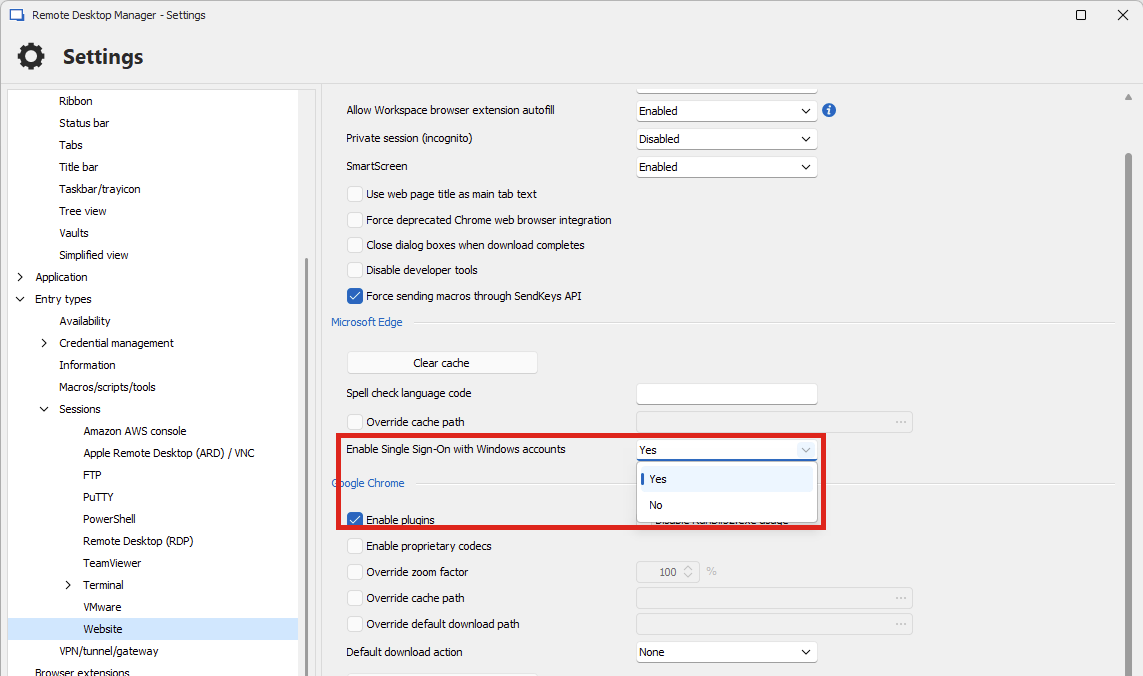
This is a setting we toggle in the WebView2 control depending on this configuration, and I would assume that no matter the profile, that will take the SSO credentials from your computer. That might explain the behavior.
https://learn.microsoft.com/en-us/dotnet/api/microsoft.web.webview2.core.corewebview2environmentoptions.allowsinglesignonusingosprimaryaccount?view=webview2-dotnet-1.0.2739.15
Regards,
Hubert Mireault
df1ae1fd-9ff1-45ec-9a1c-6b01f6856409.png
thanks that setting to disable the SSO in embedded edge might be what I need to use for my scenarios, thanks for your assistance its much appreciated as always.
Fingers crossed this will work for me, I'll come back if needed..
JK
Devolutions Force Member (and Long time Devolutions Fan)
No problem, I hope this solves the issue for you and you can successfully work with profiles afterwards.
Regards,
Hubert Mireault
Can the MS Edge WebView2 browser inject certificates for authentication? That would be handy now that EntraID CBA (Certificate Based Auth) is getting better.
JK
Devolutions Force Member (and Long time Devolutions Fan)
At the moment I don't think it's possible. We would have to investigate to see what the control offers.
Out of curiosity when you login that way with your external browser, do you get prompted to choose your certificate, or does it automatically find it on your machine and simply logs you in?
Regards,
Hubert Mireault
I've seen this on Android frequently, Windows its under certificates and smart cards. Obviously, it must be enabled on Entra's auth methods to show up and as usual there's lots to it.
JK
Devolutions Force Member (and Long time Devolutions Fan)
Thank you, we will investigate to see what is possible to do with Webview2. I know there's an event to handle when certificates are requested, but we already implement it so if it doesn't work for you, it must need something different.
Regards,
Hubert Mireault
It would be nice to see this, especially since EntraID has been getting attention recently. Although I haven’t delved into it much myself, I did enable it during the preview phase but ran into a snag and had to disable it.
It would be great to have the possibility to use certificate authentication with the WebView2 browser, even though the configuration seems quite complex. Additionally, Windows Hello and Hello for Business already deploy certificates to Windows clients. However, Hello for Business still has some bugs to overcome. Despite this, certificate-to-user binding looks promising.
JK
Devolutions Force Member (and Long time Devolutions Fan)
Thank you, we will investigate to see what is possible to do with Webview2. I know there's an event to handle when certificates are requested, but we already implement it so if it doesn't work for you, it must need something different.
Regards,
When you say it’s already implemented, what exactly do you mean? Are you referring to the request and a prompt for a certificate?
I was thinking that certificates could be imported as credential entries, which could then be used in embedded web session entries to inject the certificate without any prompts. This way, certificates enrolled to Entraid users could also be exported and integrated with RDM in the manner I just mentioned.
Granted, this can be done using existing credential entries, but it could provide an additional authentication option where it’s implemented.
As I mentioned, I personally don’t have a need for this yet, but it would be perfect if RDM could utilize the same authentication methods now available with Entraid.
Thanks!
JK
Devolutions Force Member (and Long time Devolutions Fan)
When you say it’s already implemented, what exactly do you mean? Are you referring to the request and a prompt for a certificate?
Yes, right now when the browser triggers this event, it feeds us a list of trusted certificates. RDM then prompts if you want to select a certificate or not, and if you do, you are able to choose between the list provided by the browser.
The EntraID certificate login method must not trigger this event and at the moment I couldn't give you an explanation why.
I was thinking that certificates could be imported as credential entries, which could then be used in embedded web session entries to inject the certificate without any prompts. This way, certificates enrolled to Entraid users could also be exported and integrated with RDM in the manner I just mentioned.
Granted, this can be done using existing credential entries, but it could provide an additional authentication option where it’s implemented.
As I mentioned, I personally don’t have a need for this yet, but it would be perfect if RDM could utilize the same authentication methods now available with Entraid.
Thanks!
This could be the way it's implemented once we figure out what the EntraID certificate login does differently, assuming we aren't obligated to only use the list of trusted certificates the browser itself provides.
Regards,
Hubert Mireault
Thanks for the info I'll def be keeping an eye in RDM release notes
Do love features additions, including Entraid. Only downside as you probably know is sometimes it also comes with another Hill of a learning curve lol.
Entraid CBA auth is on my to learn list too when I get the time and get though the other items on that learn list, which never seems to get smaller.... 😂
JK
Devolutions Force Member (and Long time Devolutions Fan)
I ended up formatting my PC and I solved this issue with a configuration that I now don't remember exactly how it was done.
I'm trying to look for it again, but I remember it was something like isolating each Microsoft Edge tab.
I don't know if I used any flag or command.
So much so that it created a folder for each temporary WebView2.Cache file.
As soon as I remember, I'll come back to the topic to show the solution.
I've reverted to relying on inprivate sessions and the browser extension for autofil and submits which fulfills my requirements,
I found the profiles setting a bit too fiddly currently, it would be ideal if it used a drop down list that stores the created Profiles peraistanltly, that way you can create profiles that are then selectable in other entries.
As to what you were saying about isolating tabs, we're you definitely using the embedded browser, I only ask as you can achieve something similar with edge itself which is workspaces, that I've used in the past to create isolated groups of tabs, although I've no idea how closely Webview follows edges feature sets?
JK
Devolutions Force Member (and Long time Devolutions Fan)
@John:
> it would be ideal if it used a drop down list that stores the created Profiles peraistanltly, that way you can create profiles that are then selectable in other entries
We have a few other features in RDM, for example VPN groups, where we look at the other configured values in the same vault to fill the values of a dropdown (while still being able to write in it). We could use the same principle here, I think you bring up a great point. I will open a ticket for this.
> I only ask as you can achieve something similar with edge itself which is workspaces, that I've used in the past to create isolated groups of tabs, although I've no idea how closely Webview follows edges feature sets?
I made a quick search and couldn't find anything in Webview2 relating to the workspaces feature in edge. It's not always obvious what is and isn't supported in Webview2 since sometimes it's hidden in very niche, undocumented settings, but as of now I don't see a way to support this.
@Mauricio:
Please do share your configuration with us if you figure out what combination of settings you've used, I'm sure our community would appreciate it! From what you're describing though, to me it sounds like you're using the profile feature, or the private session feature, where both of them will isolate the cache of the Webview2 browser to its own folder.
Regards,
Hubert Mireault
Also I wanted to add, the profile selection dropdown will be available in our next minor version, 2024.3.13.0, which we are hoping to release early next week.
Regards,
Hubert Mireault
@hmireault
I don't really remember the correct procedure I adopted, but it was, yes, in the Webview2 settings in CLI it is something related to keeping each tab as a separate process, it was not the incognito tab option. As soon as I have some time because it was something very specific, it was not easy at the time, I also used it this way for more than 2 years.
In the cache folder it created a folder with a long code for each open page like C:\windows\temp\{85B0F8A9-ACE8-459D-9423-A96D6646CCAE}\WebView2.Cache
I used the Windows Temp folder because I used WindowsToGo.
I ended up needing to format it and after all the installation and configuration I realized what a huge mistake it was not to have checked this issue before.
For now I'm using the Profilename option which is basically the same process, thank goodness there's batch edit so I've already changed all my 130 entries with the $FOLDER_NAME$ variable
I'm a bit confused with this feature request, because I thought that was how it worked anyway.
However, I'm here after updating to 2024.3. Before updating, each tab in RDM seemed to operate independent of other tabs. I could log in on one and log into a different account on another and they wouldn't interfere. The sessions would also be saved to each RDM entry, so I could open that tab back up and get the saved login from that session only. Now, after updating, all my browser tabs are linked. My login sessions on one will interfere with login sessions on the others.
I can say for sure that I definitely had independent tabs with Chrome browser tabs, but I though it was the same with Edge as well.
Is there any way to get that behaviour back? Or was I working under some weird glitch, and that was not how it was designed to work?
Mine works as expected, I have each web entry set to microsoft edge browser, InPrivate sessions are not enabled and i enable the Profile and match to another web entry.
Are you sure your defaults don't have InPrivate sessions enabled or something, also I need to specify edge browser not default even though my default is edge???
FYI you mention chrome, you realise from what I understand this profile feature utilises Microsoft WebView2 Embedded browser right, which is effectively embedded Edge, I do not know if setting the browser to chrome will work with this profile setting, Devo team will have to update on this.........
JK
Devolutions Force Member (and Long time Devolutions Fan)
Mine works as expected, I have each web entry set to microsoft edge browser, InPrivate sessions are not enabled and i enable the Profile and match to another web entry.
Are you sure your defaults don't have InPrivate sessions enabled or something, also I need to specify edge browser not default even though my default is edge???
FYI you mention chrome, you realise from what I understand this profile feature utilises Microsoft WebView2 Embedded browser right, which is effectively embedded Edge, I do not know if setting the browser to chrome will work with this profile setting, Devo team will have to update on this.........
I'm not really referring to the new 'profile' feature. This was just the observed behaviour I had with RDM, that each tab already ran in its own independent profile somehow. I can't recall when I first noticed it, but it had been there for quite some time, that opening up separate entries in RDM, would have an independent browser profile for that particular entry. This wasn't an inprivate or incognito setting, as a previous logged in session would still be logged in if you closed the tab, or closed RDM and came back.
One other thing I noted was that after updates, it would frequently reset all the browser login sessions, so I'd need to log in under each entry again, but they would still be independent to each other, and after closing and re-opening the tab I would still be logged in until the next RDM update was installed. It's only since 2024.03 that I've noticed that logging in to a website on one tab will now log that account in on all tabs that I open, or had open, in RDM.
It was great when logging into multiple 365 admin consoles, as they would all operate independent to each other. Now they're all connected and it's been a massive pain.
I've done some more digging on a system that still has 2024.2 installed on it.
Previously, opening an entry in "Chrome" would create a new rundll32.exe process, with a number of sub processes. Each subprocess would point at a folder: --user-data-dir="C:\Users\<username>\AppData\Roaming\Devolutions\RemoteDesktopManager\EO.WebBrowser.Cache\<guid>".
If I opened up another entry in "Chrome", it would create a new rundll32.exe process, with a number of sub processes. These would point at a new folder with a different GUID at the end.
Now, if I try to open up an entry in "Chrome" from 2024.3, it creates a msedgewebview2.exe process, and the folder for --user-data-dir is "C:\Users\<username>\AppData\Local\Devolutions\RemoteDesktopManager\WebView2.Cache\SingleSignOn\EBWebView".
If I try to open something in Edge from the 2024.2 version, it is the same, msedgewebview2.exe process, along with the "WebView2.Cache\SingleSignOn\EBWebView" as the user-data-dir.
So it would seem that the "Chrome" setting is being ignored in 2024.3, and it has decided to open in Edge instead, and with that is coming a different behaviour for user-data-dir.
Would it be possible to create a setting somewhere so Edge will use an independent user-data-dir for each entry in RDM like Chrome used to?
As a workaround, I can confirm that putting an independent string in the "Profile" field will cause it to create independent tabs.
@all,
Had a quick talk with the team. Here is where things stand. We deprecated the EO.WebBrowser control/.dll that handled our Chrome windows in favor of using Edge (which is based on Chromium) with a flag that makes Edge behave more like Chrome and not Edge. One of the major reasons for this change is security.
What we now realize, from what you're telling us, is that the way EO.WebBrowser worked by default used a distinct cache (directory) per entry. However, Edge handles this differently. In
fact, Edge has a few options that control the cache directory via the profile name + language code. Yes, that's correct—you can't have two Edge windows using different language codes with the same cache path, the second window will ignore language code.
So, what are your options for now?
- Set the profile name the same on entries where you want to share cookies/caches and different when you don't.
- You've tested this, and it looks like it's working.
- Go to
File>Options>Entry types>Sessions>Websiteand uncheckForce deprecated Chrome web browser integration- This will make RDM run Chrome sessions with EO.WebBrowser.
These are two possible workarounds while we figure out how to fix this properly.
Best regards,
Stéfane Lavergne
@all,
The changes are complete and will be available in the next 2024.3 release (no ETA).
Current workarounds
File>Options>Entry types>Sessions>Websiteand uncheckForce deprecated Chrome web browser integration- This will make RDM run Chrome sessions with EO.WebBrowser
- This is only possible in v2024.3; v2025.1 will not have this option.
- Set a unique profile name for each Chrome embedded session
- Manually
- By setting the profile name to
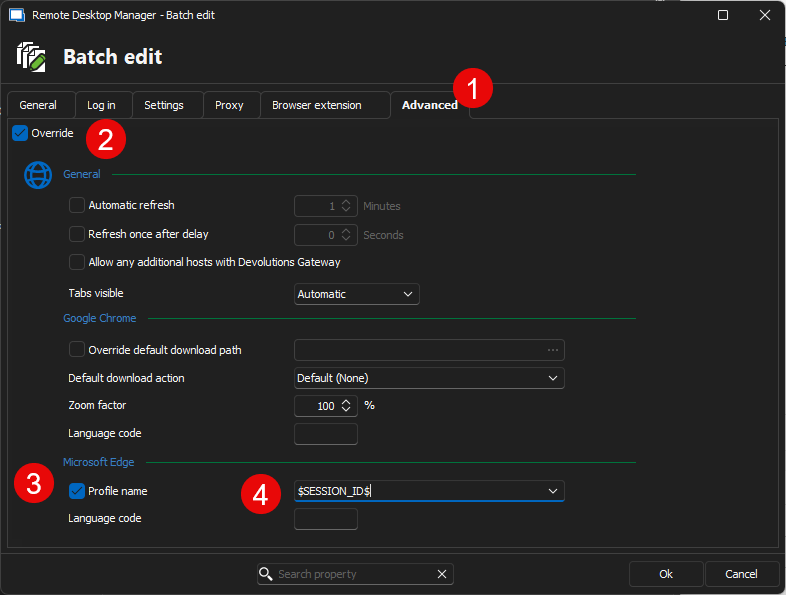
$SESSION_ID$via batch edit (see images below).- Multi-select your Chrome web sessions
Right-click>Edit>Batch edit>Edit entries (session type settings)...- Select
Advancedtab > checkOverride> checkProfile name> enter$SESSION_ID$
New option
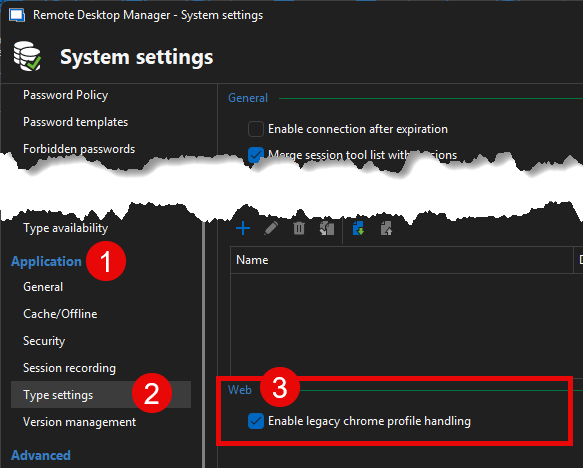
Start the next release you will be able to use the new Enable legacy Chrome profile handling feature.
You have two options
- Via GPO
%Root%\SOFTWARE\Policies\Devolutions\RemoteDesktopManager\EnableLegacyChromeProfileHandlingset value 1- Note: this will work with any data source type but is your only option for any data source that do not support system settings (ex: Hub, SQLite, XML)
- Via
System settingsAdministration>System settings>Application(section) >Type settings>Web(section) > checkEnable legacy Chrome profile handling(see image)- SQL Server & DVLS data sources only
Best regards,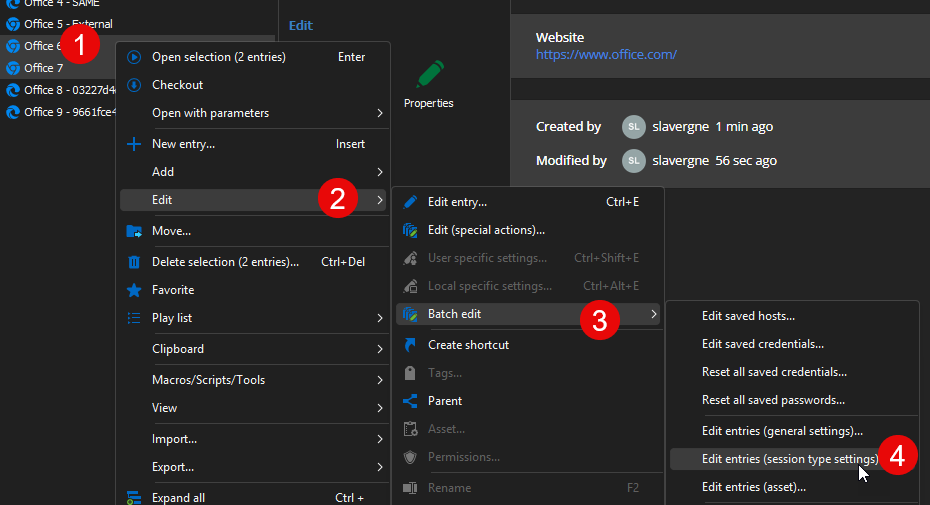
Stéfane Lavergne
01860472-eb64-4007-adcd-959e58697588.png
64cbaf9e-7717-4519-afb0-e4484513cc60.png
1d46b7a5-5990-4f6a-a443-abb902864454.png