RDP Kerberos authentication

Hi, I am experiencing an issue with RDP authentication using Kerberos. The error presented by RDM is:
Unable to connect to host dc.conteclab.local
ERRCONNECT_CONNECT_TRANSPORT_FAILED (0x0000000D)
The domain in question has been configured to disable NTLM and enforce Kerberos as the only possible method of authentication.
Actions Taken:
• A configuration file /etc/krb5.conf was created with all the necessary domain data for Kerberos, including the resolution of SRV records.
• FQDNs are being used instead of IP addresses.
• A successful test was performed using the kinit command.
• Microsoft’s Remote Desktop Manager application was downloaded and used successfully to access the Windows server via RDP.
The version of RDM is 2024.2.9.2 (August 8, 2024).
A detailed log of the login attempt is attached.
Thanks in advance
rdm-logs.txt
All Comments (6)
Hello
I'm sorry to hear about the problem. Your logs confirm that only NLTM is being attempted.
We ship our own SSP module to enable kerberos on platforms other than Windows. In the settings for one of your RDP sessions, can you switch to the "authentication" tab and under "SSPI" change the "SSPI Module" to "Portable".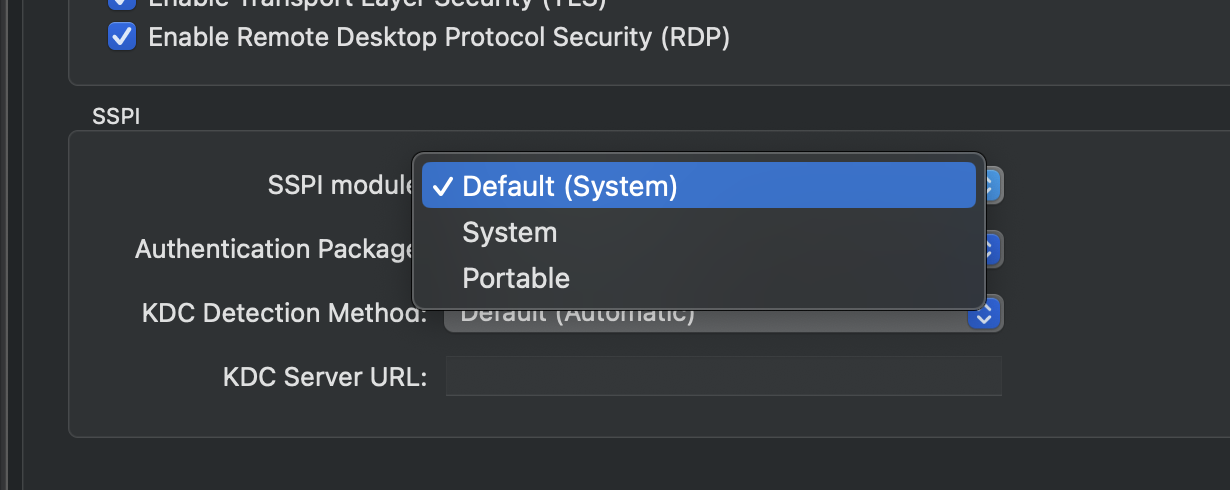
You can also explicitly select kerberos for the authentication package to skip negotiation.
I believe it should work, but if you try that and still experience issues, let me know. Let me know also if something isn't clear.
Thanks and kind regards,
Richard Markievicz
Screenshot 2024-08-21 at 09.16.24.png
Richard thanks for your response, after the changes the problem persists, this is my RDP configuration:
I have create a new RDP profile and set up the SSPI to portable and also got the same error message, attach is the log file that i think is the same than before.
Regards
logs2.txt.zip
Hello
Thanks for the follow up. The log is actually different; we're attempting kerberos but not finding the KDC. We don't use the information in the krb5 configuration but will try to locate the server using DNS SRV records.
So, as a next step, let's make sure this actually works and then drill into why the KDC cannot be found.
You can try setting KDC detection method to "Explicit" and then providing the server URL in the next field; e.g. tcp://my-domain-dc.my-domain.com:88 (I don't think you need to be explicit with the port number unless it's not standard, but for now include it anyway).
Let me know if that unblocks the connection. If so we can look further at why the KDC can't be resolved automatically.
Please let me know if something isn't clear
Best regards,
Richard Markievicz
Hey Richard it work just fine doing a declaration like tcp://my-domain-dc.my-domain.com:88, thank you very much for your support.
Now to have some fun with my RDM for macOS :)
Kind regards
Hello
I'm glad that's working for you. If you're interested in seeing why the automatic KDC detection isn't working, please try running the following command on your terminal and send me the output:
dig {realm}.{tld} srv
For example: `dig mydomain.com srv`
Please let me know any further questions or comments
Kind regards,
Richard Markievicz
Hi,
Reviving this old thread, but I've faced similar issues. Configuring an explicit KDC URL like tcp://my-domain-dc.my-domain.com:88 as suggested previously does solve the problem as a workaround.
Best I can tell from my troubleshooting, it seems to come down to KDC selection seems to be entirely random (round robin?) out of all DC:s in the domain, rather than using site-aware "DC locator" logic to actually pick a correct, reachable, domain controller when multiple AD sites are involved.
The effective result of this is when a DC in an incorrect site is selected (that isn't reachable by the client), the connection fails. When a correct DC happens to be selected, it works.
A lookup of SRV records at for example `_kerberos._tcp.corp.contoso.com` would return results with all domain controllers in the domain. A Windows client would to my understanding follow this up with a UDP LDAP "ping" to determine its site based on its subnet configuration, and pick a DC in its own site through something like querying for _kerberos._tcp.{sitename}._sites.corp.contoso.com.
Could Devolutions RDM be extended with proper site aware logic for its automatic KDC selection? Or perhaps just retrying with another DC if the first one can't be reached.