How to sign in to a different account?

I've been using the app for years. Recently I've changed my email provider. I've read, that it's impossible to change email address, so I've deleted my old Devolutions account and created a new one. But I can't sign in to the new account in my Remote Desktop Manager. Every time I click Sign in there's already my old email inserted and it wants me to create a new account. When I login to my new account on this website, nothing goes back to the app, it just keeps waiting.
All Comments (2)
Hello Woocash,
Thank you for contacting us on that matter!
Could you please verify the information below?
- When RDM is opened, under File > Devolutions Account, Enter the right email under Settings.
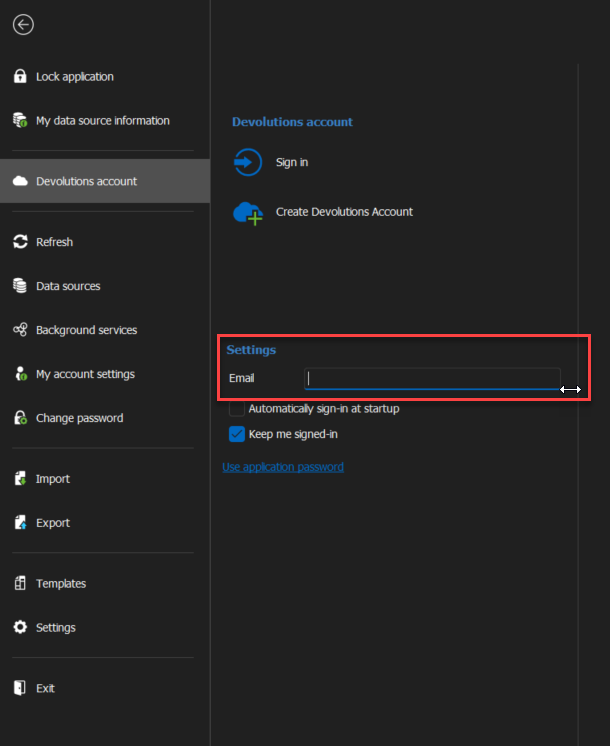
- If you don't have the same menu as the screenshots above, go to File > Settings > User Interface > Main Header > Ribbon instead of Menu Bar, then do the same steps as shown above. *You can reconfigure the main header to the Menu bar afterwards*
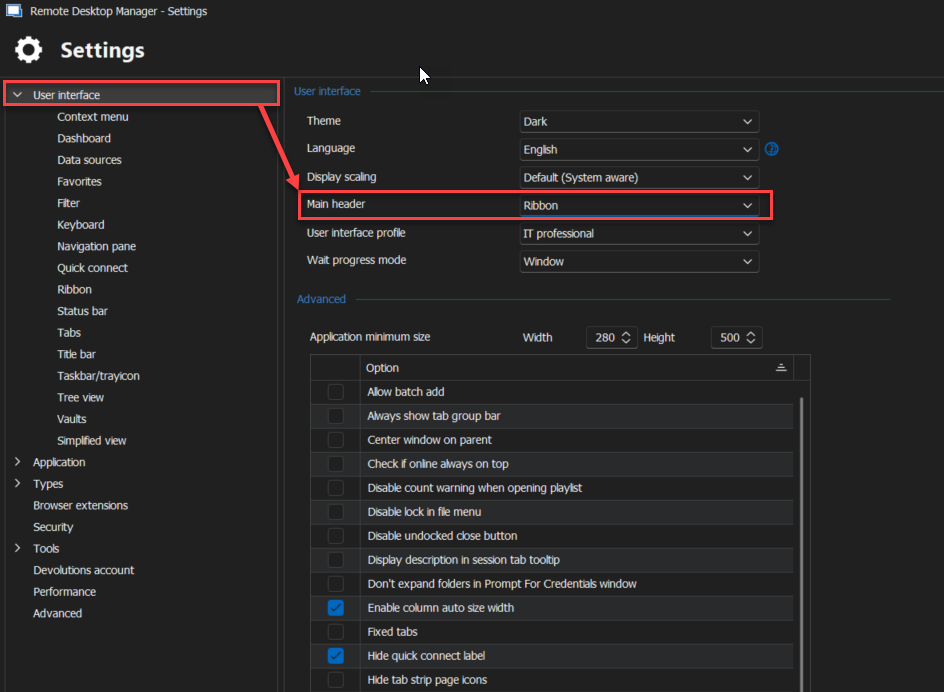
Please let us know if the steps above are not working. If you have any other questions, feel free to let us know.
Best regards,
Maxim Robert
2024-08-13_11-43-05.png
2024-08-13_11-40-39.png
Great, thanks. I had had the ribbon off for years and couldn't find this setting. I've signed in now and it works fine.