$DYNAMIC_PORT$ variable for entries using gateway tunnel
$DYNAMIC_PORT$ variable for entries using gateway tunnel
0 vote

Hello,
Would it be possible to extend the use of the variable called $DYNAMIC_PORT$ to return the local bind point port for gateway tunnel connections? Currently it appears to only be applicable to entries that use an SSH VPN with dynamic port configured.
The use case is to be able to reference a dynamic gateway tunnel bind point (i.e. 127.0.0.1:$DYNAMIC_PORT$) as an argument for an entry of type 'Powershell (local)'. This would accomodate using PowerShell remoting from a machine that needs to indirectly connect to a target via a gateway server.
Please let me know if you would like more info.
Thanks
Joe
400f71cb-351b-448a-95bf-12754245cfa3.png
All Comments (21)
Hello Joe,
Thanks for the request. We will analyse this and get back to you when possible. This is interesting and as you say it would make using the Gateway easier with this versatility.
Regards,
Hubert Mireault
Hello
The problem here in the simple case is that the gateway tunnel supports multiple listeners in a single tunnel; so there might be multiple local ports listening. This doesn't align well with DYNAMIC_PORT which obviously only works with a single listener.
I'm going to investigate ways we can support this, as I agree with my colleague that this would be very useful, but ultimately the solution might not use the dynamic port variable.
I'm guessing that you typically just have a single TCP listener in your tunnel connections?
Thanks and kind regards,
Richard Markievicz
Hi Richard,
Thanks for your assistance with this. Yes currently I'm using tunnel entries with a single static bind point.
Possibly the simplest solution is to just map $DYNAMIC_PORT$ to the first bindpoint in a tunnel.
A more elegant approach maybe to add a dropdown box on the tunnel settings of an entry to choose a specific bind point from the selected tunnel for which to override the $HOST_WITH_PORT$ variable.
Another idea is to create a variable (i.e. $TUNNEL_BINDPOINTS$) that contains all the tunnel binding info as a delimited string, similar to what happens with the existing variable $INFORMATION_SERVER_ROLES$. This approach could be useful in the sense that a script which is passed the variable via an argument could enumerate all the bindpoints available and decide which one/s to use.
The flexibility of being able to choose from any/all of these could be useful depending on the usage scenario.
Pls let me know if you would like more info.
Thanks
Joe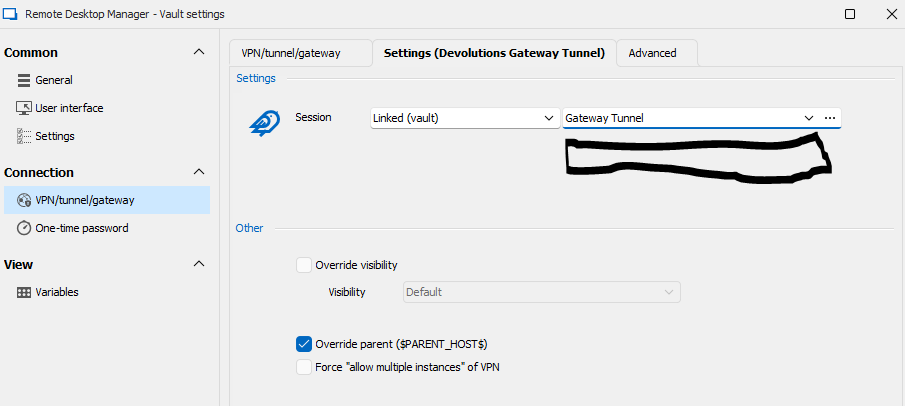
fb04f2b0-ee05-48be-8b59-1b9d30b8c2ee.png
Hello
Thanks for the information and sorry for the slow reply. I wanted to update you that we are working on this, and the approach taken will likely be similar to your final suggestion - putting all the bind points in a delimited string that you can parse on your side. I know that it shifts some of the work onto the script but as you wrote, it will be the most flexible and avoids either bloating things with an additional setting or potential confusion from only providing a single bind point in the variable.
I'll update this post again once I have some more information for you, but in the meantime please don't hesitate with additional questions or comments.
Kind regards,
Richard Markievicz
sounds good, thanks RIchard.
Joe
Hello Joe
I've had some time to do a little work on this, but won't be able to merge any changes for a week or two while we stabilize the initial 2024.3 release.
In the meantime I did want to try and solicit some feedback, I am not a power user of PowerShell, scripting or variables inside RDM. So I wanted to give you an idea of things and see if this will work for your use case.
First, a basic example tunnel configuration: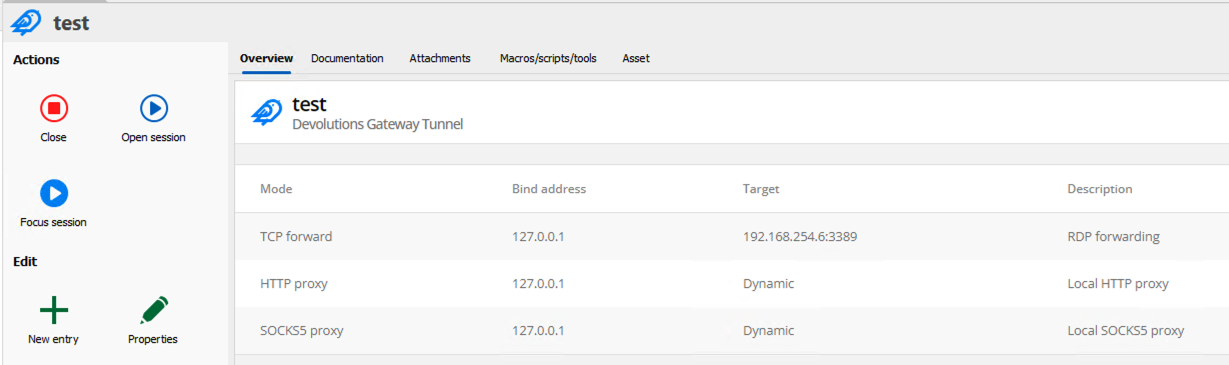
PowerShell configuration. The PowerShell session is using the tunnel as a VPN. In this case, the new variable is temporarily named "FOOBAR":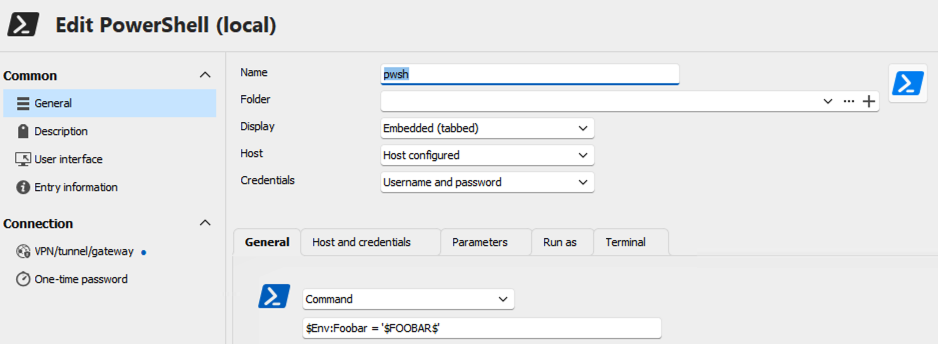
Once the tunnel is up and the session is opened, the contents of the variable are available as JSON. Note that we have access to the dynamic port information: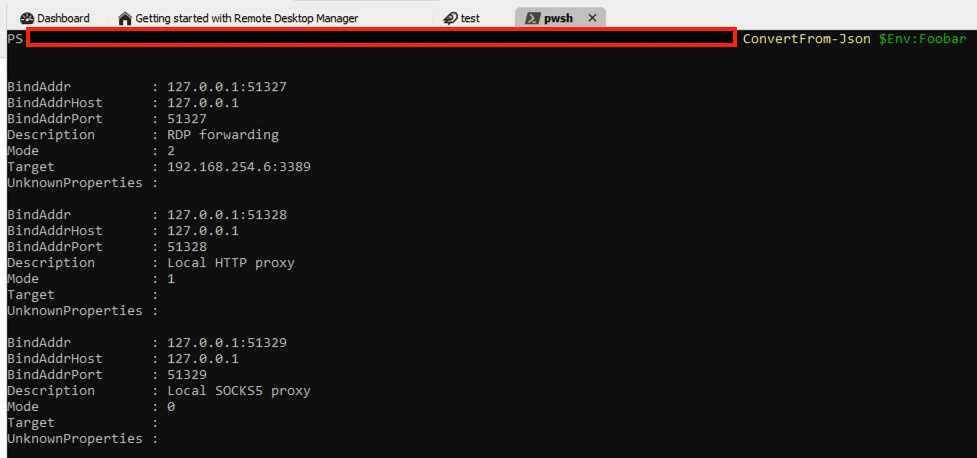
Please forgive the simplistic example but I'm not sure exactly how a real world use case would look.
Looking forward to your feedback, questions or comments
Best regards,
Richard Markievicz
Screenshot 2024-09-26 at 10.53.42.png
Screenshot 2024-09-26 at 10.53.32.png
Screenshot 2024-09-26 at 10.53.07.png
Hi Richard,
Thanks for your work on this. An example use case is a powershell script that connects to multiple domains and queries dormant user/computer objects in AD in each, then outputs the results to a csv file on the local computer where RDM is running. If this script is being run on a machine that doesnt have direct connectivity to the respective targets, it needs to use a gateway tunnel and connect via the local bind point/s instead. In order to do this with dynamic ports, the script needs to enumerate/identify the local bind point/port for each target. Currently I've been using statically assigned bind ports, but this isnt ideal as sometimes the assigned port may allready be in use by another application.
Hopefully all that makes sense, if you would like further clarification, please let me know.
Thanks
Joe
Hello
Thanks for the extra information.
For the next release (sadly it missed today's 2024.3.12), there is a new variable GATEWAY_LISTENERS that will contain all the Gateway Tunnel bind information as JSON.
I hope this will work for you. I'll try to post back here when the next version is available. Once you have a chance to try it out, we appreciate any feedback or questions.
Kind regards,
Richard Markievicz
Hi Richard,
Thanks for the update. Looking forward to testing this out when it becomes available.
Joe
Hello Joe
The latest release (2024.3.13) contains this feature. Please let us know any feedback you might have.
Thanks and kind regards,
Richard Markievicz
Hi Richard,
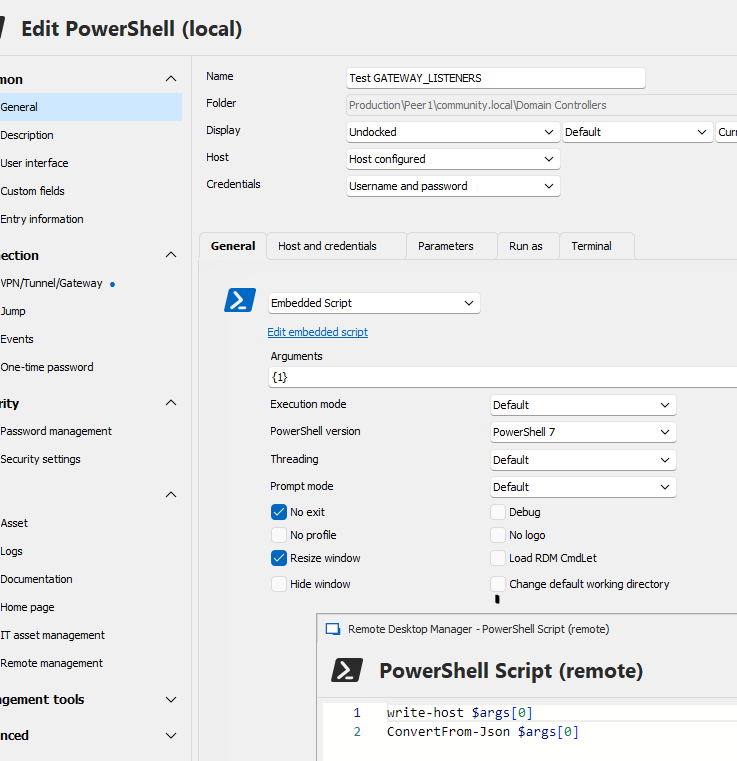
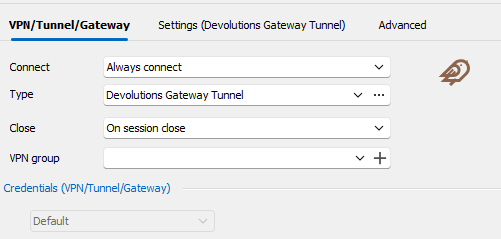
Thanks for your help with this, and aplogies for the delayed response. Finally got around to testing the new variable, however it doesnt seem to be working with RDM 2024.3.13.
Joe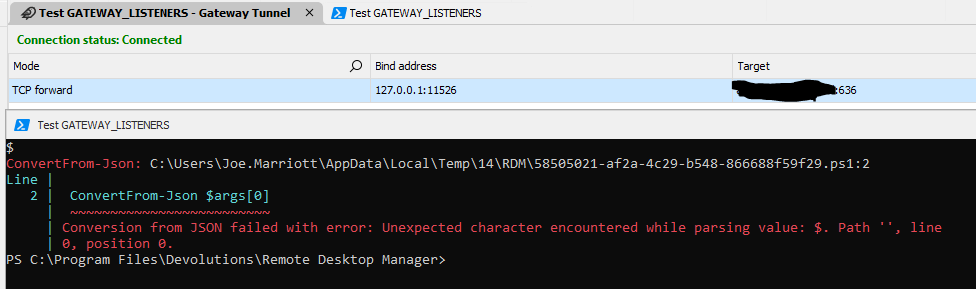
0fe85c25-8b89-4acc-b988-e5b7dad421e0.png
53050917-6da9-42c0-8b86-3897b0d450c2.png
25b2587d-eaf8-4f4d-b4de-98596b68fe7c.png
8c82d7c7-a2f2-4214-a03b-aabd842b9aa5.png
Hello
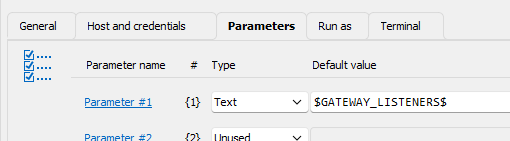
My apologies for that - I've only ran through the case where I referenced the variables directly in the embedded script, not using parameters (as I wrote above - I'm not a power user of PowerShell, variables or scripting in RDM - it's no excuse, but simply my area of expertise is more on the Gateway side of things).
Fortunately this is a straightforward fix, it's simply that the variable is not getting resolved when used in a parameter. I'll commit a fix for that and it will be in the next release, and I'll try to update this post once that's available. One warning though, that you will need to enclose the argument in single quotes to escape the JSON in the variable.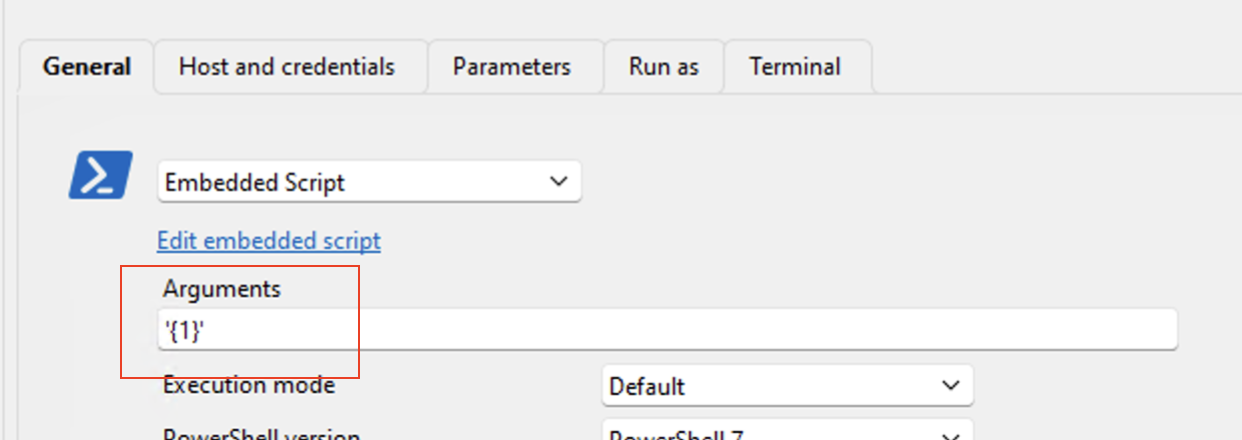
Once again, I apologize for the oversight and thank you for your patience
Kind regards,
Richard Markievicz
Screenshot 2024-10-16 at 21.13.27.png
Thanks Richard. As you mentioned, the variable does resolve if its used explicitly in the Arguments field, but enabling it for use as a parameter will be great too.
Also fyi, noticed that it isnt listed in the variables section of an entry properties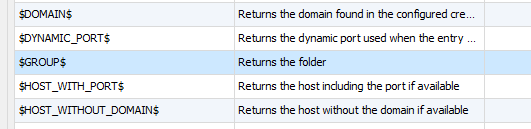
52d54ed5-7896-432f-afdf-eab0ad8c00a4.png
Hello
Just to let you know that 2024.3.15 is released, and this variable should now work when used in a parameter (remembering to single-quote the argument placeholder).
Please let me know if something isn't working right after updating.
I'll work on adding this to the variable list in the entry properties.
And as always, don't hesitate with further questions or comments!
Kind regards,
Richard Markievicz
Hi Richard,
Have been working with this new variable in some PowerShell scripts, and its definetely proving very handy with gateway tunnels that have multiple targets.
However, I think there maybe a bug where when the local bind address port is set to Dynamic, the respective value in the passed variable doesnt match, usually its +2 or +3 from the port value shown in the tab for the open/connected tunnel. Could you check if you see the same behaviour pls? Using RDM 2024.3.16.
Also, I wanted to ask what the purpose is of being able to configure/change the local bind address for the TCP forwarding mode. In what cases would one need to change it from 127.0.0.1/localhost?
Please let me know if you would like any additional info.
Thanks
Joe
Hello
You're quite right, my apologies while we work through some of these teething issues.
I had to adjust the logic for generating the dynamic ports so they were resolved before the VPN opens (to make them available in the variable, which is evaluated earlier in the connection process) but there's clearly a mistake. I can reproduce the problem easily.
I'll work on a fix for this and let you know once I have an update. Thanks again for your patience on that and sorry for the inconvenience.
Kind regards,
Richard Markievicz
Hello again
This is resolved for the next release, which I'd expect to be available within a week or so.
Thanks again for your patience and please don't hesitate with further questions or comments.
Kind regards,
Richard Markievicz
Perfect, thank you Richard.
Hello again
This should be all corrected in 2024.3.17. Please let me know if you have any other problems or feedback.
Best regards,
Richard Markievicz
Perfect, thank you Richard. Have confirmed the dynamic local port is acurately reflected in the variable now.
Hi Joe
Good news, I'll mark this topic as resolved, Please don't hesitate to post again with further feedback.
Kind regards,
Richard Markievicz