Make it easier to specify alternative credentials when connecting
Make it easier to specify alternative credentials when connecting
0 vote

We're former ASG (Rocket Remote Desktop) users moving to Devolutions RDM. One of the features of ASG that we used a lot was the ability to connect to a session with alternative credentials.
Here's a screenshot showing how easy that is in Rocket—within three clicks, we can connect to the server ADFS1 with the username dobiminer. 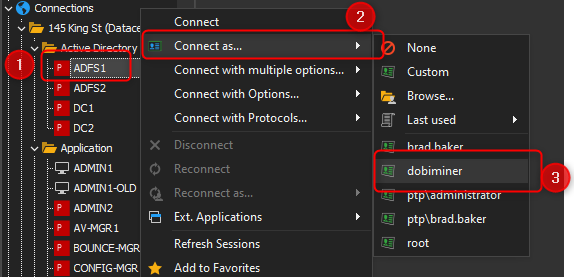
Devolutions RDM has this same feature, but it's much more cumbersome to use. I need to:
1) Right-click the connection
2) Go to "Open with Parameters"
3) Then go to "Open (selected credentials)..." (At this point Rocket would be connected) but for RDM we have more steps: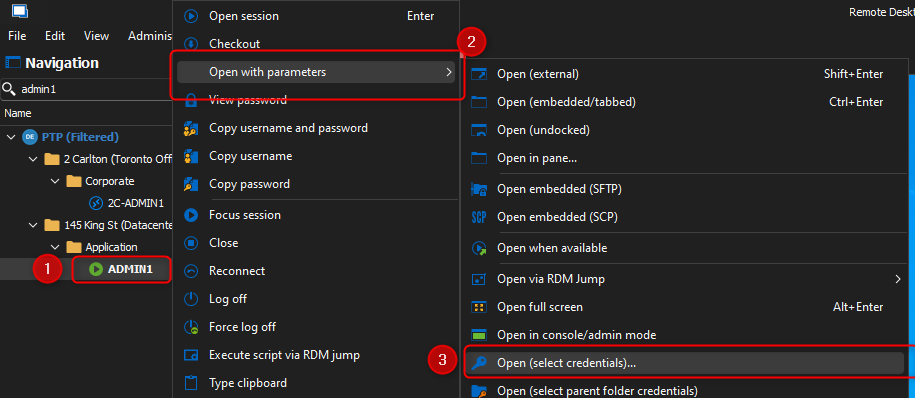
4) Wait for the credential list to open then click on User Vault
5) Then click the username I want to use
6) Then click on ok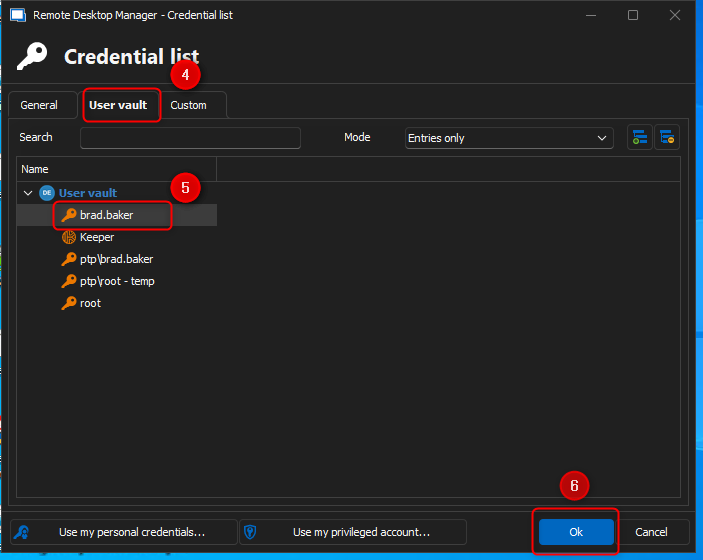
A few extra clicks and a few extra screens get the job done - it's not as if a few more steps will kill us, but I find having the credentials in the context menu is much more efficient and convenient and allows us to respond just a little bit faster with Rocket vs RDM.
d30245ea-8d81-4628-b4cc-35bf867f3a76.png
79ab0292-7482-4f04-a301-6a2983601ad0.png
8d829af3-1623-4f8b-b130-1b05c6261589.png
All Comments (4)
Hello,
Thank you for the suggestion.
For a little more context, in your scenario, do you always want to select a credential from your user vault? If so, we could add a similar flow to what you've shown with Rocket Remote. I'm just worried about showing the shared vault's credentials as well, as that might make the menu unwieldy. Maybe we could add some options to configure where the list is populated from.
In the mean time, you could configure a keyboard shortcut for "Open (select credentials)" to save a few clicks. You can do so by going in File > Settings > User Interface > Keyboard, and configuring the keyboard shortcut to the key combination you want: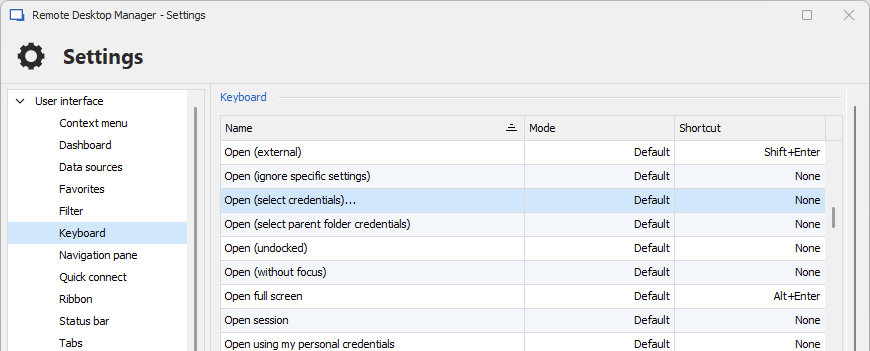
Let me know if this helps.
Regards,
Hubert Mireault
3270d975-1079-405e-8fcd-5523b4b909be.png
For a little more context, in your scenario, do you always want to select a credential from your user vault? If so, we could add a similar flow to what you've shown with Rocket Remote.
We are new to RDM so I'm a little hesitant, but I think so - that sounds like what we want.
I'm just worried about showing the shared vault's credentials as well, as that might make the menu unwieldy. Maybe we could add some options to configure where the list is populated from.
I can understand that - the menu is already a bit unwieldly. Maybe a way to solve the problem of having too many vault credentials in the context menu is to favourite/star the ones you want in the menu. So you can select up to 10 (or whatever fits reasonably in the menu). For us, we have fewer than 10 connections we frequently switch between.
In the mean time, you could configure a keyboard shortcut for "Open (select credentials)" to save a few clicks. You can do so by going in File > Settings > User Interface > Keyboard, and configuring the keyboard shortcut to the key combination you want:
This is super helpful! Thank you! I'll set that up immediately.
You bring up a good point that slipped my mind: the favorites could be a great way to populate this menu. You can already configure entries as favorites by selecting your entry > right click > Favorite in the navigation pane (there is a dedicated tab for seeing just your favorite entries in the navigation pane, as well). Leveraging the favorites for this feature seems like a no-brainer to me.
I will open a ticket to add this. I'm still not sure whether we will have this by default or not, but worst case you will simply need to enable an option in File > Settings. I can't give you an estimate on when we will be able to work on this, but we will post here once we have an update.
I hope that the shortcut can help you for now to make things a little smoother.
Regards,
Hubert Mireault
Hello,
We've implemented a new Open as mode (which will be located directly under the Open with parameters in the context menu). By default, it will display accessible favorites credential entries to directly open with (this can be changed to other modes in File - Settings - User interface - Context menu - "Open as" mode).
This should provide the desired behavior, and you can expect this to take effect with our upcoming 2025 version.
Regards,
Jafran Majeau