Remote PowerShell Script entry needs Arguments property to utilize configurable parameter properties
Remote PowerShell Script entry needs Arguments property to utilize configurable parameter properties
0 vote

Hello,
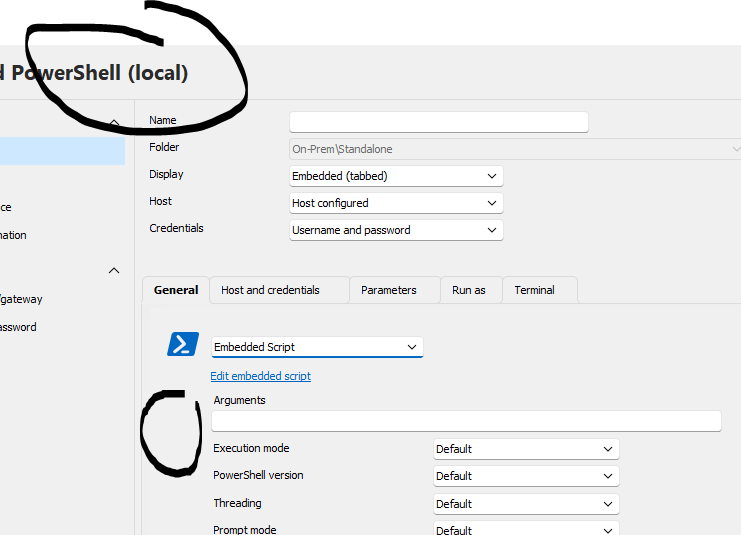
The remote powershell script type entry includes parameter properties, which implies they are supported for use, but there is no capability to pass the parameters into the embedded script via an Arguments property on the entry, effectively making the parameters redundant. Comparatively, the Local Powershel Script type entry does have an Arguments property where the parameters can be specified to be be passed into an embedded script.
Could you add an Arguments property to the Remote PowerShell Script type entries please?
Thanks
Joe
All Comments (7)
Hello,
Thank you for the request. I'm not sure why it's missing, as the macro-type remote powershell entry also has an arguments field. Either the entry is unclear, or it's not currently possible to pass them. We will investigate and get back to you when possible.
Regards,
Hubert Mireault
Hello,
Could you please tell us which version of RDM you are using?
I have downloaded our latest version of RDM and looked at the "PowerShell Script (remote)" entry type and it has the exact same properties as the local version of the script.
Please let us know if this issue is already fixed for you in the latest version of RDM.
Best Regards,
Michaël Beaudin
Using 2024.2.17. The remote variant has a 'Configuration' property but that doesnt seem to accept variables. The local variant doesnt have a 'configuration' field, but does have one for arguments.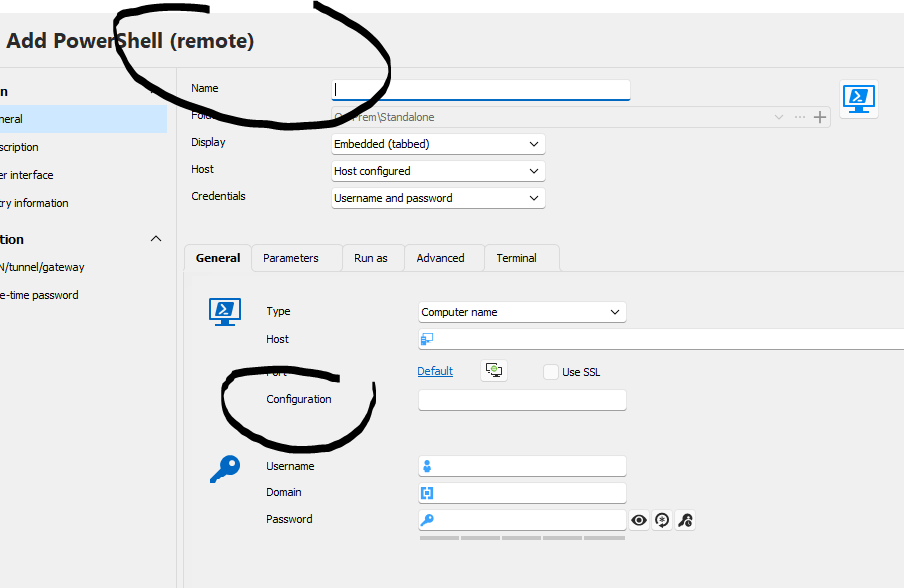
7e5e05dd-4a7b-4123-a77e-621036becb30.png
38323591-b5a7-47d6-8ac8-fa959501dde6.png
Hello,
Sorry about this, I thought you were talking about the Powershell "Macro/Script/Tools" entry type and not the Powershell "session" entry type.
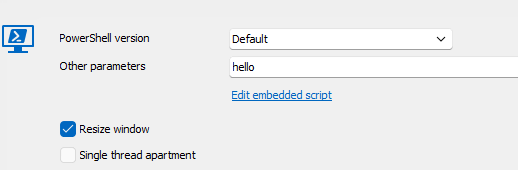
The Powershell (Remote) entry indeed does not have the arguments field and instead has the "Other Parameters" field in the advanced tab which seems to intend to do something similar but from looking at the code it does not build the script exactly the same way as the arguments field.
We will create a ticket to normalize this and keep you updated on the progress.
In the meantime, please let us know if the "Other Parameters" works for you as an alternative solution (it should simply append whatever you type in the field after your command).
Best Regards,
Michaël Beaudin
Hi Michael,
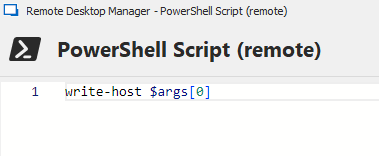
Thanks for the info. I tried using the 'Other Parameters' field to pass an argument and it does seem to pass it, but not in a usable way. It results in error 'positional parameter cannot be found that accepts argument'.
Joe
c5b9c2e7-b3f7-4b83-b5d1-ef988d81a95e.png
88e7aabf-f0c2-4c79-87cd-d7390d863d17.png
be27366b-dba1-4ef7-84b8-196c2390f140.png
Hello,
Thank you for testing this. We have created the ticket to add the "Arguments" field. We will let you know when the change is done.
Best Regards,
Michaël Beaudin
Hello,
Thank you for being so patient!
I'm pleased to inform you that a new version of RDM (2026.2.12.0) has been released, featuring the requested feature.
Latest Version: Download RDM
Please let us know if this works or if you encounter any issues.
Best regards,
Maxim Robert
