SSH Session logging - variables for logfile name creates folders instead
SSH Session logging - variables for logfile name creates folders instead

Hi all,
I'm quite new with RDM and would like to ask you if I'm doing something wrong or there is an issue.
For SSH session I have configured Template which I can easily use for QuickConnect SSH sessions (just enter IP address and I'm connected).
However, I do have a requirement to log all SSH session printable outputs to a files. Which I've done as well with global path settings (Settings > Types > Terminal > Logging) and then within template itself within SSH Shell > Logs. Here I can configure "Log filename" where there is an option to use available Variables.
Whenever I combine two variables within logfile name instead of logfile name following variables structure it does create folders instead and very last piece is used as file name.
Example of Log filename: $QUICK_CONNECT$_$DATE$.log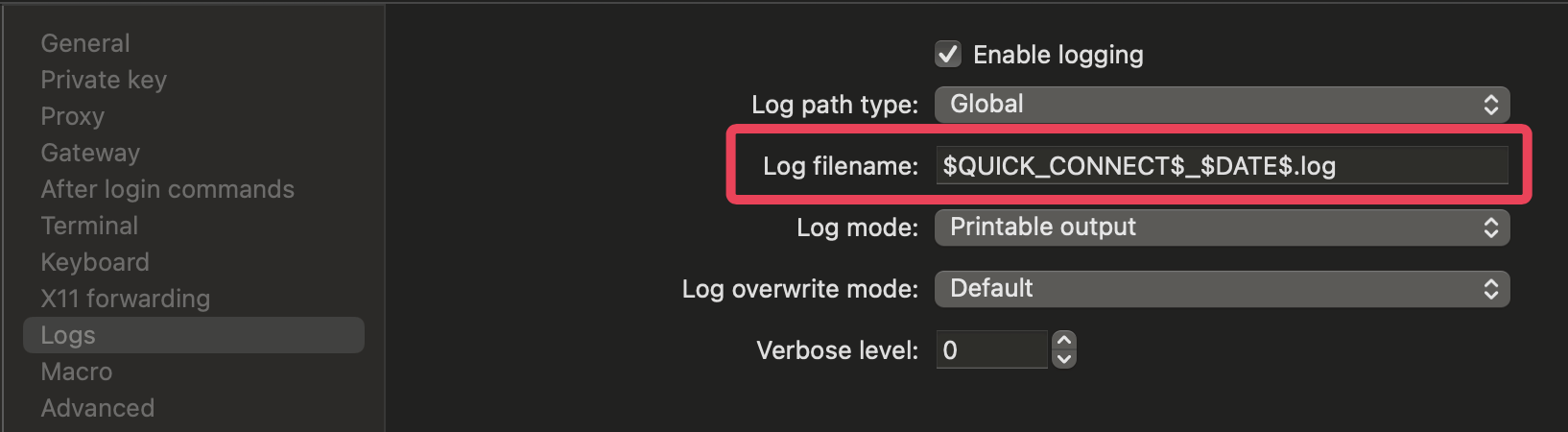
I would expect to have filename "10.240.19.242_82024.log" but instead folders are created followed by filename "2024.log".
I'm not sure if this is same behavior on Windows based system, as I'm using RDM on MacOS.
So, in nutshell I can easily have logfiles created for all quickconnection sessions or normal sessions, but "filename" creation is an issue as Variables are not working properly for me.
Any clue or similar behavior is observed, or I used available Variables incorrectly?
Thanks
Martin
3b895fc3-81fa-498c-8c3e-63b40c20fbd3.png
b8d8da51-7abf-4675-8681-f65c69758533.png
All Comments (6)
Hello Martincz,
Thank you for contacting us on that matter!
After testing and contacting the development team, we have been able to reproduce the issue and a ticket with the development team of Mac has been opened. We will let you know with more information as soon as possible.
If you have any other questions, feel free to let us know.
Best regards,
Maxim Robert
Hi Robert,
Heh, looks like a bug for MacOS.
Though do you know if "same" behavior is happening for Windows platform as well?
Thanks,
Martin
Hello Martin,
Thank you for your response!
After testing the behaviour on Windows, it looks like the problem only concerns MacOS. Here's our result on Windows after configuring it like on MacOS.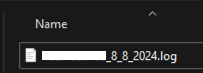
If you have any other questions, feel free to let us know.
Best regards,
Maxim Robert
ad113274-8059-4677-853e-648e76a6afa7.png
Thanks a lot. Need to wait for a new update for MacOS to get this fixed. Hopefully soon.
Thank you,
Martin
Hello,
A new version of RDM Mac is available (2024.2.10.3) and if should have fixed your issue.
If there's anything, don't hesitate to communicate with us.
Best regards,
Michel Lambert
Hi Michel,
Thank you, quickly updated my version and tested log file creation on MacOS and looks to be fixed, filename contains defined variables, and it is no longer structured into folders as previously. That was a quick fix ;-) Thanks, appreciate.
Martin