RDM auto login with proxmox

I am trying to auto login to a proxmox login page and I was able to get the fields for username and password, but I can't get the Login box to select. Any idea how to get RDM to submit the request after autofill. I have selected submit and enter and neither work. I have attached a screenshot of the login page and this is what is shown for the code where the login button is. I have also tried putting in the button id.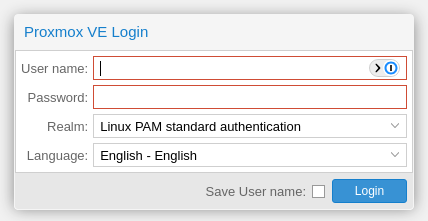
<a class="x-btn x-unselectable x-box-item x-toolbar-item x-btn-default-small" style="min-width: 75px; left: 311px; top: 0px; margin: 0px;" hidefocus="on" unselectable="on" role="button" aria-hidden="false" aria-disabled="false" id="button-1070" tabindex="0" data-componentid="button-1070"><span id="button-1070-btnWrap" data-ref="btnWrap" role="presentation" unselectable="on" style="" class="x-btn-wrap x-btn-wrap-default-small "><span id="button-1070-btnEl" data-ref="btnEl" role="presentation" unselectable="on" style="" class="x-btn-button x-btn-button-default-small x-btn-button-center x-btn-text"><span id="button-1070-btnIconEl" data-ref="btnIconEl" role="presentation" unselectable="on" class="x-btn-icon-el x-btn-icon-el-default-small " style=""></span><span id="button-1070-btnInnerEl" data-ref="btnInnerEl" unselectable="on" class="x-btn-inner x-btn-inner-default-small">Login</span></span></span></a>
Proxmox-login.png
All Comments (1)
Hello,
Thank you for reaching out to Devolutions support.
Did you follow this documentation to manually find and add the ID?
https://docs.devolutions.net/rdm/mac/kb/rdm-windows/how-to-articles/otp-autofill-workspace-browser-extension/
You should be able to locate the login button ID by following this documentation
It is also possible that Proxmox blocks RDM when the application tries to push the login button. When this happens, we usually recommend opening the website entry externally and using the workspace plugin.
If you have any additional questions, concerns, or require further support, please let me know, and I'll be more than happy to help.
Best regards,
Carl Marien