RDP Sessions Disconnect Unexpectedly

I am currently in the process of running a new round of testing for this issue on my machine, which I have experienced for probably over a year at this point but I honestly am unsure what the root cause is.
Problem Description:
I have used Remote Desktop Manager for a number of years now both at work and at home and at work I never seemed to have any issues with keeping long-lived RDP Sessions open over a local network.
Here at home however, I have a primary desktop machine plus 3 additional machines running Windows 10 Pro / Windows 11 Pro and I'd like to have Remote Desktop Manager keep RDP Sessions to those machines active.
This used to work without issue from what I recall here at home, however probably for about a year now, I'll open up sessions to these 3 machines and leave those open for the day and when I come back later in the day I'll discover that one or more of the machines are now disconnected.
Yesterday, I read through the suggestions here (https://forum.devolutions.net/topics/41193/any-way-to-capture-rdp-disconnects-to-allow-for-reconnects-when-servic#187366) and enabled the "Keep tab page opened on disconnect" option under the User Interface area for the connections and also enabled the "Smart Reconnect" mode under the Advanced tab and also went ahead and even saved my password in the connection to further help with any possible automatic reconnection behavior, but even with those options enabled it doesn't seem like the "Connect when available" option shown below is utilized automatically?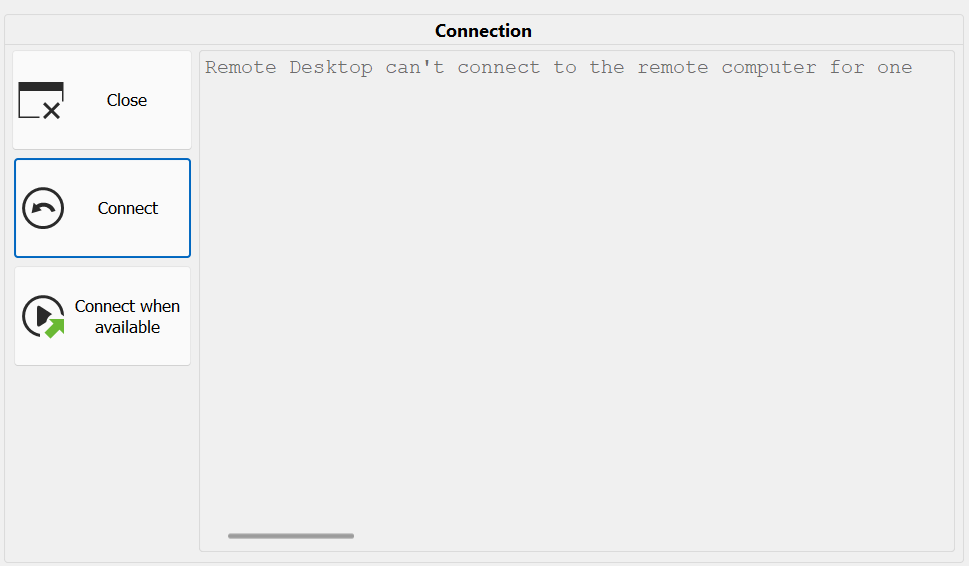
I am currently collecting some additional data to share here since it's been a while since I last tried to figure this issue out, but just to share a few details of previous tests I have used the Net Uptime Monitor program to confirm it isn't an internet issue, but that mainly checks for external internet activity.
Aside from that, the current network structure is <main eero 6 Pro unit> -> primary desktop (wired) and that main eero 6 Pro unit is connected to another eero 6 Pro unit wirelessly across the room where a switch is connected that allows for the 3 other desktops to be connected to it. The connection between the two eero 6 units is strong and I don't have any reason to believe that there is an issue between those two. I've also swapped out the network switch previously that the desktops are connected to which also didn't improve the behavior either.
The other possible factor here is that even though the desktops are local on my home network, I am utilizing ZeroTier and am connecting through the private IP addresses on the ZeroTier network to the other machines.
As additional tests I am running a new one with the regular Windows RDP client to one of the desktops to see if it will stay online or disconnect as the ones via Remote Desktop Manager do currently since it's been a while since I ran that test. To rule out ZeroTier as a factor I will also swap over to using the regular internal home network IPs once I see the next round of disconnects occur here in Remote Desktop Manager and report those results as well once I have them.
14532d9a-9812-44b8-b9ea-285a517c263a.png
All Comments (4)
Running one of the connections directly through the regular Windows RDP client and the ZeroTier network does still lead to reconnect behavior occurring as I saw this popup appear for that connection twice over the last half hour already: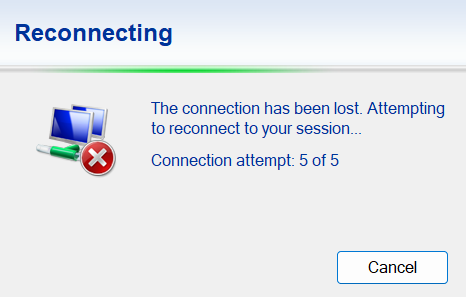
Probably the only minor difference between the regular client and Remote Desktop Manager though is seeing that the multiple attempts are occurring and I thought that it was going to fail completely after getting to the "5 of 5" spot as shown above, but then after a few seconds the connection established itself again and the desktop appeared.
To rule out the ZeroTier usage I've swapped things over to using the regular internal home network IP instead for the same connection to this desktop and will continue to observe the behavior throughout today and will run similar tests from within Remote Desktop Manager if I notice any new disconnects from the ZeroTier-enabled connections I have open for the other 2 desktops at the moment.
9cb0ecd4-6f25-4f1f-9048-3b0c69ebb06d.png
Hello,
Thank you for reaching out to us regarding this,
Since you're also experiencing the issue while using MSTSC, I can only assume the issue is related to the remote host itself or your connection to it from your home network; this will make troubleshooting difficult for us.
You could go under the "General" -> "Advanced" section of your RDP entry "Properties" and change the "RDP Version" to "FreeRDP (Latest)" to see if this helps, but due to the fact that you're also experiencing the behavior outside RDM, I'm not too optimistic it will.
Let me know,
Best regards,
Samuel Dery
Thanks Samuel for the reply!
I'm currently leaning in that direction as well as writing things out earlier in the replies above was helping me to conclude that it might be more on the ZeroTier side of things in this situation.
Since my last reply above, one of the other ZeroTier-enabled connections within Remote Desktop Manager disconnected so I've switched that one to use the regular internal network IP here on my home network instead and I'll continue monitoring but given my prior tests ruling out the switch connected to those other desktops and the home network in general being reliable, it does appear this is likely going to point towards ZeroTier + RDP not playing as nicely together as I would like them to, although that wasn't typically an issue in the past.
I did find the following ZeroTier Forum discussion with some relatively recent replies, but no direct solution that seems to indicate I might not be alone however with the experience I've been having so I'll probably switch over to help add to the discussion over there:
https://discuss.zerotier.com/t/remote-connection-disconnect-freqeuntly/21058
Hello,
Thank you for your reply,
No worries, if you have further questions for us regarding this, feel free to let me know,
Hopefully, you are able to resolve your issue!
Best regards,
Samuel Dery