RDM only shows a small subset of Bitwarden credentials

Running 2024.2.16.0 on Windows, for the past few days my stored Bitwarden credentials are only able to see a small subset of the entries of my vault - I cannot seem to see anything that differentiates the entries it can and cannot see. The only thing of note is, for "reasons", is that I'm connecting to my free Bitwarden account that is connected to a shared organisation of my paid Bitwarden account. Both the Bitwarden Windows app and Chromium extension have no issues seeing the entire vault, it's just RDM. I also tried to rotate the API key.
I'm using a licenced version of RDM.
I would have submitted a ticket but your ticketing system continues to refuse to send me emails so without an on-line system I cannot use it so I stuck using the forum, although I think it too cannot send me emails I can at least manually monitor it.
All Comments (25)
Hello,
I have a few questions for you:
- You mentioned that it's happened the past few days. Did you change anything in your environment at that time? For example, did you update RDM, or change configurations on Bitwarden itself, whether that's for your free account or on the shared organisation?
- Do you see a pattern in which credentials are available and which aren't? For example, is it shared vaults by the organisation that don't appear, or certain types of credentials in the vaults?
From what I can see we didn't change anything with the Bitwarden code in our latest minor versions. The latest changes we've made were to support the URL and OTP values in the synchronizer. I suspect a configuration changed or Bitwarden updated and something in the integration doesn't work right anymore.
Regards,
Hubert Mireault
Nothing was changed configuration-wise in either case, it was fine on Thursday morning, the on Friday it failed to get the stored credential, and again this morning after the weekend. Nothing was changed at all for the free account, and other than maybe adding new entries or updating passwords, nothing for the paid account.
The list it shows is consistently the same ones, but when comparing them to those missing that were similar or even those that are quite different, I couldn't see anything that stood out. They are all in the same collection within the shared organisation, on the paid account they are all in the same folder but that feature isn't available to free accounts but it never made a difference before, and I tried switching them around collections/folders and it made no difference.
It's very strange.
I just updated to 2024.2.17.0 and it's still the same
Hello,
We aren't currently able to reproduce this issue, we will have to check with our QA department to see if they can reproduce this. We may contact you to gather more information if we're not able to reproduce this in our environment.
Regards,
Hubert Mireault
Hi,
Thanks for the update. In the meantime I tried a few more things like creating a brand new credential in BW, but it never appears in RDM no matter what settings I change i.e. owner, collection, and I kept the name and password simple.
I did try the BW command-line but I cannot get it to connect through our proxy, but when I tried it outside of the network I was able to confirm that the same API key and secret work as expected and I can list all the credentials. Perhaps it's the proxy but not sure why it would not block some credentials, and I cannot remember how to log things in RDM to see if anything is logged. I did check the places where logs are shown in the application but none of them seem to have anything useful logged.
Cheers,
Fernando
Hello,
That's interesting information. Could you try the following:
- Try using RDM outside of your proxy environment. RDM uses the same endpoints as the bitwarden CLI, so it's not impossible the proxy is the culprit here
- In RDM, in the ribbon, go in "Help" and then "Profiler". Then, go in the "debug only" tab and set the value to 1. Afterwards, keep this window opened, and reproduce the issue. There may be logs output there, I'd like if you could post them here.
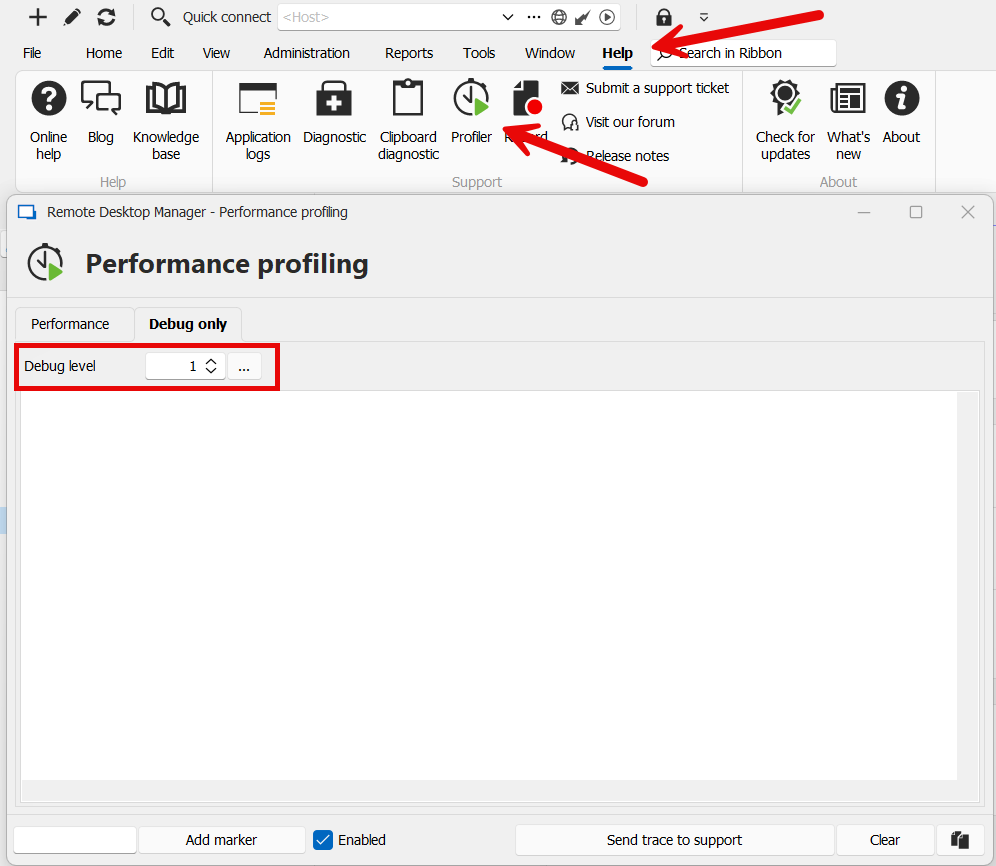
- After reproducing the issue, also check in Help > Application logs to see if a new error was logged. If there was, please post it here with the full call stack.
I'm not sure these will necessarily help but it's worth trying. What's bothersome is that the integration works only partly. If it was returning nothing or throwing an error, it would be simpler to debug.
Regards,
Hubert Mireault
bbc0b102-82d8-4513-ab65-0ff139590b4c.png
When I tried the same from home, so no proxy, I had the exact same result.
Unfortunately neither the debug log nor the application log showed any entries and remained empty.
Hello Ferd,
I sent you an email to investigate this further.
Best regards,
Patrick Ouimet
Hello Ferd,
I sent you an email to investigate this further.
Best regards,
Sure, but let me know if you have an issues because emails from Devolutions from anything other than this forum never seem to get to me - it's why I stopped using the bug reporting within RDM itself. As at, 13:58 Central European Time, I have not seen anything hit my mail server.
Hello Ferd,
we managed to reproduce the issue, a ticket has been sent to the Engineering Team.
Best Regards,
Antoine Mauger
Hello Ferd,
we managed to reproduce the issue, a ticket has been sent to the Engineering Team.
Best Regards,
That's great news, let me know if you have a test version I can check out or if you need more info. For now we can keep the scheduled remote session just in case.
Hello Ferd,
Yes, we will keep the session just in case.
This could be useful if we need more logs or information for the dev team.
Best regards,
Patrick Ouimet
Hello Ferd,
What do you want to report exactly?
I'm not quite sure I understand.
If you want to report an issue with our product, it's by thread according to the product.
If you want to report an issue related to the forum, I can communicate with the dev team for you and explain the issue.
But you will need to be more specific.
Also, the report thingy could be a good idea, but it will be required to open a feature request and explain this is related only for our forum and that you want to have this to report issue.
Best regards,
Patrick Ouimet
Hello Ferd,
If you want to communicate with us privately, it can be done by email, chat, and phone.
This is all the information:
https://docs.devolutions.net/cloud/support-resources/technical-support/
Also, the flag will required to open a feature request.
Best regards,
Patrick Ouimet
Ok, I give up - I was trying to help by alerting you to the fact that someone is creating fake accounts and then using them to send spam to other members, that's all.
Hello Ferd,
And I did,
I sent this information to the dev team and the security team.
They were already aware of this and are already working on it.
Now, let's not populate this thread with something that is not related to the main topic, please!
We will continue to investigate your issue together during a session.
Best regards,
Patrick Ouimet
I have the same issue, just opened a case
In my case, all new entries and the entries I modify, aren't synchronized, only deleted ones work.
I have more/less 300 entries in the BW vault.
I have the same Issue as @micheleberardo
Hello,
Thank you for contacting the Devolutions support team.
As one of my colleagues mentioned, we were able to reproduce this issue and an internal ticket is already opened.
We will post here when a fix version will be released.
Best regards,
Patrick Ouimet
Hello everyone,
I wanted to let you know that we have a fix internally, and it will be available starting with our 2024.2.19.0 release. We will work on releasing this as soon as possible.
Regards,
Hubert Mireault
Hello,
Version 2024.2.19.0 should now be available for download. Can you try it out and see if Bitwarden now correctly lists your accounts?
Regards,
Hubert Mireault
Hello,
Version 2024.2.19.0 should now be available for download. Can you try it out and see if Bitwarden now correctly lists your accounts?
Regards,
Confirmed working for me - thank you for the prompt action to get this fixed.
Thanks for the feedback, I'm glad to hear it works well.
Regards,
Hubert Mireault
Confirmed working for me too!