RDM Registry Entry for gateway settings

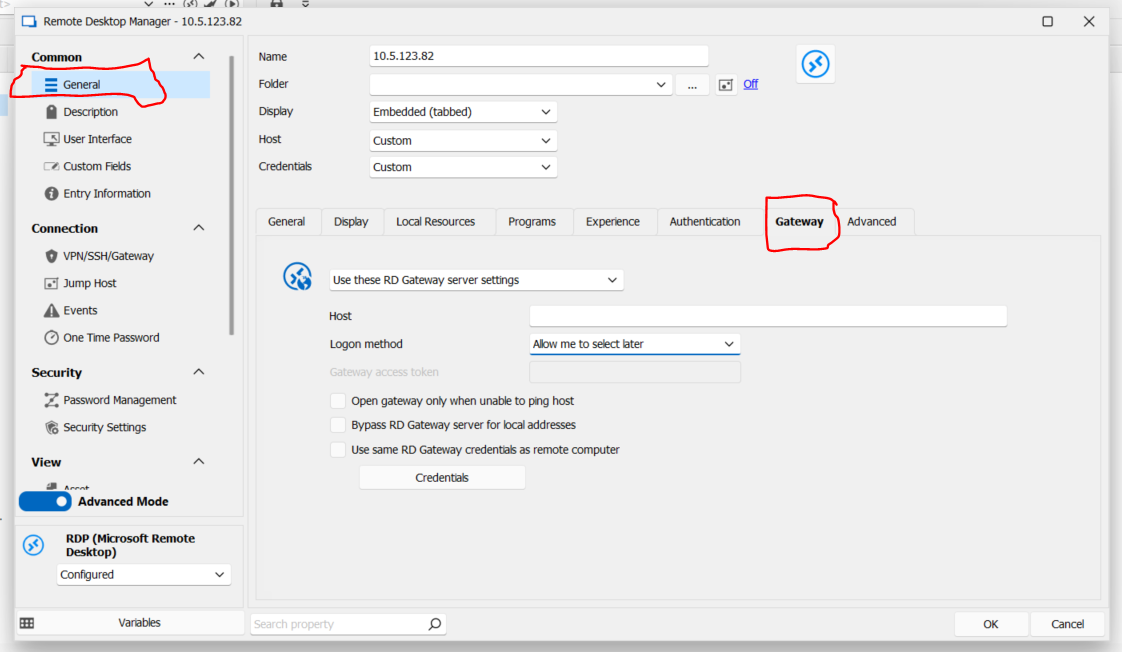
Need to control the Gateway settings with Microsoft GPO. Specifically, to force settings in this section (Gateway) through GPO. Want all clients forced to use Microsoft RDGateway..
All Comments (14)
Hello,
Could you post a screenshot of the section you would like to be able to enforce through GPO?
Regards,
Hubert Mireault
6e697360-1068-4180-939c-b86a0d5ad706.png
Hello,
Thank you for the screenshot.
I think the simplest way to do this would be the following:
- Add a GPO to forbid changing the Gateway settings (except for administrators)
- There is already a system setting to force users to use a template when creating new entries, you can activate this setting
- Then, create an RDP template that has the Gateway information filled out
The result of this would be every time one of your users creates a new RDP entry, they would have to choose an existing template, for which the Gateway section is already filled with the correct information, and that they can't modify.
Do you think this would work for you?
Regards,
Hubert Mireault
Thank you for the info. Could you give me steps for doing this: GPO setting specifically for Devolution RDM.. Forcing the template setting for all including admins and forbiding Gateway setting changes.
Once I have the GPO settings for this, we will be good.
Also, activating the settings to force usage of templates using GPO settings for devolutions RDM..
Per a document I found with available gPO settings, I do not see the GPO options you recommend... How to Apply Group Policies in Remote Desktop Manager - Devolutions Blog
Hello,
Sorry if what I said is confusing. The GPO doesn't exist yet, I was proposing a solution to add one that would disable the section rather than multiple ones to override each individual field. Paired with the other configurations, I think this should work for you.
So make a summary:
- I will open a ticket to add a new GPO to disable the Gateway section of the RDP entries
- Once this new GPO is available, activate it following the steps you saw in our blog. For more information, there is also this KB article
- Then, activate the system setting to force users to use a template when creating new entries. You can find it by going in Administration > System Settings, and change the "add entry mode" to "template list only"

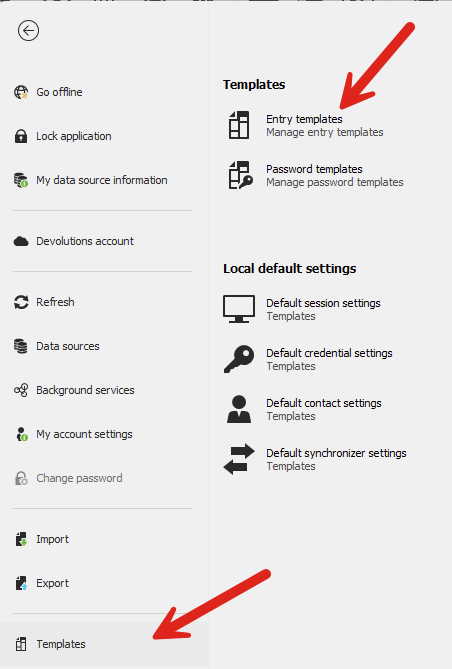
- Finally, create the necessary templates by going in File > Templates > Entry templates, and add shared templates that your users can use. Make sure to fill in the Gateway configuration on the template, as your users won't be able to change them due to the GPO.
Regards,
Hubert Mireault
a7a320d7-f00d-413b-8bb8-b593f6e90c70.png
f61abd4a-c21f-42b7-b18c-1bebeec628c1.png
Hello Hubert, thank you for the work. Looking forward to the GPO being added. Is there a release timeframe for the GPO to be added? I just need to communicate back to my folks what we should expect. Thank you again....
I can't give you an exact estimate but I will see if we can fast-track this change as it should be simple on our end. I don't expect more than 1-2 weeks if QA testing goes well. We will post back here once we have an update.
Regards,
Hubert Mireault
Hello,
We've added a new GPO named "DisableRDPGatewayEditionInEntry". With this GPO enabled, non-admin users will no longer be able to edit any settings in the Gateway tab of RDP entries. This should take effect with the upcoming 2024.2 version.
Regards,
Jafran Majeau
Hello jafran Majeau, thank you for the quick reply and quick action. When is version 2024.2 planned release?
Hello,
Version 2024.2.20.0 will contain your fix. At the moment we don't have an exact date in mind, but it will probably be this week or next week.
Regards,
Hubert Mireault
Hello Hubert,
I haven't checked yet any word on the version we discussed earlier.
Hello,
RDM 2024.2.20.0 is available on our website right now, you should be able to update to this version and use this new GPO.
Regards,
Hubert Mireault