Consistent crashing when RDP to endpoint

Starting with version 2024.2.15.0 and continuing with version 2024.2.16.0 I cannot not RDP to any endpoint. The session begins, then without an error message Remote Desktop Manager crashes. On restart of RDM I am prompted to attempt to establish the failed session again. I found two event logs in the Windows Application log file, screenshots attached.
If I revert to version 2023.3.35.0 or later the issue is not present.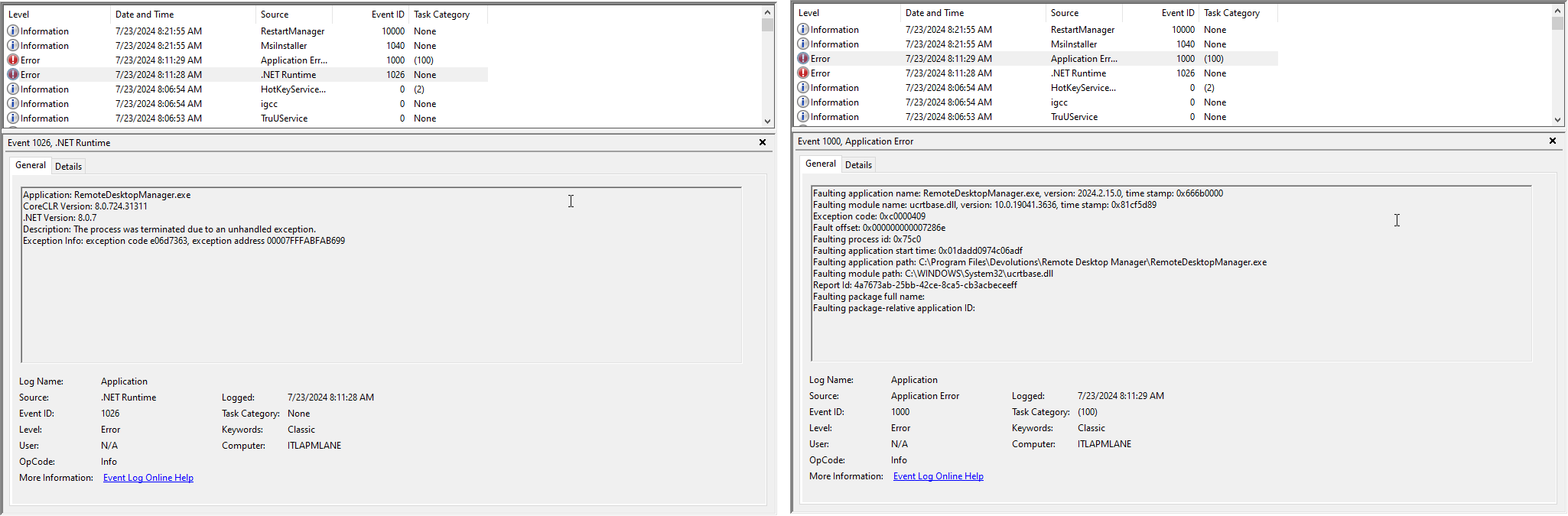
2024-07-23_08-22-59.png
All Comments (8)
Hello,
Thank you for reaching out to us regarding this,
I see, is .Net 8.0 or higher currently installed on your workstation?
Could you follow the steps mentioned in this knowledge base article and let me know if the problem persists?
https://docs.devolutions.net/rdm/mac/kb/rdm-windows/troubleshooting-articles/net-corrupted-system-file/
Best regards,
Samuel Dery
Hello,
Thank you for reaching out to us regarding this,
I see, is .Net 8.0 or higher currently installed on your workstation?
Could you follow the steps mentioned in this knowledge base article and let me know if the problem persists?
https://docs.devolutions.net/rdm/mac/kb/rdm-windows/troubleshooting-articles/net-corrupted-system-file/
Best regards,
Samuel,
Thank you for the suggestion. However, after working through them I still experience the same issue. Yes .Net 8 is installed. The application launches and the interface is usable until attempting to RDP. I only use this for RDP so I have not tested other functions. I have attached screenshots of the events found in the Application log.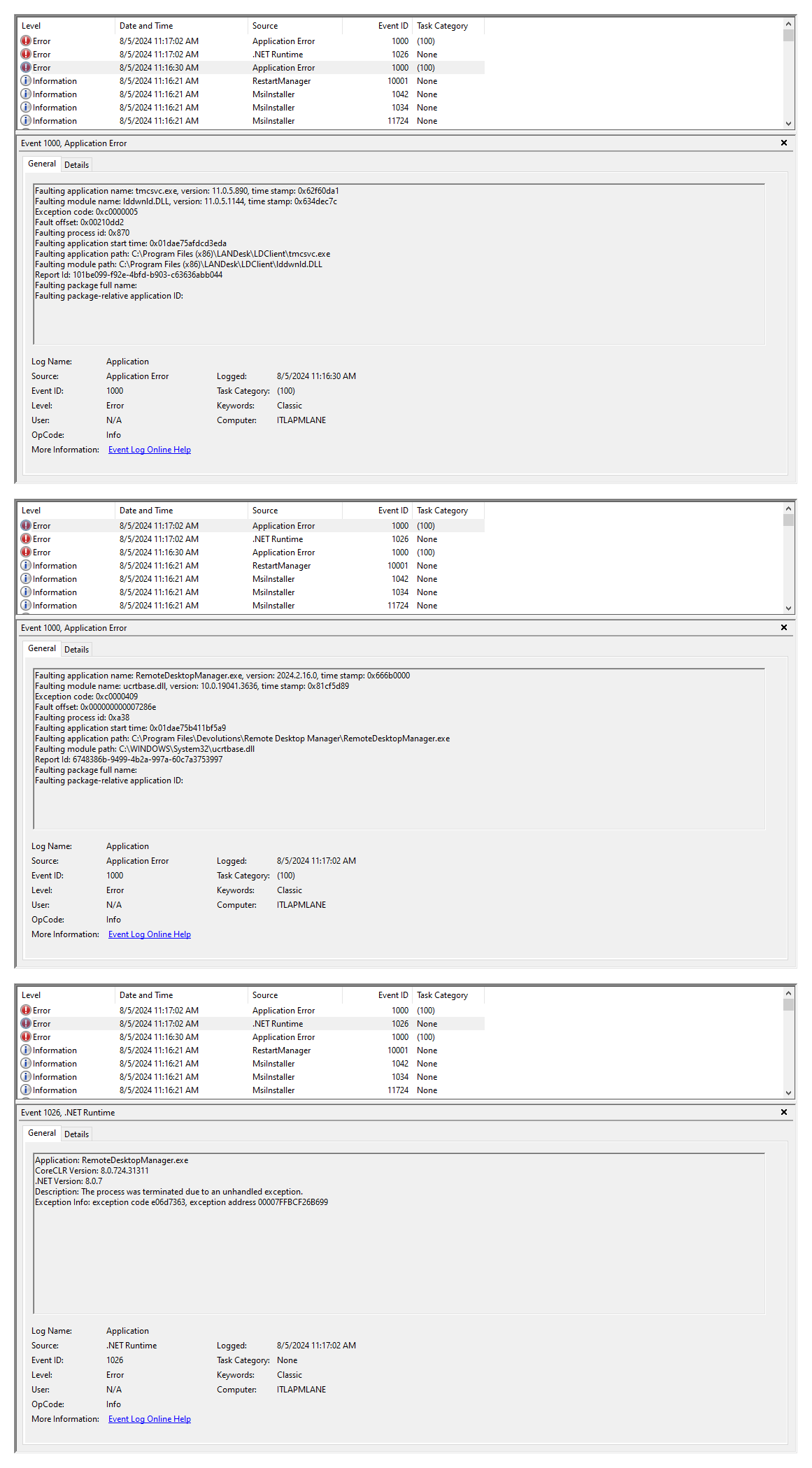
2024-08-05_11-18-28.png
Hello Michael,
Thank you for your reply,
I see, the first error does not seem to be related to this case as the program mentioned is named LanDesk, I'm assuming that is another software you are using.
That being said, the second error seems to indicate an issue with the ucrtbase.dll which is a Software component from Microsoft, I've found the following topic on Microsoft Forum that may be helpful in this case: https://answers.microsoft.com/en-us/windows/forum/all/how-do-i-fix-faulting-module-name-ucrtbasedll-for/48c58e86-aeb0-45f3-b35b-7395f3bd76ca
The third error seems to indicate an issue with .Net.
You could create a portable installation of the latest version of RDM and see if this issue still occurs? To do so, you will need to do the following:
1- Download the .zip file below:
https://remotedesktopmanager.com/home/thankyou/rdmbin
2- Create a new folder on your Desktop
3- Extract the content of the .zip file into the folder created at #2
4- Go to this folder once the .zip file has been extracted and run remotedesktopmanager.exe
5- Connect to your data source
Let me know,
Best regards,
Samuel Dery
Hello Michael,
Thank you for your reply,
I see, the first error does not seem to be related to this case as the program mentioned is named LanDesk, I'm assuming that is another software you are using.
That being said, the second error seems to indicate an issue with the ucrtbase.dll which is a Software component from Microsoft, I've found the following topic on Microsoft Forum that may be helpful in this case: https://answers.microsoft.com/en-us/windows/forum/all/how-do-i-fix-faulting-module-name-ucrtbasedll-for/48c58e86-aeb0-45f3-b35b-7395f3bd76ca
The third error seems to indicate an issue with .Net.
You could create a portable installation of the latest version of RDM and see if this issue still occurs? To do so, you will need to do the following:
1- Download the .zip file below:
https://remotedesktopmanager.com/home/thankyou/rdmbin
2- Create a new folder on your Desktop
3- Extract the content of the .zip file into the folder created at #2
4- Go to this folder once the .zip file has been extracted and run remotedesktopmanager.exe
5- Connect to your data source
Let me know,
Best regards,
Using the portable version still dies when attempting to connect to RDP, unfortunately I do not have an alternate machine to test this on at the moment.
Hello Michael,
Thank you for your reply,
I see; I would recommend you attempt to follow the fixes mentioned in the Microsoft thread I provided, as the issue seems related to the Windows components of your workstation and not RDM directly.
https://answers.microsoft.com/en-us/windows/forum/all/how-do-i-fix-faulting-module-name-ucrtbasedll-for/48c58e86-aeb0-45f3-b35b-7395f3bd76ca
Perhaps reinstalling .Net 8.0 or performing a repair may also help,
Let me know,
Best regards,
Samuel Dery
Hello
Further to what my colleague wrote, you might also try this (based on a hunch): In Settings > Types > Sessions > Remote Desktop (RDP), find the "API Hooking" section and set "Enable API Hooking" to "Disabled". You'll need to save the changes and also restart RDM for that to take effect.
Thanks and kind regards,
Richard Markievicz
Hello
Further to what my colleague wrote, you might also try this (based on a hunch): In Settings > Types > Sessions > Remote Desktop (RDP), find the "API Hooking" section and set "Enable API Hooking" to "Disabled". You'll need to save the changes and also restart RDM for that to take effect.
Thanks and kind regards,
Sorry, still crashes. I am supposed to be getting a new machine soon-ish so I will keep fingers crossed that this older machine just has had some rough times with .Net. Thanks for your time and knowledge on this.
Hello Michael,
Thank you for your reply,
I see that is unfortunate, If the issue persists with your new workstation, feel free to let us know,
Best regards,
Samuel Dery