Tab Groups Missing After Update

Hello, it seems tab groups are no longer appearing in the UI for me after updating from v2023.3 to v2024.2.15. Tab group bar is visible but nothing shows up in it. We have the tab group name configured at the folder level and the entries under it set to inherit - confirmed those settings are still in place, tried restarting RDM various times, etc., but no luck. I'm seeing the same thing on two different machines that were both updated from v2023.3.x to v2024.2.15.
Is this a known issue or is there something else I'm missing? Some new setting that was implemented that needs to be configured maybe? Any help would be appreciated.
Thanks!
David Willis
All Comments (13)
Hello,
We've made a change a few major versions ago where the tab group will not show if all the currently opened entries belong to the same tab group. Can you make sure that the tab groups for your opened entries are different? The tab groups should show once that is the case.
Regards,
Hubert Mireault
Also I forgot to mention, there is an option to always show the tab groups, located in File > Settings: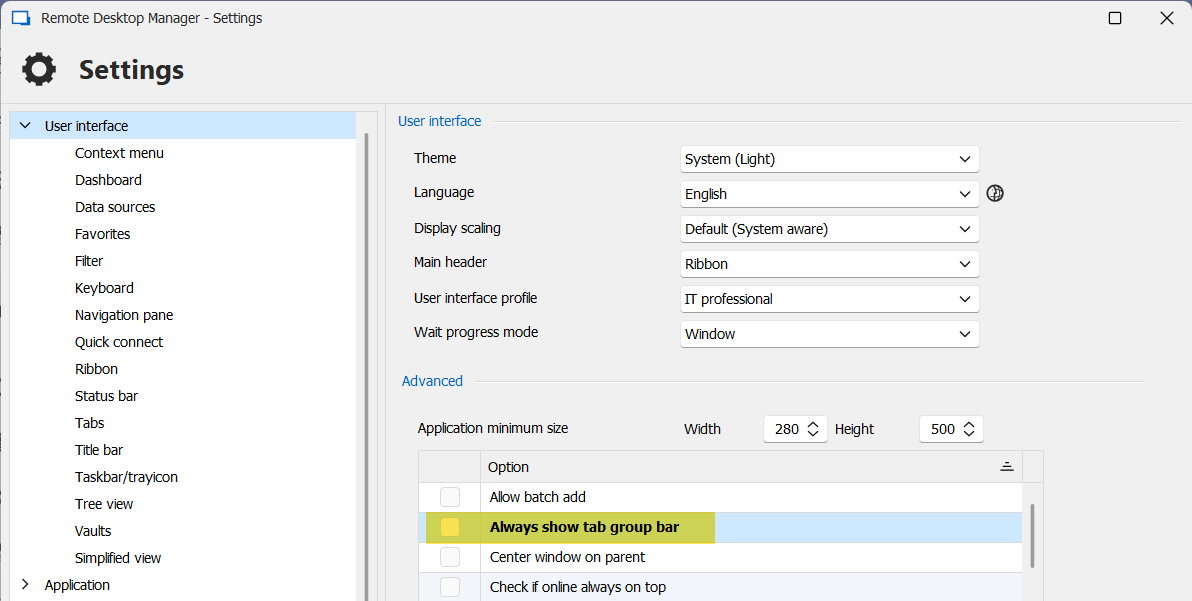
One effect of this, though, is that it will always show the "All" tab group if you enable this option.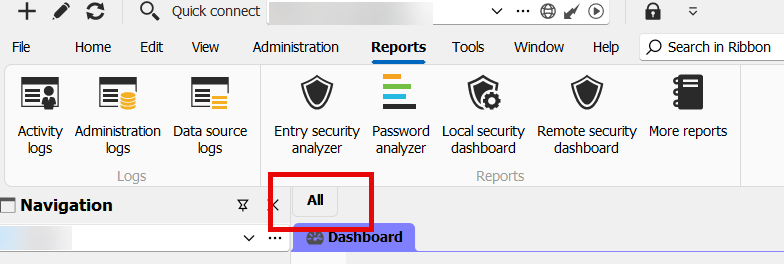
Regards,
Hubert Mireault
c7db5996-907d-4a85-8886-962ca30b7419.png
a5c80b2e-9d43-4a3c-b977-8277aa47cad3.png
Hello Hubert,
Thank you very much for the response (I can verify I had tabs open from at least one different "group" not counting those that are in the default i.e. no group) and for pointing out the "always show tab group bar" setting under User Interface - I was not aware of that setting. It seems that once I enable that, the tab group bar started working again as expected.
This is odd though, why this wasn't required in earlier versions - is this a new setting? Also it seems if the option you mentioned in Settings -> User Interface is not enabled, then the "tab groups" button on the View ribbon has no effect anymore: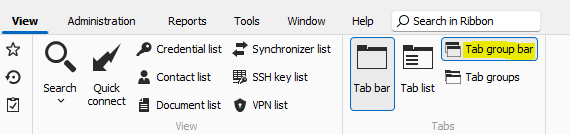
I know in previous versions, it did work (because when we first started using tab groups this is how I showed the bar). However if I do enable "always show tab groups", then the button above starts working as expected again (meaning it will toggle the tab group bar properly).
So to summarize - it seems that in the newest version, the "always show tab groups" setting is sort of a "global" enable/disable flag for this feature - if it is unchecked, then the tab group bar doesn't show in any case. If it is checked, then the tab group bar can be toggled via the button on the View ribbon.
Thanks again for the help!
Best regards!
David Willis
6fd38660-a576-48d7-b9dd-1403a0d28ce7.png
Hello,
Unfortunately, I'm unable to reproduce the behavior you're describing. On my end, it acts as I've described, and the "always show tab group bar" option is not required to see the tab group bar (when you have more than one entry with different tab groups opened). I will check with our QA team to see if we're able to reproduce your issue, as I may be missing another configuration on my end that is needed to reproduce this problem.
Maybe one test you could make in the mean time, is download the portable version of RDM, connect to the same datasource you are and open the same entries you were using as a test. If the issue doesn't happen, then it would confirm that this is related to something in the configuration, as the portable version will have all of the default configurations.
Regards,
Hubert Mireault
Hello David,
Could you please send us the following information? Our QA Team needs that information to conduct further investigation.
- A recording of the issue showing the behaviour and the steps that led to the issue. I will send you the information through a direct message to provide us with the recording.
- The config file of your RDM. I will also send you the information through a direct message to provide us with the .cfg of RDM.
Thank you for letting us know. If you have any other questions, feel free to let us know.
Best regards,
Maxim Robert
Hello,
Sure, sorry it took me a while to circle back on this as I've been swamped at work lately. But I went ahead and did the screen recording reproducing the issue and also uploaded the RDM config as requested. Please let me know if you need anything else. Appreciate the help as always!
Best regards
David Willis
Hello David,
Thank you for the recording!
After some testing, I can confirm the behaviour of my colleague when he mentioned this:
"We've made a change a few major versions ago where the tab group will not show if all the currently opened entries belong to the same tab group. Can you make sure that the tab groups for your opened entries are different? The tab groups should show once that is the case."
This does not occur on the latest version of RDM (2024.3.20.0). If the entries are all in the same tab group, no tab will appear in the tab group. But if you have multiple sessions with different tab group names configured and open them, the tab group bar will appear, showing the different tab groups. I suggest updating to the latest version of RDM and updating your Database to avoid any issues. You can upgrade the Database after upgrading RDM. You should receive a prompt to upgrade the Database.
Thank you for your collaboration. If you have any other questions, feel free to let us know.
Best regards,
Maxim Robert
Hi Maxim,
Thanks for the update. What you said makes sense, but the behavior I saw did still happen when I had two entries open that don't belong to the same tab group. In the video I opened the settings for each entry before connecting - if you look at the settings for the second entry that I connected to, it is set to "custom" with a blank tab group (in other words - no tab group). Meanwhile, the first entry I opened was in a tab group. I presume that having one entry with a tab group configured, and another without, would count as having two entries open in "different" tab groups? But even in that scenario I did not get a tab group bar.
But once I went into settings and enabled "always show tab group bar" then I did get it (without even having to open two different entries - just the one with the tab group configured).
I can try an update as well to see if that helps, but I probably won't be able to do that until next month as we are in the middle of our very busy season right now through the end of the year. This is less of an issue for me now though, since I know about the "always show tab group bar" option in settings - that works just fine as a workaround.
Appreciate the help as always.
Best regards
David Willis
Hello David,
Thank you for your response!
I've tried reproducing your issue on the same version as yours (2024.2.15.0), but unfortunately, I did not encounter the issue on this installation. I suggest to update to the latest version and see if you are still experiencing the issue. If so, we will proceed to perform further investigation.
In the meantime, until everything is upgraded, could you please try to install the portable installation of your version and see if you still have the issue? To do so, you will need to do the following:
(Close RDM)
1- Download the .zip file below:
https://cdn.devolutions.net/download/Devolutions.RemoteDesktopManager.Bin.2024.2.15.0.zip?_gl=1*15sc6az*_ga*NDExNTM4NzcwLjE3MjkxNzI2MzU.*_ga_P11646PR82*MTczMzkzMjA2Ni4yMjMuMS4xNzMzOTMyMDcyLjU0LjAuMA..
(Direct download link for portable installation version 2024.2.15.0)
2- Create a new folder on your Desktop
3- Extract the content of the .zip file into the folder created at #2
4- Go to this folder once the .zip file has been extracted and run remotedesktopmanager.exe
5- Connect to your data source
This test will allow us to rule out your local installation of RDM as a possible cause for this issue. If you have any other questions, feel free to let us know.
Best regards,
Maxim Robert
Hi Maxim,
Thanks for your help on this. So I upgraded to the latest/greatest tonight, and I believe I may have found the part where I was tripping up. I don't have a lot of tab groups setup yet, so most of my testing thus far was done with some tabs open from one group, and some open from "no groups" (entries that have no tab group defined). As I mentioned in my previous post, I thought this counted as having two separate tab groups open, but I guess it doesn't. Because tonight after upgrading, I disabled the "always show tab group" setting, and after doing that, and restoring a bunch of tabs that had been open from the previous session and watching them open, I noticed that even when some tabs from one group were opened, and some that had no group were opened, still no tab bar displayed. However as soon as entries from a second group opened, then the tab bar showed up with the two groups plus the "all" tab.
So, I apologize for dragging this out, it seems I was not performing an accurate test in my earlier testing. I do appreciate the help on working with me through this though!
One suggestion I might throw out there - I can see where it would make sense to only show the bar if at least two groups are open, but I think entries with no group should count towards that. So for example if someone ends up in my scenario where they have some entries open from one group, and some entries open from no group, it should show the bar with the one group and the "all" tab (at least, IMHO). But I suppose the "always show tab bar" sort of gives the user an option here, they can check that if (like me) they prefer the bar to show up when even entries from only one group are open.
Thanks again for the help, it's much appreciated as always!
Best regards!
David Willis
Hello David,
Thank you for your feedback!
I’ve initiated a discussion with the QA and Development teams to enhance this feature to align with your suggestion. We agree that this approach would be beneficial and could significantly improve the workflow using this feature. I will let you know with more information as soon as possible.
We appreciate your collaboration on this matter. If you have any other questions, feel free to let us know.
Best regards,
Maxim Robert
Hello David,
Thank you for being this patient!
After providing all the information to our teams, a ticket was opened with the development team to improve this feature. We will let you know with more information as soon as possible.
In the meantime, I wish you a wonderful holiday season.
Best regards,
Maxim Robert
Sounds great, thanks again for all your help!
David Willis