DPI Issue

hello,
i have changed my monitor to an 57 inch modell and have a lot of issues with the size of the rdp sessions. it doenst mater what i configure it comes not bigger.
The resolution is 7680*2160, i have done all the steps from this document hiere but without any success High DPI issues - Devolutions Documentation
also checked the config file which is from my point of view correct but i am not sure
<DpiAwareness>None</DpiAwareness> this is in my file configured
The RDM is my most important tool and i want to bring this back on my default apps but at the moment it is very difficult to work with it.
I have also pleayed a lot with the display sizes on the configuration of the rdp session in the rdm but also without any helpfull way.
So may some of you can help me here please!
Many thanks and best Regards
Philipp
All Comments (13)
Hello Philipp,
Thank you for reaching out to us regarding this,
- Could you please specify the version of RDM you are currently using?
- What type of data source are you using?
Would you be able to provide us with a screenshot of the issue?
When going under "File" -> "Settings" -> "User Interface" the "Display Scaling" option is currently set to "DPI Unaware" is that correct?
Let me know,
Best regards,
Samuel Dery
Hello Samuel,
first of all thanks for your response on this conversation!
- Could you please specify the version of RDM you are currently using?
2024.1.29.0 64-bit
- What type of data source are you using?
SQLite
Windows Version: Windows 11 23H2
Would you be able to provide us with a screenshot of the issue?
I dont think it make sense, because it doest affect when i change to an specific resulution for example 2560*1440 it is alllways the same size.
and you will not see the difference between
When going under "File" -> "Settings" -> "User Interface" the "Display Scaling" option is currently set to "DPI Unaware" is that correct?
Yes it set to it
The issue is, when i work on my administrative server, i have an java console on it which is very small this is the reason why
the resulution should come higher.
i was able to find an workaround when i change the resultuion for the monitor to 5120*1440 but this should not be the final workaround or
to send the monitor back.
there was also in the past a way to change some manifest in the registry, but i am not sure if this is still needed ?
Many thanks and best Regards
Philipp
hello,
i have now done a test with an xml datasource - result is the same and as you can see i have open in the screenshot one rdp session with the default settings and one with a specific resulution 1920*1440 and the rdp looks the same.
Cheers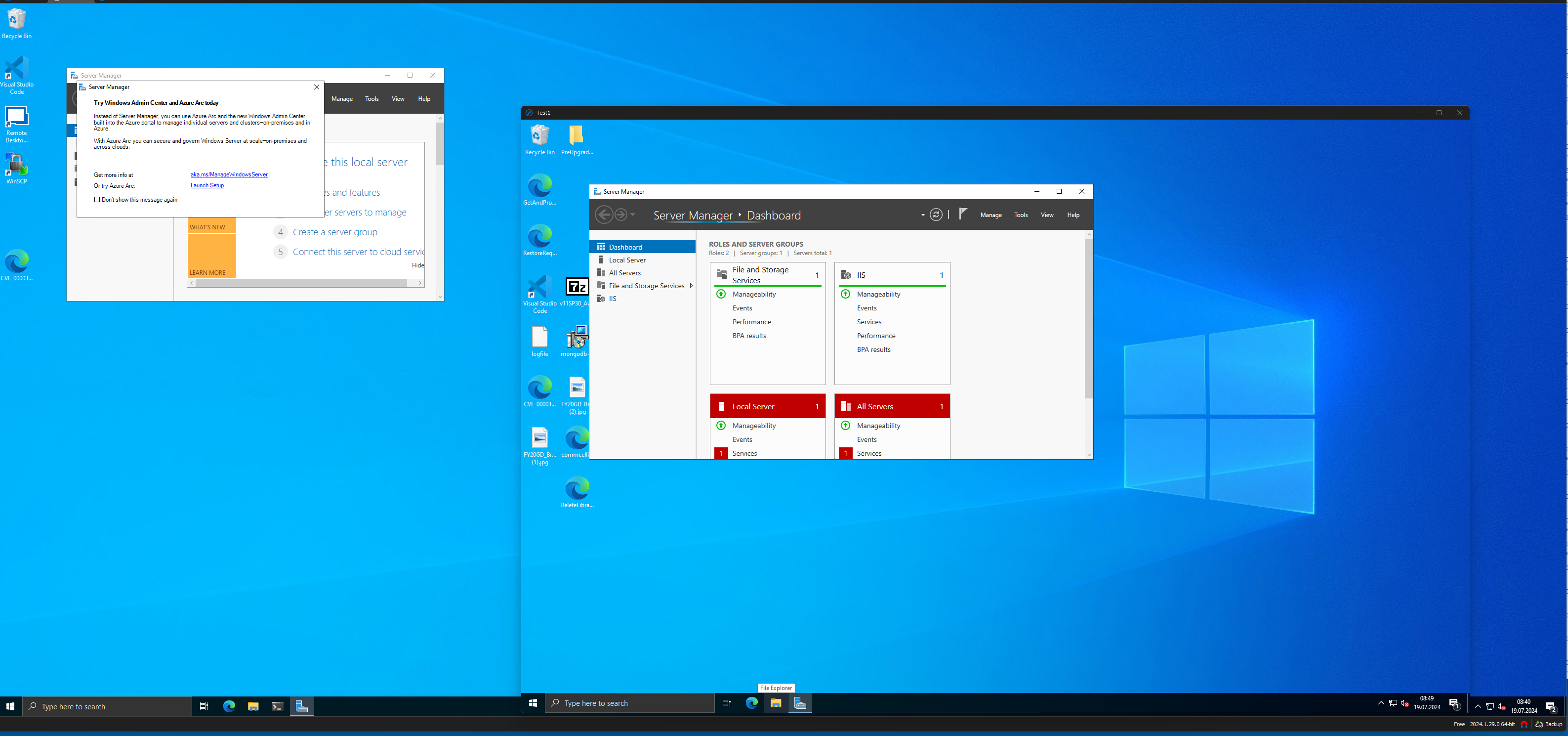
19-07-2024_08-47-00.png
Hello,
Thank you for your reply,
We are fairly limited in what can be done regarding this, you have already attempted all method provided in this knowledge base article including method 2# is that correct?
https://docs.devolutions.net/rdm/kb/rdm-windows/troubleshooting-articles/high-dpi-issue/
When testing method 2# did you log off and log back in with your user?
Let me know,
Best regards,
Samuel Dery
Thanks for your response - should I try every step alone or in combination ?
also should I log off and log on after every step ?
cheers
Hello,
Thank you for your reply,
This would only be required for Method 2#, you can leave the Display scaling to DPI unaware while testing the other method,
Let me know,
Best regards,
Samuel Dery
You're having trouble with RDP session scaling on your new 57-inch monitor with a 7680x2160 resolution. Since you've already adjusted DPI settings and configuration files without success, the issue might stem from a combination of high-resolution settings and DPI scaling in RDM (Remote Desktop Manager) or the RDP client itself. Ensure that RDM and your RDP client are both updated to their latest versions, as updates often address high DPI and scaling issues. You might also try adjusting compatibility settings for RDM by right-clicking the RDM executable, selecting "Properties," then navigating to the "Compatibility" tab and enabling "Override high DPI scaling behavior." This can sometimes improve how applications handle high-resolution displays. If these steps don't resolve the issue, contacting RDM support for further assistance may be necessary, as they can provide more targeted advice for handling high DPI environments. I was struggling with my research paper and decided to buy one from https://academized.com/buy-research-paper The experience was positive from start to finish. The paper was meticulously researched and well-organized, with a clear thesis and strong supporting evidence. The writer was knowledgeable and delivered the paper on time. The customer support team was also very helpful and responsive to all my inquiries. The final paper exceeded my expectations, and I would recommend this service to anyone needing to buy a research paper.
So I have tried all the workarounds without any success at the moment
cheers
Hello,
Thank you for your reply,
I see, that is unfortunate, when connecting to the Hosts outside RDM using MSTSC for example is it working as expected for you?
Let me know,
Best regards,
Samuel Dery
Yes it is the same on a mstsc - from my point of view if you say in the session use this resolution it should run on them
or did I see this wrong ?
cherrs
I mean it is the same issue sorry for confusion
cheers
Hello,
Thank you for your reply,
I see, that is unfortunate if you're encountering the same issue in MSTSC, I'm afraid we might be out of options in this case,
I'm not sure I understand your latest question, do you mean when changing the resolution in your entry Properties under the "Display" section?
Let me know,
Best regards,
Samuel Dery
No when I change the monitor to 5120 x 1440 then it works but looks very bad because the monitor is not on the Reduktion which he is build for
cheers